
The _id field uniquely identifies each MongoDB document, using ObjectId by default to ensure uniqueness and efficient data management.
- Every document contains a unique _id field.
- Acts as the primary key for documents in a collection.
- Default _id type is ObjectId.
- ObjectId is a 12-byte BSON data type.
- Provides a very high probability of uniqueness.
- Embeds metadata such as the creation timestamp.
ObjectId Structure
The ObjectId is composed of 12 bytes, broken down as follows:
- The ObjectId is 12 bytes in total.
- The first 4 bytes store the Unix timestamp.
- The next 5 bytes store a random value (used for uniqueness in modern MongoDB implementations).
- The last 3 bytes are used as a counter for uniqueness.
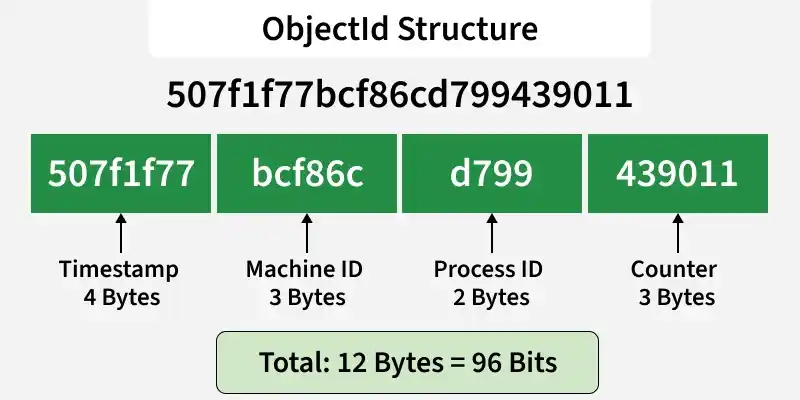
The ObjectId is represented as a hexadecimal string, and its default format is:
ObjectId(<hexadecimal>)ObjectId is a 12-byte unique identifier represented as a 24-character hexadecimal string, automatically generated by MongoDB but can be custom-defined if unique.
db.collection.insertOne({ _id: ObjectId("64f1a2b3c4d5e6f789012345") })Example of ObjectId in MongoDB
When we insert a document into a collection, MongoDB automatically assigns a unique_id using the ObjectId format.
- Database : gfg
- Collection: student_gfg
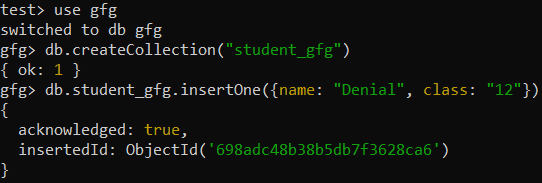
- MongoDB automatically generates a unique _id for the document.
- The document is inserted into the student_gfg collection.
- The _id field is assigned an ObjectId value by default.
Methods of MongoDB ObjectId
MongoDB provides several useful methods to interact with the ObjectId. These methods allow you to access the timestamp, convert the ObjectId to a string, and more.
- toString(): Returns the ObjectId as a 24-character hexadecimal string.
- getTimestamp(): Returns the timestamp portion of the ObjectId as a Date.
- valueOf(): Returns the ObjectId value (generally same as its string representation).
1. Creating an ObjectId
We can generate a new ObjectId using the ObjectId() constructor.
newObjectId = ObjectId()Output:

2. Getting the Timestamp from ObjectId
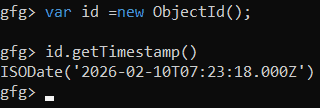
We can retrieve the creation timestamp of the ObjectId using the getTimestamp() method. This method returns the timestamp as a Date object.
var id =new ObjectId();
id.getTimestamp()
Output:
3. Converting ObjectId to String
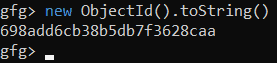
We can convert an ObjectId into its string format using the str property.
new ObjectId().toString()Output:
4. Getting the Hexadecimal Representation
You can also use the valueOf() method to get the hexadecimal representation of the ObjectId.
new ObjectId().valueOf()Output:

Using ObjectId for Querying
Since ObjectId is used as the default unique identifier for MongoDB documents, we can use it to efficiently query for documents by their _id.
db.student_gfg.findOne({ _id: ObjectId("5f92cbf10cf217478ba93561") })In this query, the ObjectId is used to retrieve a document with a specific _id. Since ObjectId is indexed, these queries are very efficient.
Usage of ObjectId Vs Custom _id
- Use ObjectId: When you need an automatically generated unique identifier with a timestamp and efficient indexing.
- Use Custom _id: When you need to control the identifier format or when you already have a unique identifier (e.g., a UUID or an existing system-generated ID).