
The $floor operator in MongoDB rounds a number down to the nearest integer within aggregation pipelines, making numeric values suitable for reporting and analysis.
- Rounds values down to the nearest whole number.
- Used inside aggregation pipeline stages like $project and $addFields.
- Accepts fields, constants, or numeric expressions.
- Useful for reporting, formatting, and analytics.
Syntax
{ $floor: <number> }- <number> can be a numeric field, constant, or expression.
- Returns the largest integer ≤ the input value.
- Used within $project, $addFields, $group, etc.
- Supports computed values (not only fixed numbers).
Use Cases of the $floor Operator
Here are some use cases:
- Data normalization: Round values down to standardize numeric data (e.g., financial figures).
- Data formatting: Prepare clean integers for reports and dashboards.
- Data transformation: Combine with $add, $subtract, $multiply for calculations.
- Data consistency: Ensures uniform numeric values during aggregation.
- In-database processing: Simplifies transformations directly in MongoDB, improving performance.
Examples of MongoDB $floor
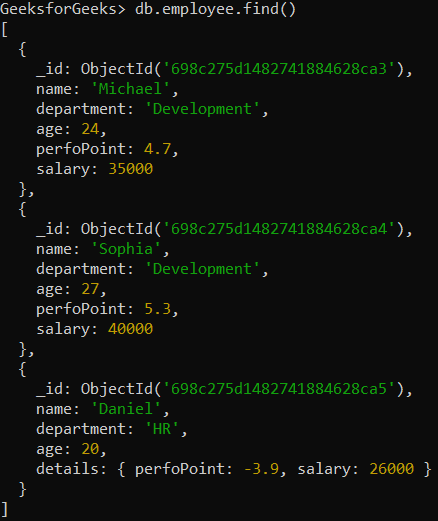
In the following examples, we are working with:
- Database: GeeksforGeeks
- Collection: employee
- Document: Three documents that contain the details of the employees in the form of field-value pairs.
Example 1: Using $floor operator
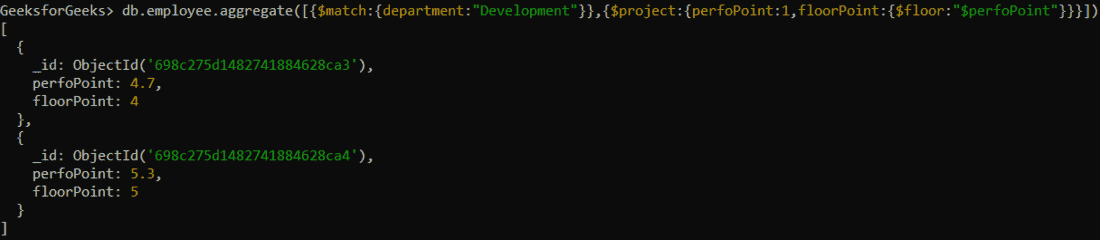
Find the largest integer less than or equal to the value of the perfoPoint field in the development department.
db.employee.aggregate([
  { $match: { department: "Development" } },
  {
    $project: {
      perfoPoint: 1,
      floorPoint: { $floor: "$perfoPoint" }
    }
  }
])
Output:
Example 2: Using $floor operator in the embedded document
Find the largest integer less than or equal to the value of the details.perfoPoint field in the HR department. Here, the field is inside an embedded document.
db.employee.aggregate([
  { $match: { department: "HR" } },
  {
    $project: {
      "details.perfoPoint": 1,
      floorPoint: { $floor: "$details.perfoPoint" }
    }
  }
])
Output:
