
findAndModify() is an atomic MongoDB operation that updates, removes, or upserts a single matching document and returns it, ensuring safe read-modify-write behavior in concurrent environments.
- Performs update, remove, or upsert on one document.
- Executes atomically to prevent race conditions.
- Returns the original document by default.
- Use new: true to return the modified document.
- Supports query filters and field projection.
- Useful for counters, queues, and state transitions.
Syntax
db.Collection_name.findAndModify(
{
    query:<document>,
    sort: <document>,
    remove: <boolean>,
    update: <document>,
    new: <boolean>,
    projection: <document>,
    upsert: <boolean>,
    bypassDocumentValidation: <boolean>,
    writeConcern: <document>,
    collation: <document>,
    arrayFilters: [ <filterdocument1>, ... ]
})
- remove: Removes the matched document when set to true (required if update is not provided).
- update: Updates the matched document using update operators or field–value pairs (required if remove is not provided).
- query: Filters documents to match. Only one matching document is modified.
- sort(optional): Chooses which document to modify when multiple documents match.
- new(optional): Returns the updated document when true (ignored for remove, default is false).
- projection(optional): Returns only selected fields (projection), e.g., { field1: 1, field2: 1 }.
- upsert(optional): Inserts a new document if no match is found (default is false).
- writeConcern(optional): Overrides the default write concern.
- collation(optional): Applies locale-specific string comparison rules.
- arrayFilters(optional): Specifies which array elements to update in array fields.
Return Value of findAndModify()
- Returns the original document by default.
- Use new: true to return the updated document.
- If upsert inserts a document and new is false, it returns null.
- If upsert inserts a document with sort specified and new is false, it returns {}.
Examples of MongoDB findAndModify Method
In the following examples, we are working with:
- Database: gfg
- Collection: student
- Document: Three documents contain name, language they use in coding and the score they got by solving problem on gfg.
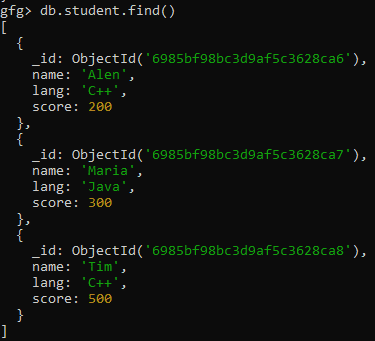
Example 1: Update a Document
To increase the score of a student named Maria by 4.
Query:
db.student.findAndModify({
    query: { name: "Maria" },
    update: { $inc: { score: 4 } }
})
Output:
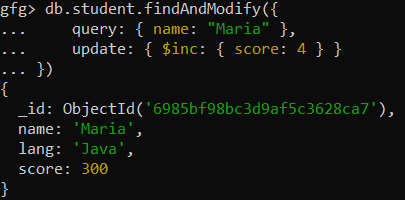
Example 2: Return the Modified Document
Find and modify the document for the student with the name Maria in the student collection by incrementing the score field by 4. Return the modified document.
Query:
 db.student.findAndModify({
  query:{name:"Maria"},
  update:{$inc:{score:4}},
   new:true
})
Output:
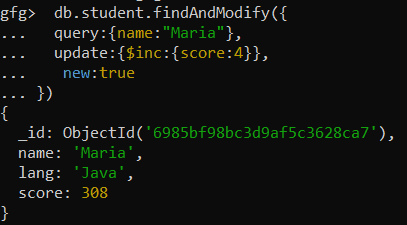
Example 3: Update and Return the Updated Document (Using findOneAndUpdate())
Update Maria’s score to 220 and return the modified document.
Query:
db.student.findOneAndUpdate(
  { name: "Maria" },
  { $set: { score: 220 } },
  { returnDocument: "after" }
)
Output:
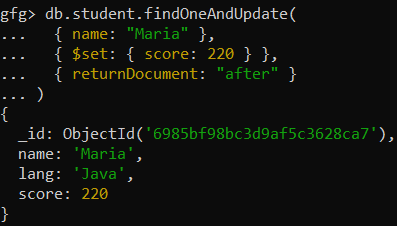
Note:findOneAndUpdate() is the modern, recommended alternative to findAndModify() for update operations and provides a cleaner API to return the updated document.
Example 4: Upsert Operation (Using updateOne())
Updates the document for the student with the name "Jenny" in the students collection. If no document matches the query, insert a new document with the name "Jenny", setting the language to "C#" and the score to 195.
Query:
db.student.updateOne(
  { name: "Jenny" },
  { $set: { lang: "C#", score: 195 } },
  { upsert: true }
)
Output:
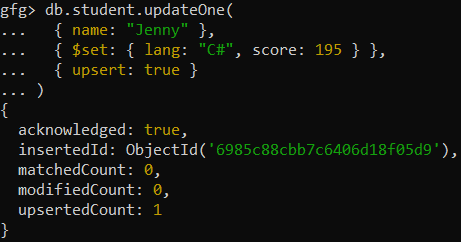
- matchedCount is 0, meaning no document with the name Jenny was found.
- upsertedCount is 1, indicating that one new document was inserted for Jenny.
Note: updateOne() with upsert: true is the recommended way to insert a document when no match is found, instead of using findAndModify() for upserts.
Best Practices for Using findAndModify()
To get the most out of MongoDB's findAndModify() method, consider the following best practices:
- Atomicity: Use findAndModify() for safe, atomic updates.
- Use the new Option for Updated Data: Set new as true to return the updated document.
- Upsert for Missing Documents: Use upsert to insert a document when no match is found.
- Query Efficiency: Use indexed fields to speed up matching and updates.