
The dropIndex() method removes a specific index from a collection to help manage indexing and improve performance. It cannot be used to drop the default _id index.
- Removes one specified index from a collection at a time.
- Cannot remove the default _id index created by MongoDB.
- Can drop hidden indexes as well.
- From MongoDB 4.4+, aborts an index build if it’s still in progress.
- From MongoDB 4.2+, use dropIndexes() (not dropIndex("*")) to remove multiple non-_id indexes.
Syntax
db.collection_Name.dropIndex(index : <document/string>)- collection_name: The name of the collection whose index we want to drop.
- index: The index to drop. This can be specified either as a string (index name) or as a document (index specification)
Return Value of dropIndex()
The dropIndex() method returns a document with the following fields:
- nIndexesWas: The number of indexes before the index was dropped.
- ok: A value of 1 indicating the operation was successful.
Example of Using MongoDB dropIndex() Method
In these examples, we are working with:
- Database: gfg
- Collection: student
- Document: Three documents contain name and language that students use in coding
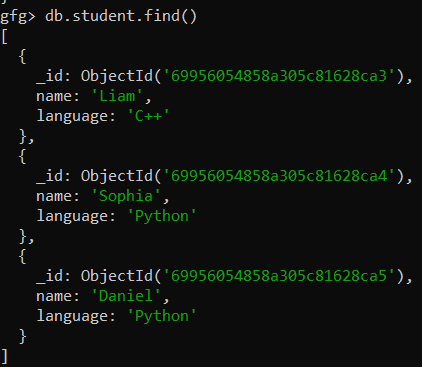
Create an Index on the name Field
First of all we created an index on the name field using createIndex() method:
db.student.createIndex({name:2})
This creates an ascending index on the name field. Now, let's check the created index using the getIndexes() method.
db.student.getIndexes()Output:
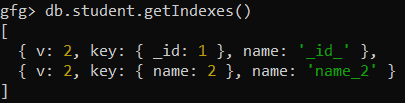
- The first index is the default _id index.
- The second index is the new name_2 index we just created on the name field.
Example 1: Drop the Index Using the Index Name
To remove the index created on the name field, we can use the index name (name_2) with the dropIndex() method.
db.student.dropIndex("name_2")Output:

- The index named name_2 on the name field is successfully dropped.
- nIndexesWas shows that the number of indexes before dropping the index was 2, and ok: 1 indicates the operation was successful.
Example 2: Drop the Index Using the Index Specification Document
We can also drop the index using the index specification document instead of the index name.
1. First, create an index on the name field with descending order.
db.student.createIndex({ name: -1 })2. Now, drop the index by specifying the index document.
db.student.dropIndex({ name: -1 })Output:
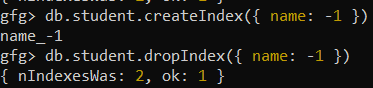
- The index on the name field with descending order (name: -1) is successfully dropped using the index specification document.
- As before, nIndexesWas shows the number of indexes before the operation (2), and ok: 1 confirms the success of the operation.
Rules and Constraints of the dropIndex()
Here are some rules and constraints:
- Single Index Deletion: dropIndex() removes one index at a time; use dropIndexes() to remove multiple indexes.
- Cannot Drop _id Index: The default _id index cannot be dropped.
- Hidden Indexes: Hidden indexes can also be dropped using this method.
- Abort Index Building (MongoDB 4.4+): dropIndex() can abort an index build that is still in progress.
- dropIndexes() for All Non-_id Indexes (MongoDB 4.2+): Use dropIndexes() instead of dropIndex("*") to remove multiple non-_id indexes.