
The $concat operator in MongoDB concatenates multiple strings or expressions into a single string within the aggregation pipeline, enabling efficient string formatting and reporting during data transformation.
- Commonly used in aggregation stages like $project, $addFields, and others for string transformations.
- Accepts multiple string expressions and computed expressions as inputs.
- Supports combining field values, literals, and expression results.
- Enables complex string formatting for reporting and presentation.
- Evaluates expressions server-side for efficient transformations.
Syntax
{ $concat: [ <expression1>, <expression2>, ... ] }- Accepts multiple arguments: string literals, fields, or expressions that resolve to strings.
- Each input expression is evaluated before concatenation.
- Produces a single combined string as the output.
Features of $concat Operator
Some features are listed below:
- Input Expressions : Accepts multiple arguments, including string literals, field references, and expressions that resolve to strings.
- Null Handling : Returns null if any argument evaluates to null.
- Missing Fields : Returns null if any referenced field is missing in the document.
- Output Type : Produces a single concatenated string as the result.
- Usage Context : Commonly used in the $project stage of aggregation pipelines for string formatting.
Use Cases for MongoDB $concat Operator
Here are a few practical scenarios where the $concat operator shines:
- Concatenating First and Last Names: Combine the first name, middle name, and last name to create a full name for a user.
- Adding Static Prefixes or Suffixes: Prefix or suffix text to data, such as adding "Hello, " before a name or " - Employee" after a title.
- Building Custom Messages: Create personalized messages, for example, for a report or a notification.
Examples of MongoDB $concat Operator
We'll use a sample collection called employee in the GeeksforGeeks database, which contains employee information.
- Database: GeeksforGeeks
- Collection: employee
- Document: Three documents that contain the details of the employees in the form of field-value pairs.
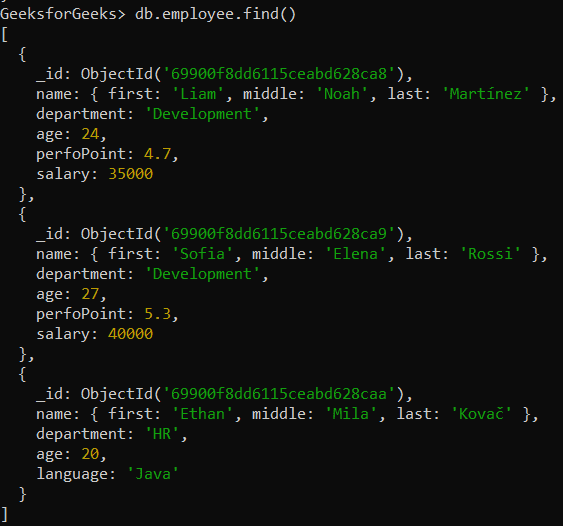
Example 1: Concatenating Strings Using $concat
Formatting a string by combining a static message with the department field. Here, we concatenate "My department is:" string with the value of the department field.
db.employee.aggregate([
  {
    $project: {
      "name.first": 1,
      _id: 0,
      dept: { $concat: ["My department is: ", "$department"] }
    }
  }
])
Output:
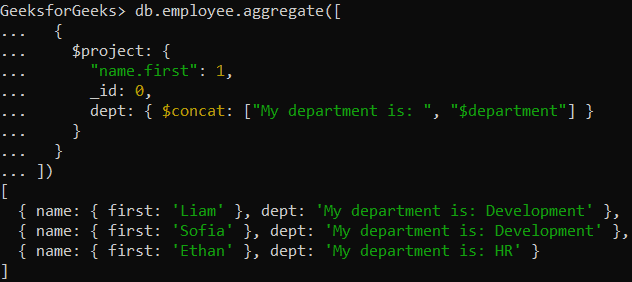
- Projects only the employee’s first name.
- Concatenates a custom string with the department field.
- Creates a formatted message indicating the employee’s department.
Example 2: Concatenating Strings in Embedded Documents
Find the full name of the employees by concatenating the values of the name.first, name.middle, and name.last fields.
db.employee.aggregate([
  {
    $project: {
      fullname: {
        $concat: ["$name.first", " ", "$name.middle", " ", "$name.last"]
      }
    }
  }
])
Output:
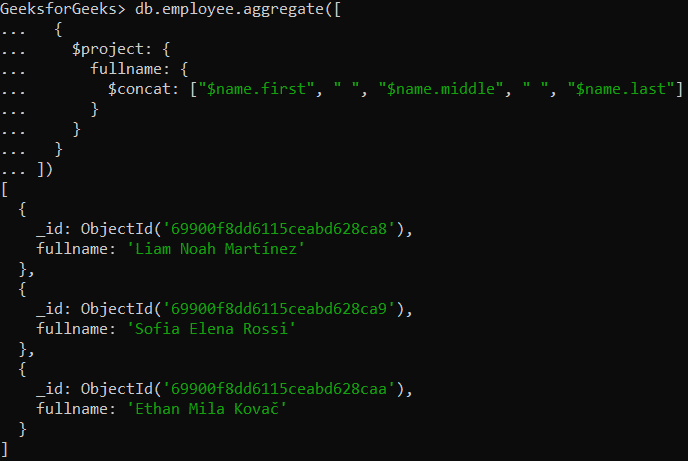
- Concatenates first, middle, and last name fields into fullname.
- Creates a new field fullname in the output.
- Provides the employee’s complete name in a single string.
Usage of $concat Operator
Here are some usage of $concat operator:
- Aggregation Usage: Commonly used in the $project stage to create new computed fields.
- Flexible Inputs: Accepts field references, string literals, and computed expressions.
- Null Handling: Returns null if any argument is null or a referenced field is missing.
- Composable: Works with operators like $trim, $toUpper, and $toLower for advanced formatting.
- Multiple Fields: Merges values from multiple fields into a single string.
- Dynamic Strings: Builds labels, messages, or formatted outputs at query time.
- Data Transformation: Adds prefixes/suffixes and formats strings for reporting or UI output.