
The $abs operator returns the absolute value of a number in MongoDB aggregation pipeline, converting negative values to positive for clean and consistent calculations.
- Used within aggregation pipeline stages (e.g., $project, $addFields, $group).
- Accepts numeric values or numeric fields.
- Helps standardize values for comparisons and reports.
- Commonly used in financial and time-difference calculations.
- Can be combined with other aggregation expressions (e.g., $add, $subtract) within pipeline stages.
Syntax
{ $abs: <number> }- <number> can be a numeric field or expression.
- Returns the absolute (non-negative) value.
- Used inside $project, $addFields, $group, etc.
- Supports computed values (not just constants).
Features of the MongoDB $abs Operator
- Absolute values: Always returns non-negative numbers.
- Operator chaining: Works with $add, $subtract, $multiply, and $divide .
- Data cleaning: Normalizes negative values to positive.
- Aggregation use: Used within aggregation pipelines for data processing.
Examples of MongoDB $abs operator
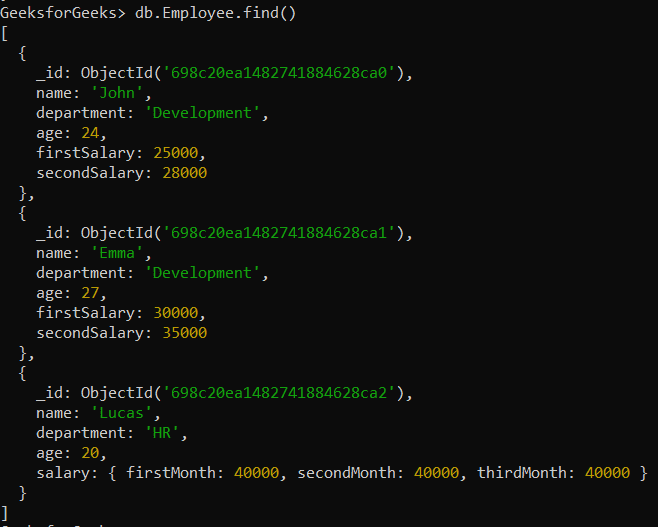
In the following examples, we will work with the GeeksforGeeks database and the Employee collection.
- Database: GeeksforGeeks
- Collection: Employee
- Document: Three documents that contain the details of the employees in the form of field-value pairs.
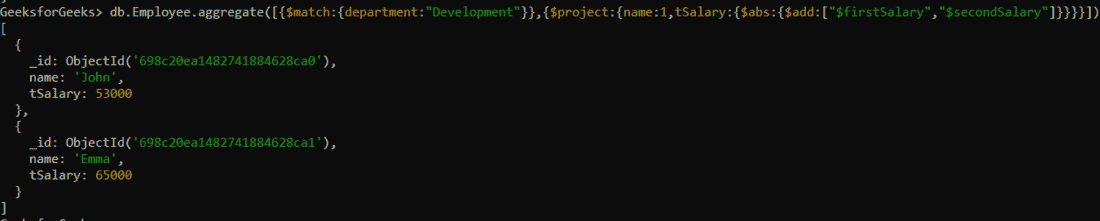
Example 1: Using $abs to Ensure Non-Negative Salary Values
Total salary of every employee in the development department, ensuring that we only use positive values (by taking the absolute value).
db.Employee.aggregate([
  { $match: { department: "Development" } },
  {
    $project: {
      name: 1,
      tSalary: {
        $abs: {
          $add: ["$firstSalary", "$secondSalary"]
        }
      }
    }
  }
])
Output:
Example 2: Using $abs operator in embedded documents
Total of three months' salary of the employee in the HR department, where the salary is stored in an embedded document, and ensure that the result is non-negative.
db.Employee.aggregate([
  { $match: { department: "HR" } },
  {
    $project: {
      name: 1,
      tSalary: {
        $abs: {
          $add: [
            "$salary.firstMonth",
            "$salary.secondMonth",
            "$salary.thirdMonth"
          ]
        }
      }
    }
  }
])
Output:
