
MongoDB’s createIndex() is used to create indexes on collection fields to improve query and sorting performance, with support for multiple index types and customization options.
- Creates a single index on a collection to speed up queries and sorting.
- Supports multiple index types (text, 2dsphere, 2d, etc.).
- Takes a key specification document with optional parameters for customization.
- MongoDB avoids creating duplicate indexes with the same key pattern and options, but conflicting or differently named definitions may still result in errors or multiple indexes.
- Indexes can be hidden or unhidden using hideIndex() and unhideIndex().
Syntax
db.collectionName.createIndex(
  { field_name: 1 },
  {
    commitQuorum: <string or integer>
  }
)
- keys: Fields to index (1 for ascending, -1 for descending)
- options: Extra settings for index creation
- commitQuorum: Number of members required to confirm index creation (inside options)
Common Index Options
The following options are available for all the index types unless otherwise specified and these options are optional:
- background: Builds the index without blocking normal read/write operations, so the collection remains usable during index creation.
- unique: Ensures all indexed values are unique, preventing duplicate entries in the collection.
- name: Assigns a custom, human-readable name to the index for easier management.
- partialFilterExpression: Indexes only documents that match a specific condition, reducing index size and improving targeted queries.
- sparse: Indexes only documents that contain the indexed field, skipping those where the field is missing.
- expireAfterSeconds: Automatically removes documents after a defined time period, useful for expiring logs or sessions.
- hidden: Hides the index from the query planner so it isn’t used for query optimization without dropping it.
- storageEngine: Applies storage-engine–specific configurations when creating the index for advanced tuning.
Some indexes may have additional options that are specified for that type only like:
1. Options For text indexes
All these parameters are optional:
- weights (document): Assigns weights to fields for text search relevance.
- default_language (string): Sets language for stop words and stemming.
- language_override (string): Field name to override the default language.
- textIndexVersion (number): Specifies the text index version.
2. Options For 2d sphere Indexes
2dsphereIndexVersion: It is of integer type and specifies the 2dsphere index version number. It is an optional parameter.
3. Options For 2d Indexes
All these parameters are optional:
- bits (number): Precision of stored geohash values (default: 26).
- min (number): Lower inclusive boundary for coordinates (default: -180.0).
- max (number): Upper inclusive boundary for coordinates (default: 180.0).
4. Options For geoHaystack Indexes
bucketSize: Number of units to group local values (must be > 0).
5. Options For wildcard indexes
wildcardProjection: Includes or excludes specific field paths from wildcard indexing.
Examples of MongoDB createIndex()
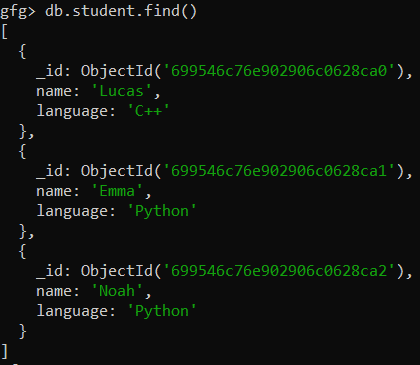
Consider below student collection to understand the MongoDB createIndex() as shown below:
Example 1: Create an Ascending Index on a Single Field
db.student.createIndex({name:1})Output:

Created an ascending index on the single field (i.e., name) without options.
Example 2: Create a Descending Index on a Single Field
db.student.createIndex({language:-1})Output:

Create a descending index on the single field (i.e., language).
Example 3: Create an Index on the Multiple Fields
db.student.createIndex({name:1,language:-1})Output:

- Creates a compound index on multiple fields.
- Applies ascending order (1) on name and descending order (-1) on language.
- Improves query performance when filtering or sorting on both fields together.
Example 4: Creating a Unique Index Using Options:
db.student.createIndex({name: 1}, {unique: true})Output:

- Creates a unique index on the specified field.
- Prevents inserting or updating documents with duplicate index key values.
Example 5: Creating a Wildcard Index
First of all, we insert one more document in the student collection that contains the branch field.
Output:
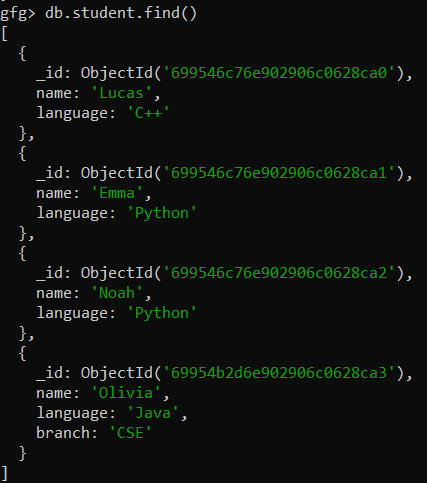
Now we create a wildcard index on a single field path:
db.student.createIndex({"branch.$**":1})Output:

Created a wildcard index on the branch field using createIndex() method.
Example 6: Create Indexes with Collation Specified
db.student.createIndex( { "name": 1 }, { collation: { locale: "en", strength: 2 } } )Output:

- Creates an index on the name field with a specified collation.
- locale: "en" applies English language rules for string comparison.
- strength: 2 enables case-insensitive comparisons.
Example 7: Create Index With Commit Quorum
db.student.createIndex( { "name": 1 }, { commitQuorum: "majority" } )Output:
name_1- Creates an index on the name field with commit quorum enabled.
- Ensures a majority of replica set members acknowledge index creation before success is returned.
Note: Before using commitQuorum, MongoDB must be running as a replica set (not standalone) and the replica set should be initialized; otherwise, the command will fail.