
Djongo is a SQL-to-MongoDB query transpiler that allows Django projects to use MongoDB as the backend database without modifying the Django ORM. It enables seamless integration with minimal configuration changes.
- Converts Django ORM queries into MongoDB queries.
- Allows MongoDB to be used as Django’s backend.
- Requires minimal configuration (single-line setup).
- No changes needed in models, views, or serializers.
Working of Djongo
Djongo works by translating SQL queries generated by Django ORM into MongoDB query documents, allowing Django to interact with MongoDB without modifying its core features.
- Intercepts Django ORM SQL queries and converts them into MongoDB queries.
- Executes the translated queries on MongoDB and retrieves results.
- Returns data in a Django-compatible format without requiring changes to models, views, or serializers.
 Requirements
- Python 3.6 or higher.
- MongoDB 3.4 or higher. (If you are using nested queries then MongoDB 3.6 or higher is required.)
Features
- Reuse Django Models / ORM : Django models are fully compatible with Djongo, allowing reuse without modification.
- Integrity Checks Support : Supports Django’s built-in validation and integrity checks before saving data.
- Field Validation Control : Prevents missing values from being stored when using constraints like null=False and blank=False (e.g., in EmbeddedField).

- Validators : We can apply validation checks like URLValidator, EmailValidator, RegexValidator etc. before each fields are saved to the database.

Steps to Configure Djongo with Django and MongoDB
Follow these steps to set up a Django project with MongoDB as the backend using Djongo.
Step 1: Setup Virtual Environment
virtualenv myenv
myenv\Scripts\activate


Step 2: Install Django
pip install django

Step 3: Install Djongo
pip install djongo

Step 4: Start Django Project
django-admin startproject geeks_project

Your project structure will look like this :
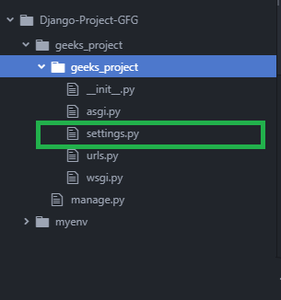
Step 5: Make changes to settings.py file
Now, open settings.py file. Comment out or remove previous SQL Database configuration and add the following code in settings.py file :settings.py
   DATABASES = {
      'default': {
          'ENGINE': 'djongo',
          'NAME': 'your-database-name',
      }
  }
 Now you can Use MongoDB as a backend database for your django project, without changing a single django model.