
MongoDB secures database access using authentication mechanisms and role-based access control (RBAC) to ensure only authorized users can access and modify data.
- Authentication verifies user identities before allowing database access.
- RBAC defines privileges using resource documents (database/collection scope) within roles, rather than directly assigning access at the collection level.
- SCRAM-SHA-256 is the default username–password authentication mechanism.
- MongoDB also supports X.509 certificates, LDAP, and Kerberos for authentication.
Role-Based Access Control (RBAC)
MongoDB uses RBAC to authorize authenticated users with specific permissions on databases and collections, ensuring controlled access to resources.
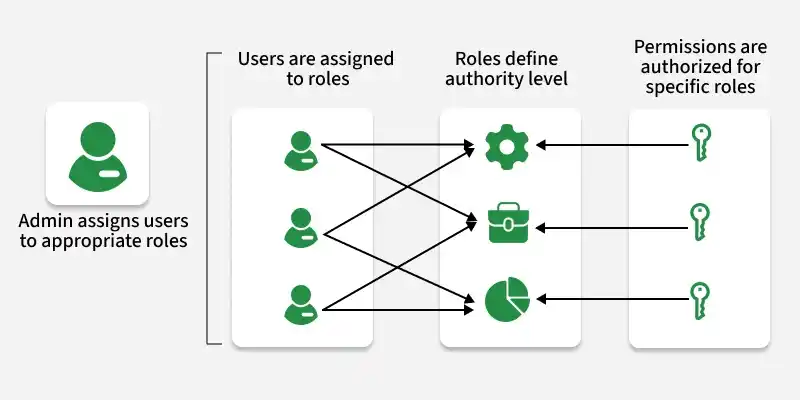
Understanding RBAC in MongoDB
- MongoDB authorization is based on RBAC.
- Access privileges are determined by the roles assigned to users.
- Roles define the actions users can perform and the resources they can access.
- MongoDB provides built-in roles for common administrative and operational tasks.
- RBAC supports fine-grained access control, including custom roles with specific permissions.
- Roles can be assigned at the database level or collection level.
- MongoDB supports role inheritance, where roles can include other roles.
- Users can be assigned multiple roles across databases and collections.
- RBAC supports privilege separation, separating administrative tasks from application data access.
Built-In Roles in MongoDB
MongoDB provides several built-in roles to cater to different administrative and operational tasks. Some of the key built-in roles include:
Database Administration Roles
- dbAdmin: Performs database-level administrative tasks, including managing collections and indexes.
- userAdmin: Creates, deletes, and manages users and role assignments within a specific database.
- clusterAdmin: Manages cluster-wide administration such as shards, replica sets, monitoring, backups, and restores.
- backup: Allows creating backups of databases for data protection and recovery.
Cluster Administration Roles
- clusterBackup: This role grants privileges to create backups of the entire cluster, including all databases and collections.
- clusterRestore: Users with this role can restore backups to the entire cluster, replacing existing data.
- clusterAdmin: Grants full cluster-level administration, including management, monitoring, backup, and restore operations.
- clusterMonitor: Provides read-only access to cluster-wide metrics and status (replica sets and sharded clusters).
Backup and Restoration Roles
- backup: Authorizes users to create backups of databases.
- restore: Enables users to restore databases from backups.
Superuser Roles:
- root: Grants superuser access to perform any action on any resource.
Creating a User-Defined Role
Define custom roles to grant fine-grained permissions for specific actions and resources in MongoDB.
1. Define the role
Decide the permissions the role should have, such as read or write access to specific databases or collections.
use myDatabase

db.createRole({
  role: "customRole",
  privileges: [
    { resource: { db: "myDatabase", collection: "" }, actions: ["find", "insert"] }
  ],
  roles: []
})
2. Assign the Role
Assign the role to a user using the db.grantRolesToUser() method. For example:
db.grantRolesToUser("myUser", ["customRole"])Modify Access for an Existing User
To modify access for an existing user in MongoDB Here's a step-by-step explanation with examples:
1. List Existing Roles
Use db.getUser() to view the roles assigned to the user.
db.getUser("myUser")2. Modify Roles
Use db.grantRolesToUser() to add roles and db.revokeRolesFromUser() to remove roles.
db.grantRolesToUser("myUser", ["customRole"])3. Verify Changes
Verify the updates by listing the user’s roles again.
db.revokeRolesFromUser("myUser", ["customRole"])Connect to MongoDB with Appropriate Privileges
Connect to MongoDB using a user account with the required roles to ensure authorized access to databases and operations.
1. Start MongoDB Shell
Start the MongoDB shell by running the following command in your terminal:
mongo -u "adminUser" -p "strongPassword" --authenticationDatabase "admin"2. Authenticate
(If not already authenticated) authenticate with a user that has the required privileges:
use admin;
db.auth("adminUser", "strongPassword");
3. Connect to Database
Switch to the desired database using the use command.
use myDatabase4. Verify Access
Verify permissions by performing an operation such as querying documents:
db.collection.find();