MongoDB’s aggregation pipeline is a framework that processes data in a sequence of stages, where each stage performs a specific operation and passes the transformed result to the next stage.
- Data flows through multiple stages in a defined order.
- Each stage performs a specific operation such as filtering, grouping, sorting, or transforming data.
- The output of one stage becomes the input for the next stage.
- It allows complex data processing and analysis in a step-by-step manner.
- Common stages include $match, $group, $sort, $project, and $limit.
Syntax:
db.<collection_name>.aggregate(pipeline, options)
 or
db.<collection_name>.aggregate( [ { <stage1> }, {<stage2>},... ] )- db.<collection_name>: Refers to the collection to work on.
- .aggregate(): Starts the aggregation process.
- pipeline: A list of stages (steps) that process the data. Each stage is written inside {}.
- options: Extra settings (optional) to control the aggregation.
- [ { <stage1> }, { <stage2> }, ... ]: Stages run in order, one after another.
Aggregation Stages
Aggregation stages are individual steps that work on data to filter, group, or sort it.
1. $addFields Stage
$addFields stage is used to add new fields to the existing documents. It returns documents that contain all the existing fields and newly added fields.
Syntax :
db.<collection_name>.aggregate([
  {
    $addFields: {
      <newField1>: <expression>,
      <newField2>: <expression>
      // ...
    }
  }
])
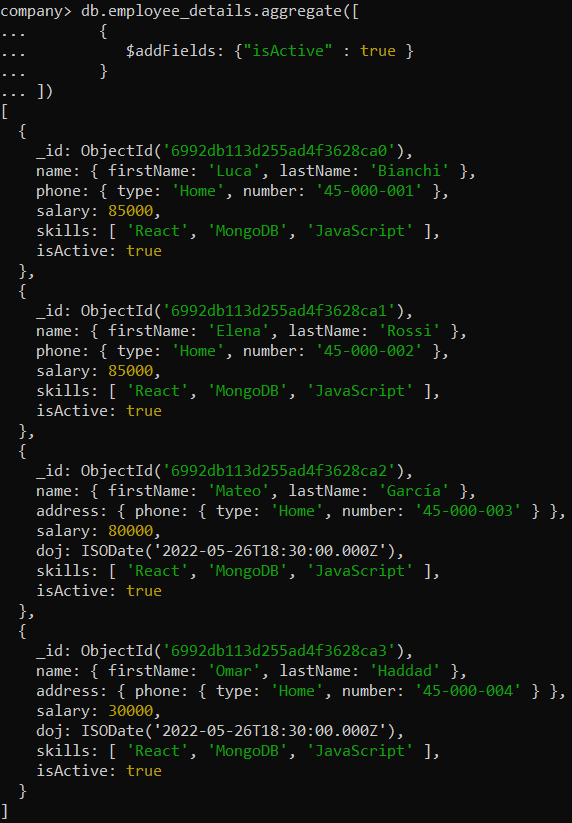
Example: Add a new field isActive with the value true to every document in the employee_details collection using the MongoDB aggregation pipeline.
db.employee_details.aggregate([
       {
          $addFields: {"isActive" : true }
       }
])
Output:
2. $set Stage
$set can overwrite existing fields; however, modifying the _id field is restricted and generally not allowed in most practical scenarios.
Syntax:
db.<collection_name>.aggregate([
  {
    $set: {
      <newField>: <expression>
      // ...
    }
  }
])
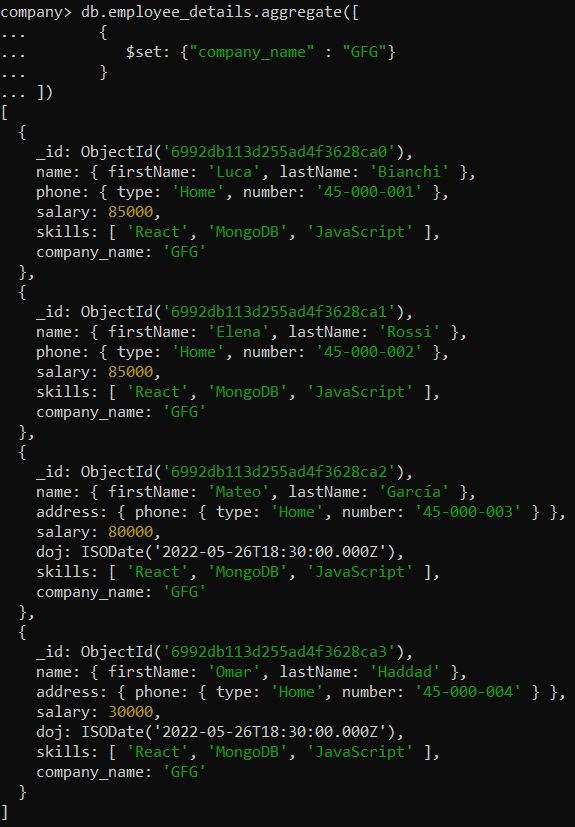
Example: Add a new field 'company_name' with the value 'GFG' to every document in the 'employee_details' collection using the MongoDB aggregation pipeline.
db.employee_details.aggregate([
       {
          $set: {"company_name" : "GFG"}
       }
])
Output:
Note: $set stage is new stage in version 4.2.
3. $unset Stage
$unset stage is used to remove/exclude fields from the documents. If you want to remove the field or fields from the embedded document then use the dot notation. $unset stage is new staging in version 4.2.
Syntax:
- To remove a single field, The $unset stage takes a string that specifies the field to remove.
db.<collection_name>.aggregate([
  {
    $unset: "<field>"
  }
])- To remove multiple fields, The $unset takes an array of fields to remove.
db.<collection_name>.aggregate([
  {
    $unset: ["<field1>", "<field2>"]
  }
])
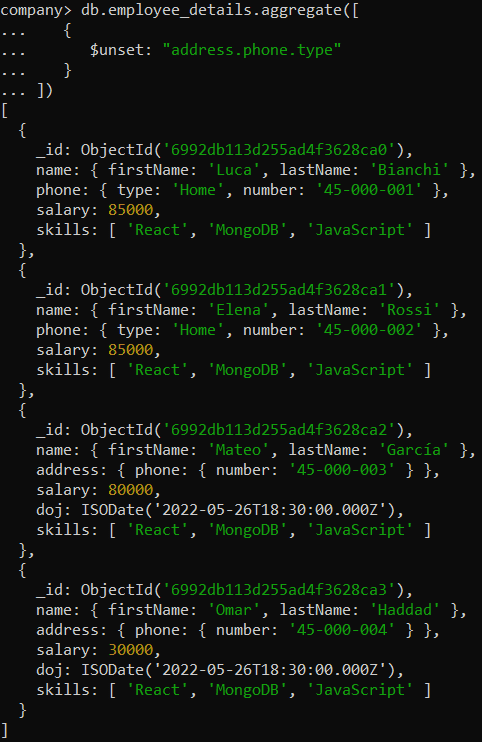
Example: Remove the nested field 'address.phone.type' from every document in the 'employee_details' collection using the MongoDB aggregation pipeline.
db.employee_details.aggregate([
   {
      $unset: "address.phone.type"
   }
])
Output:
4. $project Stage
$project stage is used to include fields, exclude _id field, add new fields and replace the existing field value in the output document. The following is the table that describes the specification and its description.
| Specification | Description |
|---|---|
| field : <1 or true> | include the field in the output document. |
| _id : <0 or false> | exclude the _id from the output document. |
| field : <expression> | add the new field or replace the existing field value. |
| field : <0 or false> | excluding any field (except _id) in $project prevents using other inclusion/expression specification. |
Syntax:
db.<collection_name>.aggregate([
  {
    $project: {
      <specification>
    }
  }
])
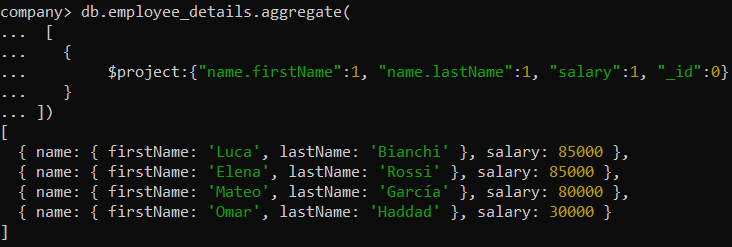
Example: Retrieve only the 'firstName' and 'lastName' fields from the 'name' object and the 'salary' field for every document in the 'employee_details' collection, excluding the '_id field, using the MongoDB aggregation pipeline.
db.employee_details.aggregate(
 [
   {
        $project:{"name.firstName":1, "name.lastName":1, "salary":1, "_id":0}
   }
])
Output:
5. $count Stage
$count returns the count of the documents present in the selected collection.
Syntax:
db.<collection_name>.aggregate([
  {
    $count: "<fieldName>"
  }
])
<fieldName> is the name of the output field that stores the count value.
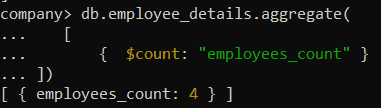
Example: Count the total number of documents in the 'employee_details' collection and return the result as 'employees_count' using the MongoDB aggregation pipeline.
db.employee_details.aggregate(
   [
       {  $count: "employees_count" }
])
Output:
Note: To get the count of documents in a collection, you can also use db.<collection_name>.countDocuments(). It returns only the count value and does not allow specifying an output field.
6. $unwind Stage
$unwind deconstructs an array field into separate documents. If the field isn’t an array but exists (not null/missing/empty), it’s treated as a single-element array, and includeArrayIndex is set to null.
Syntax:
db.<collection_name>.aggregate(
     [
         {
             $unwind:
             {
                  path: <field path>,
                  includeArrayIndex: <string>,
                  preserveNullAndEmptyArrays: <boolean>
             }
        }
])- path: Field path to unwind (e.g., "$skills").
- includeArrayIndex: Adds the array index to the output; null for non-array values.
- preserveNullAndEmptyArrays: If true, keeps documents where the field is missing, null, or an empty array (default: false).
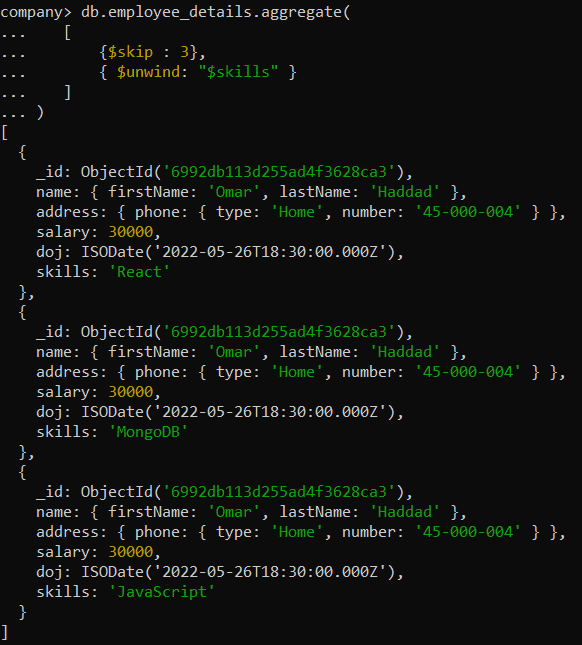
Example: Skip the first 3 documents and then unwind the 'skills' array field in each remaining document in the 'employee_details' collection using the MongoDB aggregation pipeline.
db.employee_details.aggregate(
   [
       {$skip : 3},
       { $unwind: "$skills" }
   ]
)
Output:
Note: $unwind stage does not include documents whose field is missing, null or empty array until you use preserveNullAndEmptyArrays : true
7. $limit Stage
$limit stage is used to limit the number of documents passed to the next stage in pipeline.
Syntax:
db.<collection_name>.aggregate(
    [
        {
           $limit: <positive 64-bit integer>
       }
 ])
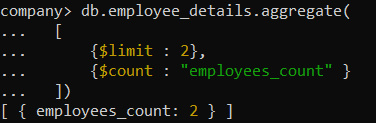
Example: Limit the results to the first 2 documents and then count these documents, returning the result as 'employees_count', using the MongoDB aggregation pipeline.
db.employee_details.aggregate(
  [
      {$limit : 2},
      {$count : "employees_count" }
  ])
Output:
8. $sort Stage
$sort orders documents by one or more fields, applying sort keys left to right (first by <field1>, then by <field2> for ties).
Syntax:
db.<collection_name>.aggregate(
   [
       { $sort: { <field1>: <sort order>, <field2>: <sort order> ... } }
 ])
<field> represents the document field on the basis of which we sort the document either ascending or descending depends on the <sort-order>. <sort order> has the following values :
| Value | Order |
|---|---|
| 1 | Ascending |
| -1 | Descending |
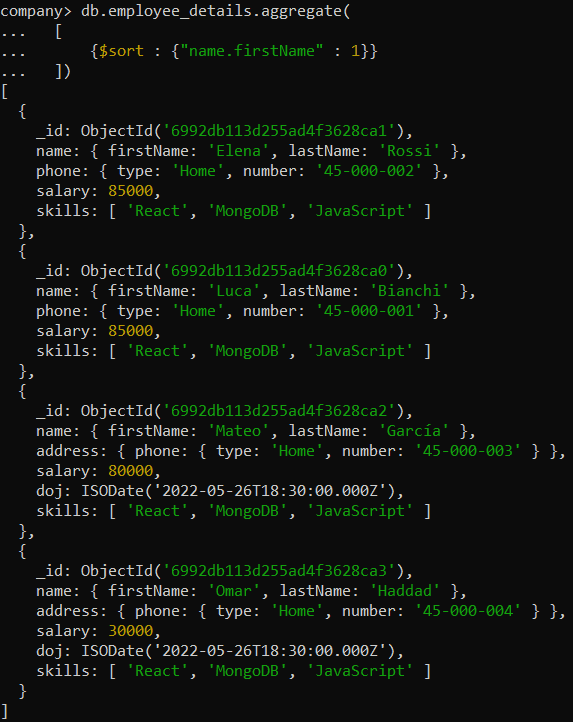
Example of $sort in Ascending Order
Sort the documents in the 'employee_details' collection in ascending order based on the 'firstName' field in the 'name' object using the MongoDB aggregation pipeline.
db.employee_details.aggregate(
  [
      {$sort : {"name.firstName" : 1}}
  ])
Output:
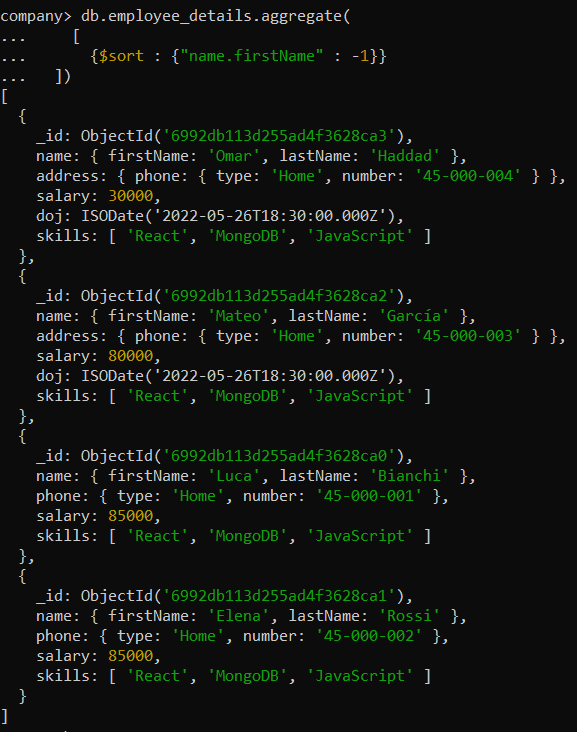
Example of $sort in Descending Order
Sort the documents in the 'employee_details' collection in descending order based on the 'firstName' field in the 'name' object using the MongoDB aggregation pipeline.
db.employee_details.aggregate(
    [
      {$sort : {"name.firstName" : -1}}
  ])
Output:
Note: You can sort a maximum of 32 keys.
9. $sortByCount Stage
$sortByCount groups documents by a field, counts each group, and returns the results sorted by count in descending order.
Syntax:
db.<collection_name>.aggregate(
   [
       {$sortByCount : "<field path>"}
])
Example: Create a MongoDB aggregation pipeline to list and count the occurrences of each skill across all employees in the employee_details collection after unwinding the skills array field.
db.employee_details.aggregate(
   [
      {$unwind : "$skills"},
      {$sortByCount : "$skills"}
  ])
Output:
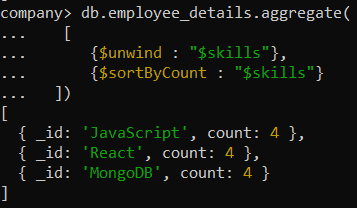
Note:$sortByCount is equivalent to applying $group with { $sum: 1 } followed by $sort in descending order of the count.
10. $skip Stage
$skip stage is used to skip the number of documents and passes the remaining documents to the next stage in the pipeline. It returns the remaining documents.
Syntax:
db.<collection_name>.aggregate(
   [
       { $skip: <positive 64-bit integer> }
  ])
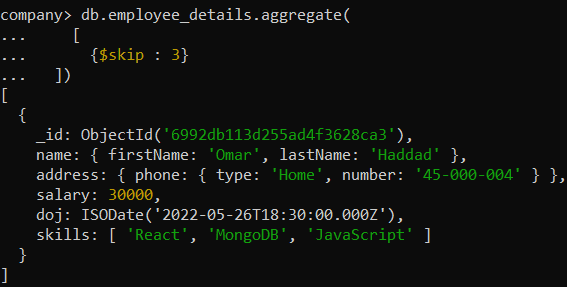
Example: Skip the first 3 documents in the 'employee_details' collection using the MongoDB aggregation pipeline.
db.employee_details.aggregate(
    [
      {$skip : 3}
  ])
Output: