The INSERT INTO SELECT statement is a DML command used to copy data from one table and insert it into another table. It combines the functionality of both INSERT INTO and SELECT statements to transfer data efficiently.
- It allows copying data from one table to another based on specific conditions.
- It requires that the data types of source and target table columns match.
Syntax:
INSERT INTO target_table (column1, column2, ...)
SELECT column1, column2, ...
FROM source_table
WHERE condition;- INSERT INTO target_table (column1, column2, ...): Specifies the target table and the columns where data will be inserted. The column order must match the SELECT statement.
- SELECT column1, column2, ...: Retrieves the required columns from the source table.
- FROM source_table: Defines the table from which data is selected.
- WHERE condition: (Optional) Filters rows so only matching records are inserted into the target table.
Working with INSERT INTO SELECT Statement
The INSERT INTO SELECT statement works by selecting data from a source table and directly inserting it into a target table in a single operation. First, we create a demo table, on which we will use the INSERT INTO SELECT statement.
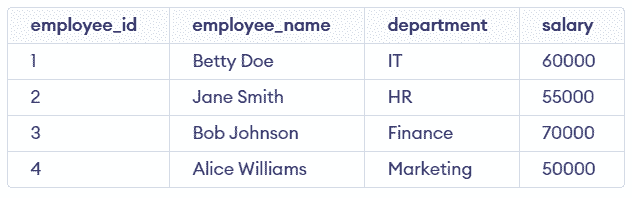
Query to Create new_employees Table:
CREATE TABLE new_employees (
    employee_id INT PRIMARY KEY,
    employee_name VARCHAR(50),
    department VARCHAR(50),
    salary DECIMAL(10,2)
);Query:
INSERT INTO new_employees (employee_id, employee_name, department, salary)
SELECT employee_id, employee_name, department, salary
FROM employees
WHERE salary > 55000;
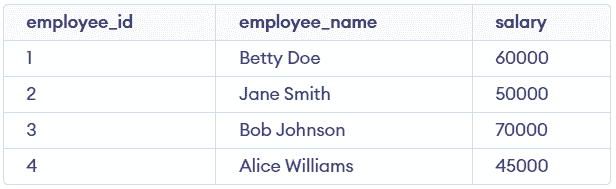
Output:

Using SELECT Instead of VALUES Clause
Using a SELECT statement instead of the VALUES clause allows inserting multiple rows in a single INSERT INTO statement. In this example, we use the employees table and assign department_id values based on conditions.
Query:
CREATE TABLE employee_department_mapping (
    employee_id INT,
    department_id INT
);
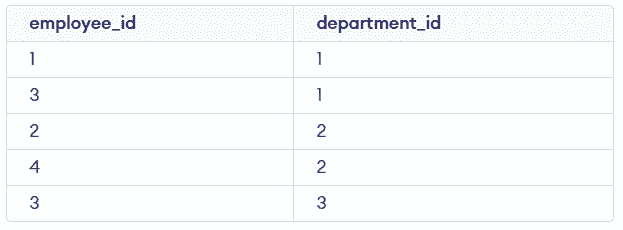
When inserting multiple columns from a subquery, the SELECT statement is used directly instead of the VALUES clause. In this case, each subquery returns two columns: employee_id and department_id.
Query:
INSERT INTO employee_department_mapping (employee_id, department_id)
SELECT employee_id, department_id
FROM (
    SELECT employee_id, 1 AS department_id FROM employees WHERE salary > 55000
    UNION ALL
    SELECT employee_id, 2 AS department_id FROM employees WHERE salary <= 55000
    UNION ALL
    SELECT employee_id, 3 AS department_id FROM employees WHERE salary > 60000
) AS subquery;
Output: