
The MySQL SELECT statement is used to retrieve data from one or more tables in a database. It helps in fetching specific columns and filtering data based on conditions.
- It allows selecting specific columns or all columns using *.
- It supports clauses like WHERE, GROUP BY, and ORDER BY for filtering, grouping, and sorting data.
- It works with aggregate functions like SUM(), COUNT(), and AVG() to perform data analysis and summarization.
Syntax:
SELECT column1, column2, ...FROM table_nameWHERE conditionORDER BY column_name [ASC | DESC]LIMIT number;- SELECT: Specifies columns to retrieve (* for all columns).
- FROM: Specifies the table name.
- WHERE: Filters rows based on conditions.
- ORDER BY: Sorts results in ASC or DESC order.
- LIMIT: Restricts the number of rows returned.
Here, column1, column2, ... are the columns you want to retrieve. If you want to retrieve data from all columns/fields, you can use the following
Syntax:
SELECT * FROM table_nameDemo MySQL Database
For this tutorial on MySQL SELECT statement, we will use the following MySQL table.
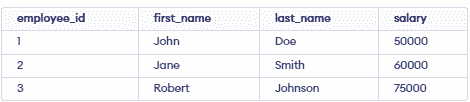
To quickly create this table on your local MySQL Workbench, enter the following MySQL query:
CREATE TABLE employees (
     employee_id INT PRIMARY KEY,
     first_name VARCHAR(50),
     last_name VARCHAR(50),
     salary DECIMAL(10, 2) );
INSERT INTO employees VALUES
     (1, 'John', 'Doe', 50000),
     (2, 'Jane', 'Smith', 60000),
     (3, 'Robert', 'Johnson', 75000);
MySQL SELECT Statement Examples
Let's explore some examples to learn how to write SELECT statement queries.
Example 1: Selecting Specific Columns
This query retrieve only first_name and last_name columns
SELECT first_name, last_name
FROM employees;
Output:

Example 2: Selecting All Columns
This query will retrieve the entire employee table.
SELECT * from employees;Output:

Example 3: Performing Arithmetic Operations
This query performs a mathematical calculation and returns the result.
SELECT 32*32Output:

We can also use SELECT statements to perform, basic mathematical operations.
MySQL SELECT DISTINCT Statement
MySQL SELECT DISTINCT Statement is used to retrieve only distinct data from a field/column. It is very used to remove duplicates from the results.
Syntax:
SELECT DISTINCT column1, column2, ...
FROM table_name
Example: Retrieves unique salary values from the employees table.
SELECT DISTINCT salaryFROM employees;