
SQL (Structured Query Language) is the standard language used with relational DBMSs to define schemas (DDL), manipulate and query data (DML/DQL) and optimize access so it’s a core skill for developers, data analysts and DBAs and a frequent interview focus. SQL covers:
- Data definition (defining schemas/structures)
- Data manipulation (inserting, updating, deleting data)
- Querying (retrieving data as needed)
- Optimization (tuning access/performance)
- Together, these enable efficient storage, retrieval and management of data in relational database systems.
1. What is the difference between CHAR and VARCHAR2?
| CHAR | VARCHAR2 |
|---|---|
| CHAR stores fixed-length character data. | VARCHAR2 stores variable-length character data. |
| It pads unused space with trailing spaces. | It does not pad unused space, saving storage. |
2. What is a view in SQL?
A view is a virtual table created from a SELECT query that displays data from one or more tables without storing it, helping simplify queries and improve security.
3. What is the purpose of the UNIQUE constraint?
The UNIQUE constraint ensures that all values in a column (or combination of columns) are distinct. This prevents duplicate values and helps maintain data integrity.
4. What is a composite primary key?
A composite primary key uses two or more columns together to uniquely identify each row when one column alone isn’t sufficient.
5. Explain the difference between the WHERE and HAVING clauses
WHERE filters individual rows before grouping or aggregation, so it can’t use aggregate functions like SUM or COUNT; it’s best for narrowing raw data early (e.g., a date range or status).
HAVING filters the resulting groups after GROUP BY, so it’s meant for conditions on aggregates (e.g., groups with totals above a threshold).
Example:
SELECT customer_id, COUNT(*) AS orders_2025
FROM orders
WHERE order_date >= '2025-01-01' AND order_date < '2026-01-01'
GROUP BY customer_id
HAVING COUNT(*) > 5;
6. What are SQL joins and what are the differences between INNER, LEFT, RIGHT and FULL joins?
SQL joins combine rows from two tables based on a matching condition (typically keys) to answer questions that span both tables.
- An INNER JOIN returns only matches that exist in both tables (the intersection).
- A LEFT JOIN returns all rows from the left table and the matching rows from the right; when there’s no match, right-side columns are
NULL. - A RIGHT JOIN is the mirror image: all rows from the right table plus matches from the left,
NULLwhen absent. - A FULL (OUTER) JOIN returns all rows from either table, filling in
NULLwhere a counterpart is missing.
7. Describe a PRIMARY KEY and how it differs from a UNIQUE key
A PRIMARY KEY uniquely identifies each row in a table: it combines UNIQUE + NOT NULL, there can be only one per table (though it can be composite across multiple columns) and it’s the default target for foreign keys.
A UNIQUE key also enforces uniqueness, but doesn’t require NOT NULL and you can have many UNIQUE constraints per table.
8. What is a CTE (Common Table Expression) and when would you use it?
A CTE (Common Table Expression) is a temporary, named result set defined with WITH that exists only for the duration of a single statement. You use CTEs to break complex logic into steps, avoid repeating the same subquery, improve readability/maintenance, enable recursion (e.g., org charts, folder trees) and make debugging easier.
9. Explain normalization and briefly describe the different normal forms
Normalization organizes relational data to minimize redundancy and prevent update/insert/delete anomalies by splitting tables based on dependencies while preserving meaning.
- 1NF requires each column to hold atomic values and no repeating groups.
- 2NF is 1NF plus no partial dependence on a composite key—every non-key must depend on the whole key.
- 3NF is 2NF plus no transitive dependencies—non-keys depend only on the key, not on other non-keys.
- BCNF strengthens 3NF: for every functional dependency X→Y, X must be a candidate key (fixes edge cases like overlapping keys)
- 4NF removes multi-valued dependencies .
- 5NF (PJNF) eliminates join dependencies, decomposing so tables can be losslessly recombined without spurious tuple.
10. What is the difference between UNION and UNION ALL?
| UNION | UNION ALL |
|---|---|
| It combines results from multiple SELECT queries and removes duplicate rows. | It combines results from multiple SELECT queries and keeps all duplicate rows. |
| It performs DISTINCT operation, so it can be slower. | It does not remove duplicates, so it is faster. |
| It is used when unique results are required. | It is used when all results, including duplicates, are needed. |
11. How do clustered and non‑clustered indexes differ and when should each be used?
A clustered index stores table rows in the physical order of the index key (the data pages are the index), so you can have only one; it’s ideal for range scans and primary-key lookups.
- Key is narrow, stable and increasing (e.g.,
order_id,order_date). - Queries often do range scans or ORDER BY on that key.
A non-clustered index is a separate structure (key → row locator) and you can have many; it accelerates specific filters, joins and sorts without changing the table’s row order.
- You need fast point lookups or high-selectivity filters (
WHERE email=?). - Columns are common JOIN/GROUP BY/ORDER BY targets.
- You can cover queries via
INCLUDEd columns.
12. How do you perform pattern matching in SQL
SQL supports pattern matching mainly with LIKE (and NOT LIKE) using wildcards—% for any-length string and _ for a single character.
PostgreSQL has case-insensitive ILIKE, SIMILAR TO and regex operators (~, ~*), MySQL/SQLite offer REGEXP/REGEXP_LIKE and all allow an optional ESCAPE clause to treat % or _ as literals.
13. How would you calculate the running total of sales for each product?
Use a window (analytic) function: compute SUM(amount) over rows of the same product, ordered by time, accumulating from the start up to the current row. This keeps row detail while adding a running total.
SELECT
  product_id,
  sale_date,
  amount,
  SUM(amount) OVER (
    PARTITION BY product_id
    ORDER BY sale_date, sale_id
    ROWS BETWEEN UNBOUNDED PRECEDING AND CURRENT ROW
  ) AS running_total
FROM sales;
14. Explain correlated subqueries and provide an example use case
A correlated subquery is a subquery that depends on the current row of the outer query—i.e., it references columns from the outer query and is re-evaluated for each outer row.
Example use case employees paid above their own department’s average:
SELECT e.employee_id, e.name, e.salary, e.department_id
FROM employees e
WHERE e.salary >
      (SELECT AVG(e2.salary)
       FROM employees e2
       WHERE e2.department_id = e.department_id);
15. What are EXISTS and NOT EXISTS and how do they differ from IN
EXISTS checks whether a correlated subquery returns at least one row; NOT EXISTS checks that it returns none. They return boolean and stop at the first match, ignoring what the subquery selects. IN compares a value against a list/set (literal list or subquery output).
EXISTS/NOT EXISTSuse a correlated subquery and are robust withNULLsNOT INis NULL-sensitive if the subquery can yieldNULL,NOT INmay return no rows (unknown comparison), so preferNOT EXISTS- Performance varies
EXISTSoften wins for large subqueries with indexes;INis fine for small, deduplicated lists.
16. Explain anti‑joins
An anti-join returns rows from one table (the “left”) that have no matching rows in another table (the “right”) based on a join condition—i.e., “in A but not in B.” It’s commonly expressed as a LEFT JOIN followed by WHERE right.pk IS NULL or with a semi-join style predicate like NOT EXISTS.
17. Explain the difference between RANK(), DENSE_RANK() and ROW_NUMBER()
| RANK() | DENSE_RANK() | ROW_NUMBER() |
|---|---|---|
| It assigns the same rank to equal values and leaves gaps in ranking. | It assigns the same rank to equal values without leaving gaps. | It assigns a unique number to each row regardless of ties. |
| It is useful when ranking with competition-style results. | It is useful when continuous ranking without gaps is needed. | It is useful when you need a unique sequence number for each row. |
18. Explain the purpose of LAG and LEAD functions
LAG and LEAD are window functions that let you look at values from previous (LAG) or next (LEAD) rows in the same result set without self-joins. They’re used for comparisons across rows e.g., changes from yesterday to today, detecting trends or filling forward/backward values
19. What is a cross join and how does it differ from an inner join?
A CROSS JOIN returns the cartesian product of two tables every row from A paired with every row from B so the result size is rows(A) × rows(B) and it doesn’t use a join condition
An INNER JOIN returns only the rows where the specified join condition matches between the two tables (e.g., matching keys), so its result is a filtered subset, not every combination
- Use a cross join for generating combinations (dates × products, sizes × colors) .
- When you intentionally need all pairings; use an inner join to combine related records.
20. Explain foreign keys and how they enforce referential integrity
A foreign key (FK) is a column (or set of columns) in a child table that references a primary/unique key in a parent table to ensure the child’s values actually exist in the parent. This enforces referential integrity by preventing actions that would create “orphan” rows.
21. Describe set operations like UNION, INTERSECT and EXCEPT and when each is useful
UNION, INTERSECT and EXCEPT are SQL set operations that combine results from two queries with the same number of columns and compatible data types. UNION returns the distinct union of both result sets (removes duplicates).
- Use it to merge similar data from multiple sources
- INTERSECT returns only rows common to both queries ideal for finding overlap.
- EXCEPT (called
MINUSin Oracle) returns rows in the first query that aren’t in the second.
22. How would you optimize a slow query?
To optimize a slow query,
- Use
EXPLAINto find slow parts - Add proper indexes and update statistics
- Use efficient conditions (avoid functions on columns)
- Filter data early and avoid
SELECT * - Optimize joins and reduce extra data
- Rewrite queries if needed (JOIN, UNION ALL)
- Use pagination, caching, or partitioning for large data
23. What is a query in SQL?
A query is a SQL statement used to retrieve, update or manipulate data in a database. The most common type of query is a SELECT statement, which fetches data from one or more tables based on specified conditions.
24. What is a subquery?
A subquery is a query nested within another query. It is often used in the WHERE clause to filter data based on the results of another query, making it easier to handle complex conditions.
25. Explain database partitioning
Database partitioning is the practice of splitting a large table (and its indexes) into smaller, more manageable pieces called partitions while keeping it logically a single table.This improves query performance (partition pruning scans only relevant partitions), eases maintenance (backup/reindex/archiving per partition) and enhances availability.
26. What strategies can protect a web application from SQL injection?
The primary defense against SQL injection is to use parameterized queries (prepared statements) everywhere never build SQL with string concatenation. Combine this with allow-list input validation (e.g., only digits for IDs), least-privilege DB accounts (no DROP, limited schema access) and safe stored procedures that don’t assemble dynamic SQL.
27. What are the main types of SQL commands?
SQL commands are broadly classified into:
- DDL (Data Definition Language): CREATE, ALTER, DROP, TRUNCATE.
- DML (Data Manipulation Language): SELECT, INSERT, UPDATE, DELETE.
- DCL (Data Control Language): GRANT, REVOKE.
- TCL (Transaction Control Language): COMMIT, ROLLBACK, SAVEPOINT.
28. What is the purpose of the DEFAULT constraint?
The DEFAULT constraint assigns a default value to a column when no value is provided during an INSERT operation. This helps maintain consistent data and simplifies data entry.
29. What is denormalizationdenormalization and when is it used?
Denormalization is the process of combining normalized tables into larger tables for performance reasons. It is used when complex queries and joins slow down data retrieval and the performance benefits outweigh the drawbacks of redundancy.
30. What are the different operators available in SQL?
- Arithmetic Operators: +, -, *, /, %
- Comparison Operators: =, !=, <>, >, <, >=, <=
- Logical Operators: AND, OR, NOT
- Set Operators: UNION, INTERSECT, EXCEPT
- Special Operators: BETWEEN, IN, LIKE, IS NULL
- Concatenation Operators:
||(Oracle, PostgreSQL) or+(SQL Server) to combine strings.
31. What are the different types of joins in SQL?
- INNER JOIN: Returns rows that have matching values in both tables.
- LEFT JOIN (LEFT OUTER JOIN): Returns all rows from the left table and matching rows from the right table.
- RIGHT JOIN (RIGHT OUTER JOIN): Returns all rows from the right table and matching rows from the left table.
- FULL JOIN (FULL OUTER JOIN): Returns all rows when there is a match in either table.
- CROSS JOIN: Produces the Cartesian product of two tables.
- SELF JOIN: A table joined with itself, often used for hierarchical data.
32. What is the purpose of the GROUP BY clause?
The GROUP BY clause is used to arrange identical data into groups. It is typically used with aggregate functions (such as COUNT, SUM, AVG) to perform calculations on each group rather than on the entire dataset.
33. What are aggregate functions in SQL?
Aggregate functions perform calculations on a set of values and return a single value. Common aggregate functions include:
- COUNT(): Returns the number of rows.
- SUM(): Returns the total sum of values.
- AVG(): Returns the average of values.
- MIN(): Returns the smallest value.
- MAX(): Returns the largest value.
34. What are indexes and why are they used?
Indexes are database objects that improve query performance by allowing faster retrieval of rows. They function like a book’s index, making it quicker to find specific data without scanning the entire table. However, indexes require additional storage and can slightly slow down data modification operations. Types of Indexes:
- Clustered Index: Sorts and stores data rows in order of the key (only one per table).
- Non-Clustered Index: Separate structure with pointers to data rows (can be many per table).
- Unique Index: Ensures no duplicate values.
- Composite Index: Index on multiple columns.
35. What is the difference between DELETE and TRUNCATE commands?
| DELETE | TRUNCATE |
|---|---|
| Removes rows one by one, logs each deletion, allows rollback and supports WHERE clause. | Removes all rows at once, minimal logging, faster, no rollback and no WHERE clause. |
| It is a DML command. | It is a DDL command. |
36. What are the differences between SQL and NoSQL databases?
| SQL Databases | NoSQL Databases |
|---|---|
| They use structured tables with rows and columns. | They use flexible, schema-less structures like key-value or documents. |
| They follow a fixed schema. | They do not require a fixed schema. |
| They support ACID properties for reliable transactions. | They often prioritize performance and scalability over strict consistency. |
| They are best for structured and stable data. | They are suitable for large, fast-changing and unstructured data. |
| They scale vertically (by increasing resources). | They scale horizontally (by adding more servers). |
37. What are the types of constraints in SQL?
Common constraints include:
- NOT NULL: Ensures a column cannot have NULL values.
- UNIQUE: Ensures all values in a column are distinct.
- PRIMARY KEY: Uniquely identifies each row in a table.
- FOREIGN KEY: Ensures referential integrity by linking to a primary key in another table.
- CHECK: Ensures that all values in a column satisfy a specific condition.
- DEFAULT: Sets a default value for a column when no value is specified.
38. What is a cursor in SQL?
A cursor is a database object used to retrieve, manipulate and traverse through rows in a result set one row at a time. Cursors are helpful when performing operations that must be processed sequentially rather than in a set-based manner.
Types of Cursors (SQL Server):
- STATIC: Snapshot of result set, does not reflect changes.
- DYNAMIC: Reflects all changes made while the cursor is open.
- FORWARD_ONLY: Can only move forward through the result set.
- KEYSET: Uses a key to fetch rows; changes to non-key columns are visible.
39. What is a trigger in SQL?
A trigger is a set of SQL statements that automatically execute in response to certain events on a table, such as INSERT, UPDATE, or DELETE. Triggers help maintain data consistency, enforce business rules and implement complex integrity constraints.
- Types: BEFORE or AFTER triggers (depending on DB).
- Uses: Enforce business rules, maintain audit logs, check data consistency.
40. What is the purpose of the SQL SELECT statement?
The SELECT statement retrieves data from one or more tables. It is the most commonly used command in SQL, allowing users to filter, sort and display data based on specific criteria.
41. What is the purpose of the ORDER BY clause?
ORDER BY sorts the result set of a query in ascending or descending order based on one or more columns.
42. What is a table in SQL?
A table is a structured collection of related data organized into rows and columns. Columns define the type of data stored, while rows contain individual records.
43. What are NULL values in SQL?
NULL represents a missing or unknown value. It is different from zero or an empty string. NULL values indicate that the data is not available or applicable.
44. What is a stored procedure?
A stored procedure is a precompiled set of SQL statements stored in the database. It can take input parameters, perform logic and queries and return output values or result sets. Stored procedures improve performance and maintainability by centralizing business logic.
45. What is the difference between DDL and DML commands?
| DDL (Data Definition Language) | DML (Data Manipulation Language) |
|---|---|
| It is used to define and modify the structure of the database. | It is used to manage and manipulate the data inside the database. |
| It works on tables, schemas and database objects. | It works on the rows stored in tables. |
| It includes commands like CREATE, ALTER and DROP. | It includes commands like INSERT, UPDATE and DELETE. |
| It changes the overall structure of the database. | It changes the actual data present in the database. |
46. What is the purpose of the ALTER command in SQL?
The ALTER command is used to modify the structure of an existing database object. This command is essential for adapting our database schema as requirements evolve.
- Add or drop a column in a table.
- Change a column’s data type.
- Add or remove constraints.
- Rename columns or tables.
- Adjust indexing or storage settings.
47. How is data integrity maintained in SQL databases?
Data integrity refers to the accuracy, consistency and reliability of the data stored in the database. SQL databases maintain data integrity through several mechanisms:
- Constraints: Ensuring that certain conditions are always met. For example,
NOT NULLensures a column cannot have missing values,FOREIGN KEYensures a valid relationship between tables andUNIQUEensures no duplicate values. - Transactions: Ensuring that a series of operations either all succeed or all fail, preserving data consistency.
- Triggers: Automatically enforcing rules or validations before or after changes to data.
- Normalization: Organizing data into multiple related tables to minimize redundancy and prevent anomalies.
- Cascading actions: Foreign keys can enforce integrity with
ON DELETE CASCADEandON UPDATE CASCADE, automatically updating or removing related rows. - These measures collectively ensure that the data remains reliable and meaningful over time.
48. How does the CASE statement work in SQL?
The CASE statement is SQL’s way of implementing conditional logic in queries. It evaluates conditions and returns a value based on the first condition that evaluates to true. If no condition is met, it can return a default value using the ELSE clause.
Example:
SELECT ID,
       CASE
           WHEN Salary > 100000 THEN 'High'
           WHEN Salary BETWEEN 50000 AND 100000 THEN 'Medium'
           ELSE 'Low'
       END AS SalaryLevel
FROM Employees;
49. What is the purpose of the COALESCE function?
The COALESCE function returns the first non-NULL value from a list of expressions. It’s commonly used to provide default values or handle missing data gracefully.
Example:
SELECT COALESCE(NULL, NULL, 'Default Value') AS Result;50. What are the differences between SQL’s COUNT() and SUM() functions?
| COUNT() | SUM() |
|---|---|
| Counts number of rows or non-NULL values | Adds all numeric values in a column |
Query: SELECT COUNT(*) FROM Orders;<br> | Query: SELECT SUM(TotalAmount) FROM Orders; |
51. What is the difference between the NVL and NVL2 functions?
| NVL() | NVL2() |
|---|---|
| Replaces NULL with a given value | Returns one value if NOT NULL, another if NULL |
| Takes 2 arguments | Takes 3 arguments |
SELECT NVL(Salary, 0) FROM Employees; | SELECT NVL2(Salary, 'Has Salary', 'No Salary') FROM Employees; |
52. What are scalar functions in SQL?
Scalar functions operate on individual values and return a single value as a result. They are often used for formatting or converting data. Common examples include:
- LEN(): Returns the length of a string.
- ROUND(): Rounds a numeric value.
- CONVERT(): Converts a value from one data type to another.
53. What happens if you use COUNT() on NULLs?
COUNT(column)ignoresNULLvalues and only counts non-NULL entries.COUNT(*)counts all rows, including those withNULLvalues in columns.
Example:
SELECT Name, ROW_NUMBER() OVER (ORDER BY Salary DESC) AS RowNum
FROM Employees;
54. What are window functions and how are they used?
Window functions perform calculations across a group of related rows while keeping each row separate. They are used for tasks like running totals, rankings and moving averages.
Example: Calculating a running total
SELECT Name, Salary,
    SUM(Salary) OVER (ORDER BY Salary) AS RunningTotal
FROM Employees;
55. What is the difference between an index and a key in SQL?
| Index | Key |
|---|---|
| Used to improve data retrieval speed | Used to enforce data integrity and relationships |
| Physical database object | Logical concept |
| Does not ensure uniqueness (can be non-unique) | Ensures uniqueness (e.g., Primary Key) |
| Helps in faster searching of data | Defines relationships (e.g., Foreign Key) |
56. How does indexing improve query performance?
Indexing helps the database quickly find data without scanning the whole table, reducing time and improving query performance.
Example:
CREATE INDEX idx_lastname ON Employees(LastName);
SELECT * FROM Employees WHERE LastName = 'Smith';
The index on LastName lets the database quickly find all rows matching ‘Smith’ without scanning every record.
57. What are the trade-offs of using indexes in SQL databases?
Advantages
- Faster query performance, especially for SELECT queries with WHERE clauses, JOIN conditions, or ORDER BY clauses.
- Improved sorting and filtering efficiency.
Disadvantages:
- Increased storage space for the index structures.
- Additional overhead for write operations (INSERT, UPDATE, DELETE), as indexes must be updated whenever the underlying data changes.
- Potentially slower bulk data loads or batch inserts due to the need to maintain index integrity.
In short, indexes make read operations faster but can slow down write operations and increase storage requirements.
58. What are temporary tables and how are they used?
Temporary tables are tables that exist only for the duration of a session or a transaction. They are useful for storing intermediate results, simplifying complex queries, or performing operations on subsets of data without modifying the main tables.
1. Local Temporary Tables:
- Prefixed with
#(e.g.,#TempTable). - Only visible to the session that created them.
- Automatically dropped when the session ends.
2. Global Temporary Tables:
- Prefixed with
##(e.g.,##GlobalTempTable). - Visible to all sessions.
- Dropped when all sessions that reference them are closed.
Example:
CREATE TABLE #TempResults (ID INT, Value VARCHAR(50));
INSERT INTO #TempResults VALUES (1, 'Test');
SELECT * FROM #TempResults;
59. What is a materialized view and how does it differ from a standard view?
Standard View:
- A virtual table defined by a query.
- Does not store data; the underlying query is executed each time the view is referenced.
- A standard view shows real-time data.
Materialized View:
- A physical table that stores the result of the query.
- Data is precomputed and stored, making reads faster.
- Requires periodic refreshes to keep data up to date.
- materialized view is used to store aggregated sales data, updated nightly, for fast reporting.
In Oracle/Postgres, you use:
REFRESH MATERIALIZED VIEW my_view;- They can also be set up with ON DEMAND or ON COMMIT refresh policies depending on DBMS.
60. What is a sequence in SQL?
A sequence is a database object that generates a series of unique numeric values. It’s often used to produce unique identifiers for primary keys or other columns requiring sequential values.
Example:
CREATE SEQUENCE seq_emp_id START WITH 1 INCREMENT BY 1;
SELECT NEXT VALUE FOR seq_emp_id; -- Returns 1
SELECT NEXT VALUE FOR seq_emp_id; -- Returns 2
61. What are the advantages of using sequences over identity columns?
- Greater Flexibility: Sequences allow you to define custom start values, increments, minimum/maximum limits and cycling options. Identity columns offer very limited control.
- Reusability: A single sequence can be used across multiple tables, making it more versatile. Identity columns are tied to only one table.
- Dynamic Modification: Sequences can be altered (e.g., change increment or restart value) without modifying the table structure. Identity columns usually require table alteration.
- Cross-Table Consistency: Sequences help generate unique IDs across multiple related tables, ensuring global uniqueness. Identity columns generate values only within a single table.
62. How do constraints improve database integrity?
Constraints enforce rules that the data must follow, preventing invalid or inconsistent data from being entered:
- NOT NULL: Ensures that a column cannot contain NULL values.
- UNIQUE: Ensures that all values in a column are distinct.
- PRIMARY KEY: Combines NOT NULL and UNIQUE, guaranteeing that each row is uniquely identifiable.
- FOREIGN KEY: Ensures referential integrity by requiring values in one table to match primary key values in another.
- CHECK: Validates that values meet specific criteria (e.g.,
CHECK (Salary > 0)).
By automatically enforcing these rules, constraints maintain data reliability and consistency.
63. What is the difference between a local and a global temporary table?
Local Temporary Table:
- Prefixed with
#(e.g.,#TempTable). - Exists only within the session that created it.
- Automatically dropped when the session ends.
Global Temporary Table:
- Prefixed with ## (e.g., ##GlobalTempTable).
- Visible to all sessions.
- Dropped only when all sessions referencing it are closed.
Example:
CREATE TABLE #LocalTemp (ID INT);
CREATE TABLE ##GlobalTemp (ID INT);
64. What is the purpose of the SQL MERGE statement?
The MERGE statement combines multiple operations INSERT, UPDATE and DELETE into one. It is used to synchronize two tables by:
- Inserting rows that don’t exist in the target table.
- Updating rows that already exist.
- Deleting rows from the target table based on conditions
- In SQL Server, MERGE can cause concurrency issues (race conditions or deadlocks).
Example:
MERGE INTO TargetTable T
USING SourceTable S
ON T.ID = S.ID
WHEN MATCHED THEN
    UPDATE SET T.Value = S.Value
WHEN NOT MATCHED THEN
    INSERT (ID, Value) VALUES (S.ID, S.Value);
65. How can you handle duplicates in a query without using DISTINCT?
1. GROUP BY: Aggregate rows to eliminate duplicates
SELECT Column1, MAX(Column2)
FROM TableName
GROUP BY Column1;
2. ROW_NUMBER(): Assign a unique number to each row and filter by that
WITH CTE AS (
    SELECT Column1, Column2, ROW_NUMBER() OVER (PARTITION BY Column1 ORDER BY Column2) AS RowNum
    FROM TableName
)
SELECT * FROM CTE WHERE RowNum = 1;
66. What are the ACID properties of a transaction?
ACID is an acronym that stands for Atomicity, Consistency, Isolation and Durability, four key properties that ensure database transactions are processed reliably.
1. Atomicity:
- A transaction is treated as a single unit of work, meaning all operations must succeed or fail as a whole.
- If any part of the transaction fails, the entire transaction is rolled back.
- Example: In banking, transferring money must debit one account and credit another; if one fails, both roll back.
2. Consistency:
- A transaction must take the database from one valid state to another, maintaining all defined rules and constraints.
- This ensures data integrity is preserved throughout the transaction process.
- Example: Inventory count cannot drop below zero.
3. Isolation:
- Transactions should not interfere with each other.
- Even if multiple transactions occur simultaneously, each must operate as if it were the only one in the system until it is complete.
- Example: Two people booking the same seat won’t overwrite each other’s data.
4. Durability:
- Once a transaction is committed, its changes must persist, even in the event of a system failure.
- This ensures the data remains stable after the transaction is successfully completed.
- Example: A confirmed order stays in the system despite a server restart.
67. What are the differences between isolation levels in SQL?
Isolation levels define the extent to which the operations in one transaction are isolated from those in other transactions. They are critical for managing concurrency and ensuring data integrity. Common isolation levels include:
1. Read Uncommitted:
- Allows reading uncommitted changes from other transactions.
- Can result in dirty reads, where a transaction reads data that might later be rolled back.
2. Read Committed:
- Ensures a transaction can only read committed data.
- Prevents dirty reads but does not protect against non-repeatable reads or phantom reads.
3. Repeatable Read:
- Ensures that if a transaction reads a row, that row cannot change until the transaction is complete.
- Prevents dirty reads and non-repeatable reads but not phantom reads.
4. Serializable:
- The highest level of isolation.
- Ensures full isolation by effectively serializing transactions, meaning no other transaction can read or modify data that another transaction is using.
- Prevents dirty reads, non-repeatable reads and phantom reads, but may introduce performance overhead due to locking and reduced concurrency.
68. What is the purpose of the WITH (NOLOCK) hint in SQL Server?
- The WITH (NOLOCK) hint allows a query to read data without acquiring shared locks, effectively reading uncommitted data.
- It can improve performance by reducing contention for locks, especially on large tables that are frequently updated.
- Results may be inconsistent or unreliable, as the data read might change or be rolled back.
Example:
SELECT *
FROM Orders WITH (NOLOCK);This query fetches data from theOrderstable without waiting for other transactions to release their locks.
69. How do you handle deadlocks in SQL databases?
A deadlock is a situation where two or more transactions are waiting for each other to release resources, creating a cycle that prevents any of them from proceeding.
1. Deadlock detection and retry:
- Many database systems have mechanisms to detect deadlocks and terminate one of the transactions to break the cycle.
- The terminated transaction can be retried after the other transactions complete.
2. Reducing lock contention:
- Use indexes and optimized queries to minimize the duration and scope of locks.
- Break transactions into smaller steps to reduce the likelihood of conflicts.
3. Using proper isolation levels:
- In some cases, lower isolation levels can help reduce locking.
- Conversely, higher isolation levels (like Serializable) may ensure a predictable order of operations, reducing deadlock risk.
4. Consistent ordering of resource access:
- Ensure that transactions acquire resources in the same order to prevent cyclical dependencies.
70. What is a database snapshot and how is it used?
A database snapshot is a read-only, static view of a database at a specific point in time.
- Reporting: Allowing users to query a consistent dataset without affecting live operations.
- Backup and recovery: Snapshots can serve as a point-in-time recovery source if changes need to be reversed.
- Testing: Providing a stable dataset for testing purposes without the risk of modifying the original data.
Example:
CREATE DATABASE MySnapshot ON
(
    NAME = MyDatabase_Data,
    FILENAME = 'C:\Snapshots\MyDatabase_Snapshot.ss'
)
AS SNAPSHOT OF MyDatabase;
71. What are the differences between OLTP and OLAP systems?
| OLTP (Online Transaction Processing) | OLAP (Online Analytical Processing) |
|---|---|
| Handles simple, frequent transactions | Handles complex queries and data analysis |
| Optimized for fast read and write operations | Optimized for read-heavy workloads and aggregation |
| Uses normalized schema for data consistency | Uses denormalized schema (star/snowflake) |
| Example: E-commerce, banking systems | Example: Data warehousing, business intelligence |
72. What is a live lock and how does it differ from a deadlock?
1. Live Lock
- Occurs when two or more transactions keep responding to each other’s changes, but no progress is made.
- Unlike a deadlock, the transactions are not blocked; they are actively running, but they cannot complete.
2. Deadlock
- A deadlock occurs when two or more transactions are waiting on each other’s resources indefinitely, blocking all progress.
- No progress can be made unless one of the transactions is terminated
61. What is the purpose of the SQL EXCEPT operator?
The EXCEPT operator is used to return rows from one query’s result set that are not present in another query’s result set. It effectively performs a set difference, showing only the data that is unique to the first query.
Example:
SELECT ProductID FROM ProductsSold
EXCEPT
SELECT ProductID FROM ProductsReturned;
Use Case:
- To find discrepancies between datasets.
- To verify that certain data exists in one dataset but not in another.
Performance Considerations:
- EXCEPT works best when the datasets involved have appropriate indexing and when the result sets are relatively small.
- Large datasets without indexes may cause slower performance because the database has to compare each row.
73. How do you implement dynamic SQL and what are its advantages and risks?
Dynamic SQL is SQL code that is constructed and executed at runtime rather than being fully defined and static. In SQL Server: Use sp_executesql or EXEC. In other databases: Concatenate query strings and execute them using the respective command for the database platform.
Syntax:
DECLARE @sql NVARCHAR(MAX)
SET @sql = 'SELECT * FROM ' + @TableName
EXEC sp_executesql @sql;
Advantages:
- Flexibility: Dynamic SQL can adapt to different conditions, tables, or columns that are only known at runtime.
- Simplifies Complex Logic: Instead of writing multiple queries, a single dynamically constructed query can handle multiple scenarios.
Risks:
- SQL Injection Vulnerabilities: If user input is not sanitized, attackers can inject malicious SQL code.
- Performance Overhead: Because dynamic SQL is constructed at runtime, it may not benefit from cached execution plans, leading to slower performance.
- Complexity in Debugging: Dynamic queries can be harder to read and troubleshoot.
74. What is the difference between horizontal and vertical partitioning?
| Horizontal Partitioning | Vertical Partitioning |
|---|---|
| Divides rows of a table based on column values | Divides columns of a table into separate parts |
| Data is split row-wise (same columns, different rows) | Data is split column-wise (different columns) |
| Improves performance by reducing number of rows scanned | Improves performance by separating frequently and rarely used data |
| Example: Table divided by region or year | Example: Large text columns stored separately |
75. What are the considerations for indexing very large tables?
1. Indexing Strategy:
- Focus on the most frequently queried columns or those involved in JOIN and WHERE conditions.
- Avoid indexing every column, as it increases storage and maintenance costs.
2. Index Types:
- Use clustered indexes for primary key lookups and range queries.
- Use non-clustered indexes for filtering, ordering and covering specific queries.
3. Partitioned Indexes:
- If the table is partitioned, consider creating local indexes for each partition. This improves manageability and can speed up queries targeting specific partitions.
4. Maintenance Overhead:
- Index rebuilding and updating can be resource-intensive. Plan for regular index maintenance during off-peak hours.
- Monitor index fragmentation and rebuild indexes as necessary to maintain performance.
5. Monitoring and Tuning:
- Continuously evaluate query performance using execution plans and statistics.
- Remove unused or rarely accessed indexes to reduce maintenance costs.
76. What is the difference between database sharding and partitioning?
| Sharding | Partitioning |
|---|---|
| Splits database into multiple independent databases | Splits a table into parts within the same database |
| Used for horizontal scaling across servers | Used for better performance and data management |
| Data is stored on different servers | Data stays in one database |
| Example: Database divided by region | Example: Table divided by year |
77. What are the best practices for writing optimized SQL queries?
1. Write Simple, Clear Queries:
- Avoid overly complex joins and subqueries.
- Use straightforward, well-structured SQL that is easy to read and maintain.
2. Filter Data Early:
- Apply WHERE clauses as early as possible to reduce the amount of data processed.
- Consider using indexed columns in WHERE clauses for faster lookups.
3. **Avoid SELECT *:
- Retrieve only the columns needed. This reduces I/O and improves performance.
4. Use Indexes Wisely:
- Create indexes on columns that are frequently used in WHERE clauses, JOIN conditions and ORDER BY clauses.
- Regularly review index usage and remove unused indexes.
5. Leverage Query Execution Plans:
- Use execution plans to identify bottlenecks, missing indexes, or inefficient query patterns.
6. Use Appropriate Join Types:
- Choose INNER JOIN, LEFT JOIN, or OUTER JOIN based on the data relationships and performance requirements.
7. Break Down Complex Queries:
- Instead of a single monolithic query, use temporary tables or CTEs to process data in stages.
8. Optimize Aggregations:
- Use GROUP BY and aggregate functions efficiently.
- Consider pre-aggregating data if queries frequently require the same computations.
9. Monitor Performance Regularly:
- Continuously analyze query performance and fine-tune as data volumes grow or usage patterns change.
78. How can you monitor query performance in a production database?
1. Use Execution Plans:
Review the execution plan of queries to understand how the database is retrieving data, which indexes are being used and where potential bottlenecks exist.
2. Analyze Wait Statistics:
Identify where queries are waiting, such as on locks, I/O, or CPU, to pinpoint the cause of slowdowns.
3. Leverage Built-in Monitoring Tools:
- SQL Server: Use Query Store, DMVs (Dynamic Management Views) and performance dashboards.
- MySQL: Use
EXPLAIN,SHOW PROFILEand the Performance Schema. - PostgreSQL: Use
EXPLAIN (ANALYZE),pg_stat_statementsand log-based monitoring.
4. Set Up Alerts and Baselines:
- Monitor key performance metrics (query duration, IOPS, CPU usage) and set thresholds.
- Establish baselines to quickly identify when performance degrades.
5. Continuous Query Tuning:
- Regularly revisit and tune queries as data grows or application requirements change.
- Remove unused or inefficient indexes and re-evaluate the indexing strategy.
79. What are the trade-offs of using indexing versus denormalization?
1. Indexing
- Advantages:
- Speeds up read operations and improves query performance without changing the data structure.
- Can be applied incrementally and is reversible if not effective.
- Consider indexing when you need faster lookups without altering the data model.
- Disadvantages:
- Slows down write operations as indexes need to be maintained.
- Requires additional storage.
2. Denormalization
Advantages:
- Simplifies query logic by storing pre-joined or aggregated data.
- Can improve performance for read-heavy workloads where complex joins are frequent.
- Consider denormalization when complex joins or repeated aggregations significantly slow down queries
Disadvantages:
- Introduces data redundancy, which can lead to inconsistencies.
- Increases storage requirements.
- Makes updates more complex, as redundant data must be synchronized.
80. How does SQL handle recursive queries?
SQL handles recursive queries using Common Table Expressions (CTEs). A recursive CTE repeatedly references itself to process hierarchical or tree-structured data.
Key Components:
- Anchor Member: The initial query that starts the recursion.
- Recursive Member: A query that references the CTE to continue building the result set.
- Termination Condition: Ensures that recursion stops after a certain depth or condition is met.
Example:
WITH RecursiveCTE (ID, ParentID, Depth) AS (
    SELECT ID, ParentID, 1 AS Depth
    FROM Categories
    WHERE ParentID IS NULL
    UNION ALL
    SELECT c.ID, c.ParentID, r.Depth + 1
    FROM Categories c
    INNER JOIN RecursiveCTE r
    ON c.ParentID = r.ID
)
SELECT * FROM RecursiveCTE;
81. What are the differences between transactional and analytical queries?
| Transactional Queries | Analytical Queries |
|---|---|
| They focus on short, day-to-day operations like INSERT, UPDATE and DELETE. | They focus on complex analysis, aggregations and data transformations. |
| They are optimized for high speed and quick response (low latency). | They process large volumes of data and are usually read-heavy. |
| They are mainly used in OLTP systems for routine operations. | They are mainly used in OLAP systems for analysis and reporting. |
| They help maintain data integrity in regular operations. | They help in decision-making by providing insights from data. |
82. How can you ensure data consistency across distributed databases?
- Distributed Transactions: Ensure all databases commit or roll back together (e.g., 2PC).
- Eventual Consistency: Allow data to become consistent over time.
- Conflict Resolution: Use timestamps or versioning to resolve conflicts.
- Data Replication: Keep data synchronized across databases.
- Audits & Validation: Regularly check and fix inconsistencies.
83. What is the purpose of the SQL PIVOT operator?
The PIVOT operator transforms rows into columns, making it easier to summarize or rearrange data for reporting.
Example:
Converting a dataset that lists monthly sales into a format that displays each month as a separate column.
SELECT ProductID, [2021], [2022]
FROM (
    SELECT ProductID, YEAR(SaleDate) AS SaleYear, Amount
    FROM Sales
) AS Source
PIVOT (
    SUM(Amount)
    FOR SaleYear IN ([2021], [2022])
) AS PivotTable;
84. What is a bitmap index and how does it differ from a B-tree index?
| Bitmap Index | B-tree Index |
|---|---|
| It uses bitmaps (arrays of bits) to represent data. | It uses a balanced tree structure to store data in sorted order. |
| It is suitable for low-cardinality columns (e.g., gender, yes/no). | It is suitable for high-cardinality columns (e.g., IDs, large ranges). |
| It is efficient for logical operations like AND, OR, NOT. | It is efficient for range-based queries. |
| It is best for filtering and boolean conditions. | It is best for searching and sorting large datasets. |
85: Difference between blocking and deadlocking.
| Blocking | Deadlocking |
|---|---|
| One transaction waits because another holds the lock | Two or more transactions wait for each other (circular wait) |
| Resolves automatically after lock release | Needs detection and rollback to resolve |
86: Delete duplicate data from table only first data remains constant.
Managers :
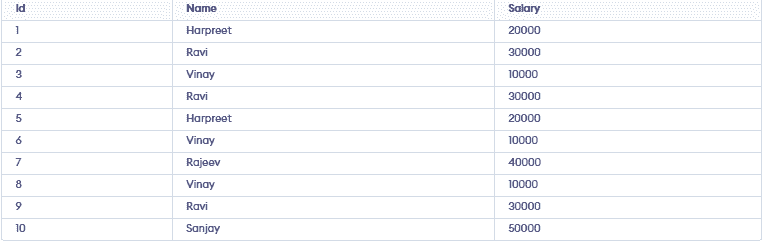
Query:
DELETE M1
From managers M1, managers M2
Where M2.Name = M1.Name AND M1.Id>M2.Id;

86 : Find the employee name using COALESCE() when First_Name, Second_Name, or Last_Name may contain NULL values.
Employee Table:

Query:
SELECT ID, COALESCE(FName, SName, LName) as Name
FROM employees;

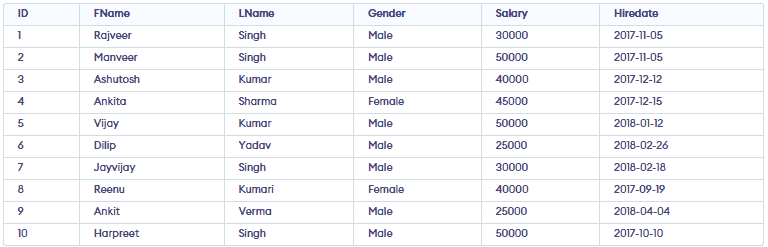
87: Find employees hired in the last n months using the TIMESTAMPDIFF() function.
Query -
Select *, TIMESTAMPDIFF (month, Hiredate, current_date()) as DiffMonth
From employees
Where TIMESTAMPDIFF (month, Hiredate, current_date())
Between 1 and 5 Order by Hiredate desc;
Output:
Topic-wise Interview Questions
- Data Definition and Control (DDL + DCL + TCL)
- Data Manipulation and Querying (DML + Query Processing)
- Advanced SQL and Optimization
Relevant Resources
To do well in interviews, you need to understand core concepts, Database Languages, DDL, DML, DQL, Joins, etc.
1. Core Concepts:
- Data Types
- Operators, Commands
- CREATE Database
- SELECT Database
- CREATE TABLE
- WHERE Clause
- ORDER By Clause
- Aggregate Function
- Constraints
2. Advanced Topics: