
The UPDATE statement in MySQL is used to modify existing records in a table and update column values as needed. It helps in correcting errors and keeping data accurate.
- Changes made using UPDATE are permanent, so it should be used carefully.
- The two key keywords used are UPDATE and SET.
- The SET clause is used to assign new values to one or more columns.
Syntax:
UPDATE table_name
SET column_name = value
WHERE (condition);
Note: Always use the WHERE clause with an UPDATE statement to target specific records. Without it, all rows in the table will be updated, which may lead to unintended data changes.
Working with MySQL UPDATE Statement
Let’s look at some examples of the UPDATE statement in MySQL to understand how it works and its different use cases. First, we will create a demo table on which the UPDATE statement will be applied:
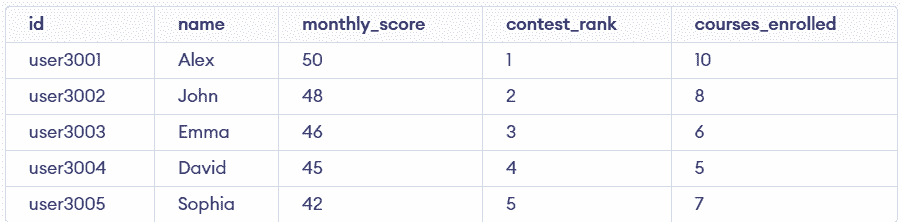
Example 1: UPDATE Statement with Single Column
This example updates a single column value for a specific row using the WHERE clause. It ensures only the targeted record is modified.
Query:
UPDATE geeksforgeeks
SET contest_rank = 10
WHERE id = 'user3003';

SELECT * FROM geeksforgeeks;
Output:
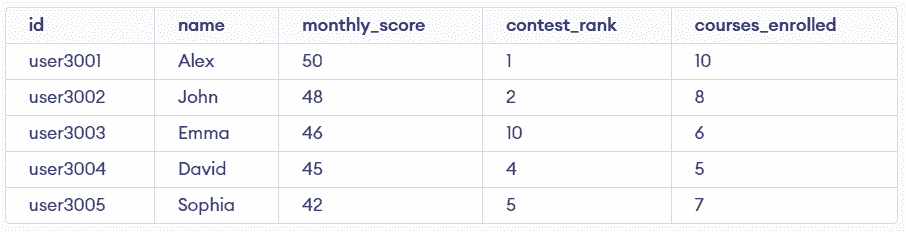
- The WHERE clause targets only one specific row based on id.
- Only the contest_rank column is updated without affecting other columns.
Example 2: UPDATE Statement with Multiple Columns
This example updates multiple columns in a single query for a specific record. It helps modify related data together efficiently.
Query:
UPDATE geeksforgeeks
SET contest_rank = 55, courses_enrolled = 15
WHERE id = 'user3004';

SELECT * FROM geeksforgeeks;
Output:
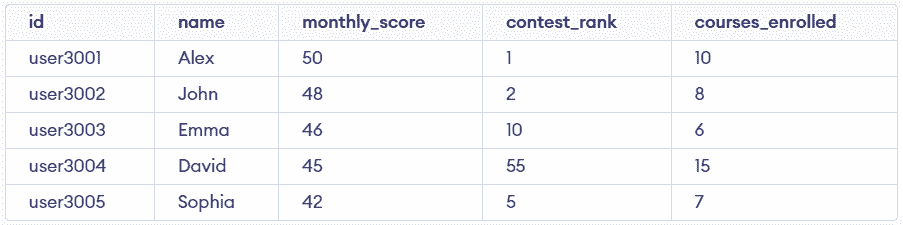
- Multiple columns are updated using a single SET clause.
- The WHERE condition ensures only the selected row is modified.
Example 3: UPDATE Statement with String Values
This example updates a string value in a column for a specific row. It is useful when modifying text-based data.
Query:
UPDATE geeksforgeeks
SET name = 'Alexander'
WHERE id = 'user3001';

SELECT * FROM geeksforgeeks;
Output:
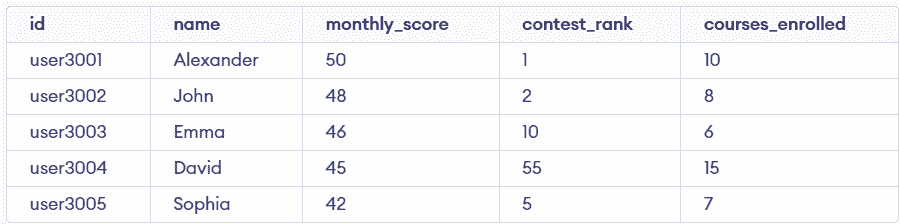
- String values are updated using quotes in the SET clause.
- Only the targeted row is affected due to the WHERE condition.
Example 4: UPDATE Statement Without WHERE Clause
This example updates all rows in the table by modifying a column value. It is useful for bulk updates but should be used carefully.
Query:
UPDATE geeksforgeeks
SET monthly_score = monthly_score + 1;

SELECT * FROM geeksforgeeks;
Output:
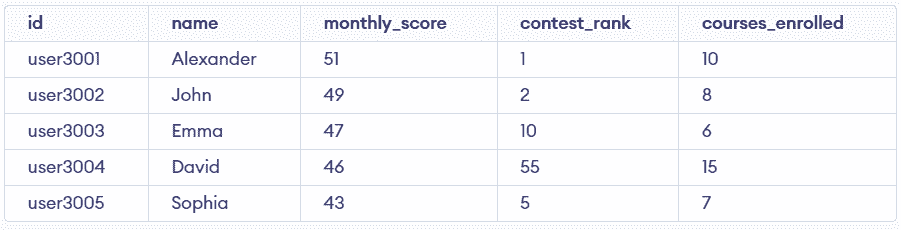
- Without WHERE, all rows in the table are updated.
- The query performs a calculation on existing values for each row.
Example 5: UPDATE Statement with Complex Query
This example updates multiple rows based on multiple conditions using logical operators. It helps apply changes to selected records.
Query:
UPDATE geeksforgeeks
SET contest_rank = contest_rank + 5,
    courses_enrolled = courses_enrolled + 10
WHERE id = 'user3001' OR name = 'Sophia';

SELECT * FROM geeksforgeeks;
Output:
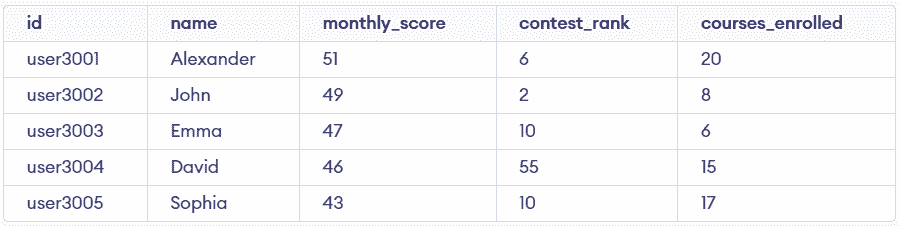
- Logical conditions (OR) are used to target multiple rows.
- Multiple columns are updated with calculated values in one query.
IGNORE Clause with UPDATE Statement
The IGNORE clause is used with the UPDATE statement in some database systems like MySQL. It allows users to control error handling during the update process.
- Rows that violate unique key constraints (duplicate values) are skipped and not updated.
- Rows with data type conversion issues might be updated with the closest valid value instead of raising an error.
- IGNORE is useful when updating large datasets where some rows may cause errors.
Syntax:
UPDATE IGNORE table_name
SET column1 = 'new value'
WHERE column2 = 'condition';
Query:
UPDATE IGNORE geeksforgeeks
SET id = 'user3001'
WHERE contest_rank > 3;- Rows that would violate the PRIMARY KEY constraint (duplicate id) are ignored.
- The query continues execution and updates only the valid rows without throwing an error.