
MySQL allows inserting multiple rows in a single query, improving performance and reducing database calls. It is useful for bulk data operations and efficient data handling.
- Multiple rows can be inserted using INSERT INTO VALUES, INSERT INTO SELECT, or LOAD DATA INFILE.
- Batch inserts reduce queries and improve performance for large datasets.
First, we create a demo table on which we will insert multiple rows.
Query:
CREATE TABLE students (
    StudentID INT PRIMARY KEY,
    FirstName VARCHAR(50),
    LastName VARCHAR(50),
    Department VARCHAR(50)
);
Here we will use different methods such as INSERT INTO VALUES, INSERT INTO SELECT, LOAD DATA INFILE, and Batch Inserts.
[Method 1]: Using INSERT INTO VALUES
The INSERT INTO statement allows inserting multiple rows by specifying multiple value sets in the VALUES clause. Simply mention the table name, columns, and provide values matching the column order.
Syntax:
INSERT INTO table_name (column1, column2, column3, ...)
VALUES
  (value1_row1, value2_row1, value3_row1, ...),
  (value1_row2, value2_row2, value3_row2, ...),
  ...
  (value1_rowN, value2_rowN, value3_rowN, ...);
Query:
INSERT INTO students (StudentID, FirstName, LastName, Department)
VALUES
  (1, 'John', 'Doe', 'IT'),
  (2, 'Jane', 'Smith', 'Finance'),
  (3, 'Michael', 'Brown', 'IT');
Output:
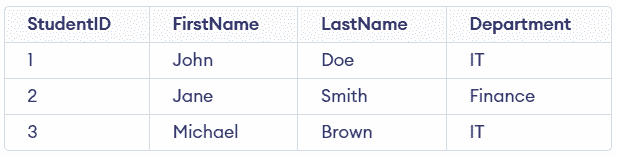
Multiple records are inserted into the students table in a single query.
[Method 2]: Using INSERT INTO SELECT
We can also use the INSERT INTO SELECT statement to insert multiple values from another table, it selects data from one table and inserts it into another.
Syntax:
INSERT INTO destination_table (column1, column2, column3, ...)
SELECT column1, column2, column3, ...
FROM source_table
WHERE conditions;
Query:
-- Create another table with same structure
CREATE TABLE students_backup LIKE students;

-- Insert data from students to backup table
INSERT INTO students_backup
SELECT * FROM students
WHERE Department = 'IT';
Output:

Only records from the IT department are copied into students_backup.
[Method 3]: Using LOAD DATA INFILE
This method is used to load bulk data from a file directly into a table. It is efficient for handling large datasets quickly with minimal queries.
Syntax:
LOAD DATA INFILE 'file_path'
INTO TABLE table_name
FIELDS TERMINATED BY ','
OPTIONALLY ENCLOSED BY '"'
LINES TERMINATED BY '\n'
IGNORE 1 ROWS
(column1, column2, column3, column4);
Query:
LOAD DATA INFILE '/path/to/data.txt'
INTO TABLE students
FIELDS TERMINATED BY ','
OPTIONALLY ENCLOSED BY '"'
LINES TERMINATED BY '\n'
(StudentID, FirstName, LastName, Department);
Output:
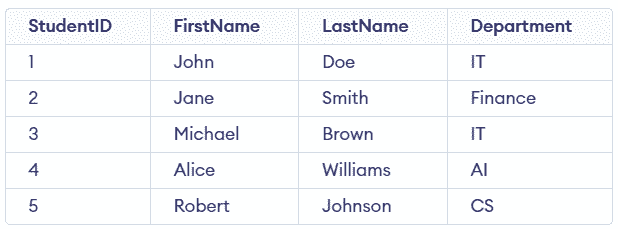
Data from the file is inserted into the students table.
Note: Use IGNORE 1 ROWS if the file contains a header.
[Method 4]: Using Batch Inserts
Using Batch Inserts reduces the number of queries, and we can insert multiple rows in a query. It uses the "INSERT INTO" and "VALUES" clause.
Query:
INSERT INTO students (StudentID, FirstName, LastName, Department)
VALUES
    (6, 'Emma', 'Davis', 'IT'),
    (7, 'Daniel', 'Miller', 'CS'),
    (8, 'Sophia', 'Taylor', 'CS'),
    (9, 'Liam', 'Anderson', 'IT'),
    (10, 'Ethan', 'Clark', 'Finance');
Output:
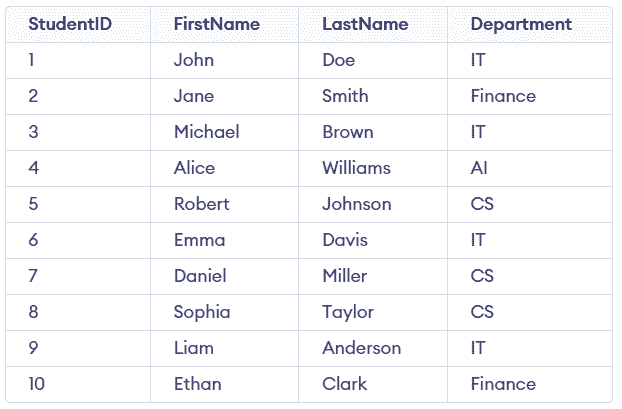
Multiple rows are inserted efficiently using a single query, improving performance.
Note: INSERT INTO VALUES defines the syntax for inserting multiple rows, while batch insert refers to using this same syntax as a performance optimization to insert large volumes of data in a single query.
Best Practices
Follow these practices to ensure efficient and error-free insertion of multiple rows in MySQL.
- Use Batch Inserts: Insert multiple rows in a single query to reduce overhead and improve performance.
- Match Column Order: Ensure values align correctly with the specified columns.
- Choose the Right Method: Use INSERT INTO SELECT for copying data and LOAD DATA INFILE for bulk imports.
- Validate Data & Constraints: Check data types, keys, and constraints before inserting to avoid errors.