
MySQL provides Nested SELECT statements (subqueries) to perform complex and flexible data queries. They allow one query to be placed inside another for better data filtering and analysis.
- A subquery is a query inside another SELECT statement.
- It is useful for complex conditions and data retrieval.
- It helps in creating dynamic and efficient queries for different scenarios.
Syntax :
SELECT column1, column2, ...
FROM table_name
WHERE column_name OPERATOR (
    SELECT column_name
    FROM another_table
    WHERE condition
);
Working with Nested SELECT Statement
This section demonstrates how Nested SELECT statements work using practical examples to handle complex queries and conditions.
Example 1: Complex Filtering Using Nested SELECT Statement
This example uses a nested SELECT to find product names with quantity greater than the highest ordered quantity.
Step 1: Create a table with PRIMARY KEY constraints.
-- product table
CREATE TABLE IF NOT EXISTS products
 (   product_id INT PRIMARY KEY,
product_name VARCHAR(100) );

--order table
CREATE TABLE IF NOT EXISTS orders
 (   order_id INT PRIMARY KEY,
product_id INT,   quantity INT );
Step 2: Insert valid records into the table without any conflicts.
INSERT INTO products VALUES
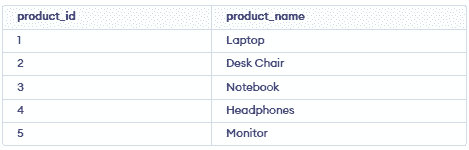
  (1, 'Laptop'),
  (2, 'Desk Chair'),
  (3, 'Notebook'),
  (4, 'Headphones'),
  (5, 'Monitor');

INSERT INTO orders VALUES
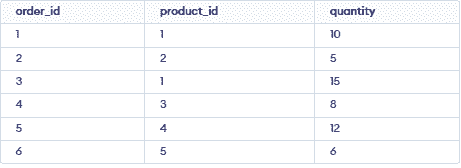
  (1, 1, 10),
  (2, 2, 5),
  (3, 1, 15),
  (4, 3, 8),
  (5, 4, 12),
  (6, 5, 6);
Product Table:
Orders Table:
Query using a Nested SELECT Statement for complex filtering:
-- Query using a Nested SELECT Statement for complex filtering
SELECT p.product_id, p.product_name, o.quantity
FROM products p JOIN orders o
ON  p.product_id = o.product_id
WHERE o.quantity > (SELECT MAX(quantity) FROM orders);
SELECT MAX(quantity) FROM orders;
Output:

- The subquery finds the maximum order quantity (15) using
MAX(quantity). - This value is used as a condition in the outer query.
- The outer query retrieves products with quantity greater than 15.
Query Retrieving Product and Order Information:
SELECT p.product_id, p.product_name, o.quantity
FROM products p JOIN orders o
ON p.product_id = o.product_id;
Output:
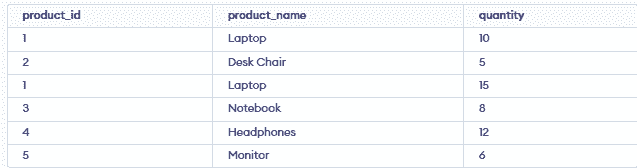
- Retrieves product_id, product_name, and quantity from the tables.
- Uses a join on product_id to combine products and orders.
- Shows product details with their corresponding order quantities.
Example 2: Used Nested select Statement
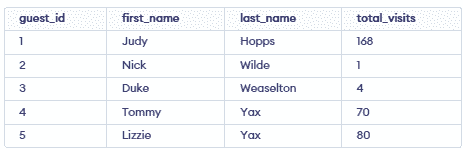
A database Practice is created with a guests table containing given data.
Step 1: Create a table with PRIMARY KEY constraints.
CREATE TABLE IF NOT EXISTS guests (
  guest_id INT PRIMARY KEY,
  first_name VARCHAR(30),
  last_name VARCHAR(30),
  total_visits INT
);
Step 2: Insert valid records into the table without any conflicts.
INSERT INTO guests (guest_id, first_name, last_name, total_visits)
VALUES
  (1, 'Judy', 'Hopps', 168),
  (2, 'Nick', 'Wilde', 1),
  (3, 'Duke', 'Weaselton', 4),
  (4, 'Tommy', 'Yax', 70),
  (5, 'Lizzie', 'Yax', 80);
Query to calculate the average visits:
SELECT AVG(total_visits) AS average_visits FROM guests;
Output:

Query using nested statements to calculate the average visits and retrieve guests with visits above the average:
SELECT first_name, last_name, total_visits  FROM guests
WHERE total_visits > ( SELECT AVG(total_visits)  FROM guests);
Output:
