
A pretrained model in Hugging Face consists of two core components, the model weights and the configuration file. The weights store the parameters learned during training, while the configuration file defines the model’s architecture and structure.
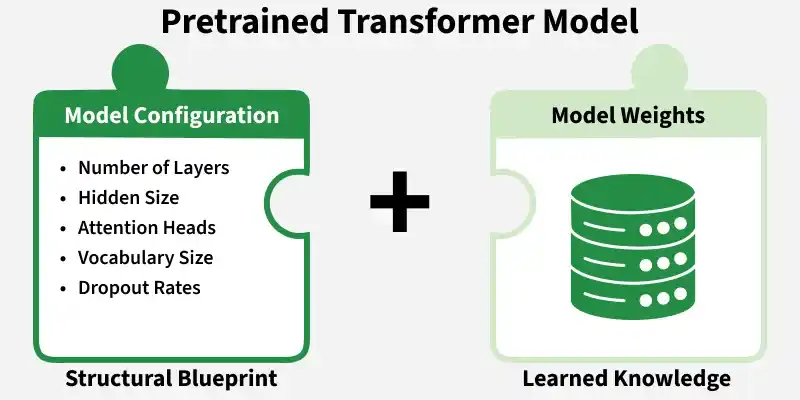
The configuration determines how the model is constructed, whereas the weights represent the knowledge acquired through training. Both components work together to properly initialize and execute a transformer model.
Model Configuration in Hugging Face
This configuration defines the structural setup of the model before the weights are loaded. The configuration serves as the structural blueprint of the model. It specifies key architectural settings such as:
- Number of layers
- Hidden size (embedding dimension)
- Number of attention heads
- Vocabulary size
- Dropout rates
For example, the model bert-base-uncased includes architectural details such as:
- 12 transformer layers
- 768 hidden size (embedding dimension)
- 12 attention heads
These values define how the model is built internally and are stored in a configuration class accessed using AutoConfig. The configuration does not contain learned parameters; it only defines the architecture before loading pretrained weights.
Working with Model Configuration in Hugging Face
Model configuration in Hugging Face can be loaded, inspected and even customized before initializing a model. Below is a structured implementation showing how configuration works in real scenarios.
1. Install Required Libraries
Run the following command in your command prompt.
pip install transformers
2. Loading a Pretrained Configuration
The AutoConfig class allows you to load the configuration of any pretrained model.
- AutoConfig reads the configuration file associated with the model.
- Printing config displays all architectural parameters such as layers, hidden size and attention heads.
- This does not load the model weights but only the blueprint.
from transformers import AutoConfig

config = AutoConfig.from_pretrained("bert-base-uncased")
print(config)
Output:

3. Accessing Specific Configuration Parameters
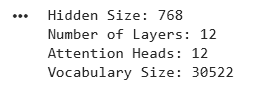
We can directly inspect important attributes from the configuration object. These parameters define the size and capacity of the model:
- Hidden size determines embedding dimension.
- Number of layers controls model depth.
- Attention heads define parallel attention mechanisms.
- Vocabulary size determines how many tokens the model can handle.
print("Hidden Size:", config.hidden_size)
print("Number of Layers:", config.num_hidden_layers)
print("Attention Heads:", config.num_attention_heads)
print("Vocabulary Size:", config.vocab_size)
Output:
4. Loading a Model with Its Configuration
This code loads a pretrained BERT model using AutoModel. When from_pretrained() is called, Hugging Face automatically reads the model’s configuration, builds the architecture and loads the pretrained weights into it.
- Load a pretrained model with initialized architecture and weights
- Automatically apply the correct configuration
- Keep the code simple and efficient
from transformers import AutoModel

model = AutoModel.from_pretrained("bert-base-uncased")
Output:

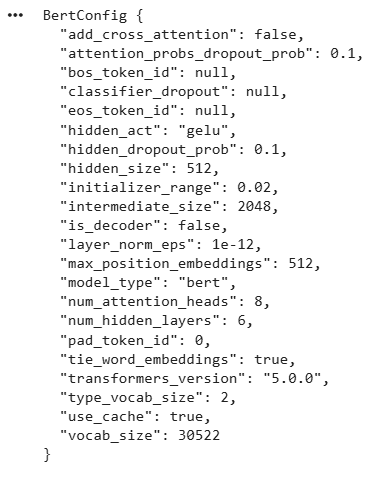
5. Creating a Custom Configuration
You can also define a custom configuration before building a model.
- A new BERT architecture is defined manually.
- The model is created using this custom blueprint.
- Since no pretrained checkpoint is loaded, the model is initialized with random weights.
from transformers import BertConfig, BertModel

custom_config = BertConfig(
    hidden_size=512,
    num_hidden_layers=6,
    num_attention_heads=8,
    intermediate_size=2048
)

model = BertModel(custom_config)

print(model.config)
Output:
Working with Model Parameters
Model parameters are the learnable weights inside a transformer. They determine how the model makes predictions and are updated during training. Below are practical and relevant operations you can perform with parameters.
1. Install Required Libraries
Run the following command in your command prompt
pip install transformers torch
2. Load a Pretrained Model
- Loads the BERT base model.
- Both configuration and pretrained weights are initialized automatically.
from transformers import AutoModel
import torch

model = AutoModel.from_pretrained("bert-base-uncased")
Output:

3. View Model Parameters
- named_parameters() returns each layer name and its weight tensor.
- param.shape shows the size of the weight matrix.
- Useful for understanding internal structure.
for name, param in model.named_parameters():
    print(name, param.shape)
    break
Output:
embeddings.word_embeddings.weight torch.Size([30522, 768])
4. Count Total Parameters
- numel() counts elements inside each tensor.
- This calculates total learnable parameters.
- BERT-base has around 110 million parameters.
total_params = sum(p.numel() for p in model.parameters())
print("Total Parameters:", total_params)
Output:
Total Parameters: 109482240
5. Freeze Parameters
Setting requires_grad = False stops the model’s weights from updating during training. It is commonly used in transfer learning, where the pretrained model is kept fixed and only new layers are trained.
for param in model.parameters():
    param.requires_grad = False
You can download the full code from here
Model Parameters vs Configuration
Aspect | Configuration | Parameters |
|---|---|---|
Definition | Defines the architecture and structural settings of the model | Learnable weights adjusted during training |
Purpose | Determines how the model is built | Stores learned knowledge from data |
Contains | Layers, hidden size, attention heads, dropout, vocabulary size | Numerical weight values (millions or billions) |
Role in Model | Acts as the blueprint | Acts as the learned intelligence |
Changes During Training | No | Yes |
Required For | Building the model structure | Making predictions and performing inference |
Advantages
- Adjust layers, hidden size or attention heads to design models suited to specific tasks.
- Changing configuration (e.g., fewer layers) directly reduces the number of parameters, making the model lighter.
- Smaller configurations lead to fewer parameters, which lowers memory and compute requirements.
- Tuning architectural settings can improve speed and efficiency without retraining from scratch.
- Custom configurations allow experimentation with different model sizes and structures, while parameters adapt through training.
Limitations of Modifying
- Changing architecture usually prevents loading existing parameters.
- Custom models require training from scratch.
- Poor configuration choices can reduce model accuracy.