
Function calling(also known as tool-calling) is a method by which models can reliably connect and interact with external tools or APIs. We provide the LLM with a set of tools and the model intelligently decides which tool it wants to invoke for a specific user query and to complete a given task. Function calling gives the LLM the power to interact with external information sources like APIs , databases or knowledge base.
Architecture and Core Mechanism
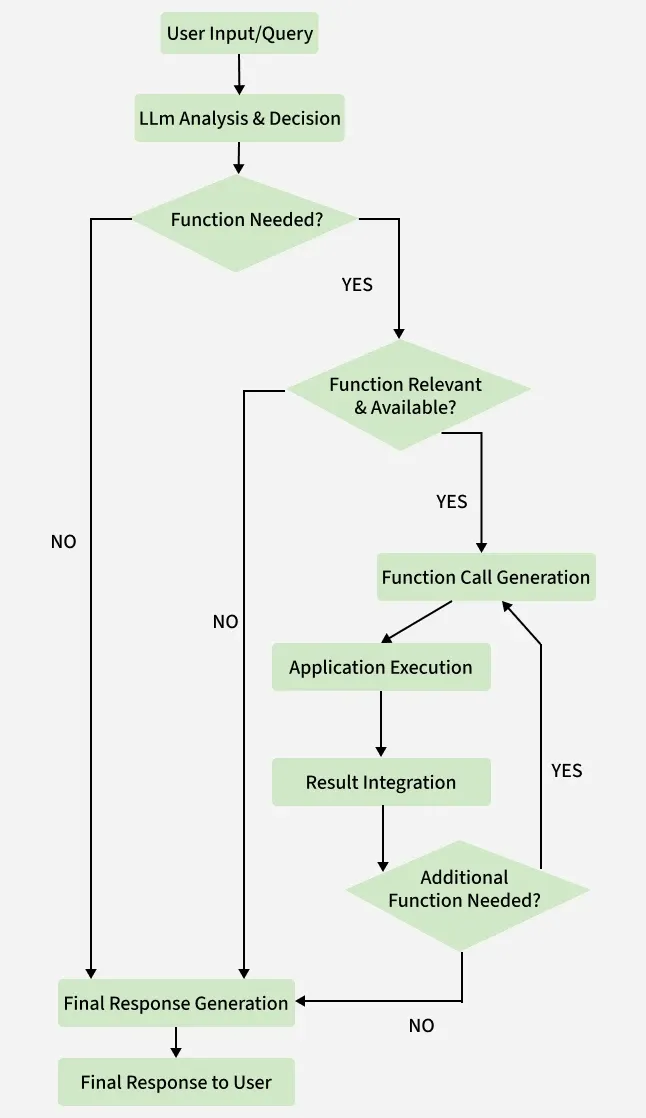
1. Initial Request with tool definitions: The application is given the available tools in the form of JSON with fields name, description and the number and types of arguments needed.
2. Function/Tool Decision: The model reasons whether the query warrants the use of any tool available, if it does, it returns a JSON specifying the name of the function and the parameters to pass.
tools = [
    {
        "type": "function",
        "function": {
            "name": "get_stock_price",
            "parameters": {
                "type": "object",
                "properties": {
                    "name": { "type": "string" }
                },
                "required": ["name"]
            }
        }
    }
]
3. Application-side Execution : The LLM waits while the application processes the request and executes the function.
4. Result concatenation : The output of the function is formatted and passed back to the LLM along with the original user query.
5. Final Generation : The LLM reasons and thinks about the function's outputs and the query and returns a grounded and well-informed response to the question.
Implementation
We will be following the below given conceptual flow for the implementation in langchain.
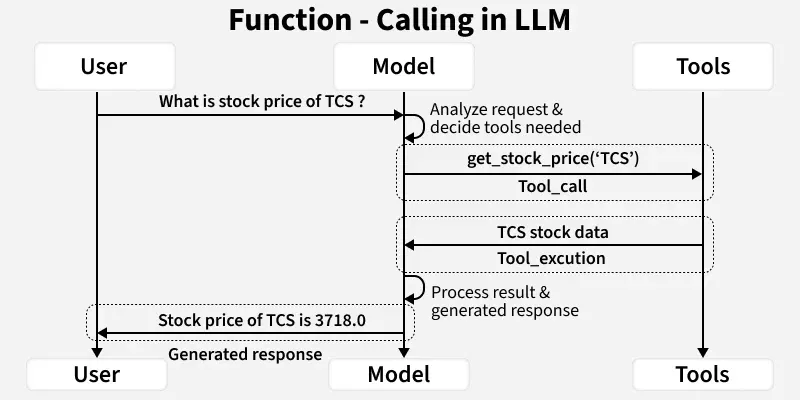
1. Install dependencies & necessary libraries
We will import the necessary libraries for langchain and langchain-google-gen-ai , note that if you are using any other model provider instructions for the same can be found here.
!pip install langchain langchain-google-genai
from langchain_google_genai import ChatGoogleGenerativeAI
secret_key='YOUR_GOOGLE_GEMINI_API_KEY'
!export GOOGLE_API_KEY=secret_key
2. Define an Instance of Chat models in Langchain
We will define the model and test its response with a dummy query, such as 'hello google'.
llm = ChatGoogleGenerativeAI(
    model="gemini-2.5-flash",
    temperature=0,
    api_key=secret_key
)
resp = llm.invoke('hello google')
print(resp.content) # Testing the model's response
Output:
'Hello! How can I help you today?"
3. Define the function/tool and bind to the LLM
For purpose of this tutorial, we will be using a simple function, that performs string matching and returns a output, then we bind this function to the LLM, so the LLM knows that the function is present.
def get_stock_price(name:str) -> float:
  """ Gives stock prices of some stocks """
  if name == 'TCS':
    return 3718.0
  if name == 'infy':
      return 4210.0
  else:
    return 1000.00

tools = [get_stock_price]
llm_with_tools = llm.bind_tools(tools)
4. Invoke the LLM for a stock-price related query:
Langchain abstracts this part away but below the hood, the LLM automatically reasons whether a function/tool should be called or not.
resp_with_tool_call = llm_with_tools.invoke('What is the current TCS stock price')
print(resp_with_tool_call.tool_calls)
Output:
price of TCS is 3718.0
5. Calling the function with LLM reasoned arguments
The LLM reasons about the arguments it wants to pass to the function , in some cases we apply logics to ensure the arguments are not malicious such as when generating a SQL query one might not execute the query which performs a DELETE or update operations, but in our case it's rather simple, so we will pass the arguments as is.
def format_result(stock_name:str, stock_price:float):
  """Formats the result for easier LLM processing"""
  return f'price of {stock_name} is {stock_price}'


for tool_call in resp_with_tool_call.tool_calls:
  if tool_call['name'] == 'get_stock_price':
    stock_name = tool_call['args']['name']
    stock_price = get_stock_price(**tool_call['args'])

tool_final_output = print(format_result(stock_name,stock_price)) #Output will be price of TCS is 3718.0
6. Construct final prompt and give to the LLM
We will do a simple concatenation of the two strings and give it to the LLM.
final_informed_output = llm.invoke([user_query + tool_final_output])
print(final_informed_output)
Output:
Based on your statement, **the price of TCS is 3718.0.
You can download the source code from here.
Applications of Function calling
- Customer support and conversational AI: Customer-facing chatbots with function calling can help resolve customer issues by accessing backend APIs like get_order_status(), check_delivery() e.t.c. , this helps the model give accurate responses.
- Travel planning : A chatbot equipped with tools to search the web, the LLM can search the web for hotels near the location, check their vacancy status & interact with backend API to book the hotel.
- HR & Business Operations: A chatbot can help resolve common employee queries like - "How many leaves can i take", "what are the working hours" by interacting with the backend APIs.
- Automated SQL queries : A LLM can generate SQL queries for a given user query and interact with functions like check_query() which ensure that the query executed is read-only and execute_query() which executes the query in the database.
Advantages
- Real-time data access and information retrieval: Function calling eliminates the fundamental problem of LLMs giving responses based on stale, training data.
- Reducing Hallucinations : Models have a tendenancy to not accept that they don't know something, this can cause confusion and failures in downstream tasks , function calling tackles this.
- Extends capability of LLMs : LLMs are notoriously bad at doing maths , by equipping them with a calculator tool, the LLM can simply call the calculator with the operands and the operators, increasing factual correctness of the response.
Limitations
- Token consumption and Cost : If the number of functions and tools are high, the JSON gets big, increasing the overall token count and increasing the cost for the user.
- Cost & Latency : Deciding which tool to call and then using that tool and then doing a final generation, adds latency, making it a non-starter for applications requiring low latency.
- Security & Safety Risks : In important sectors like healthcare, defense using a LLM to call functions can have real-world consequences. Such errors can cause financial loss, data corruption or security breaches.