
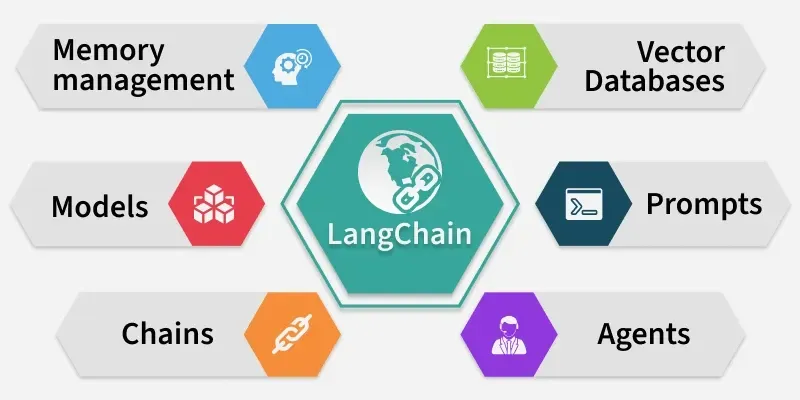
LangChain is transforming the way developers build applications with Large Language Models (LLMs). From chatbots to retrieval-augmented generation (RAG) pipelines, it allows us to seamlessly connect language models with external data and tools. LangChain is a framework designed to simplify the development of LLM-powered applications. Its key capabilities include:
- LLM orchestration: Easily call multiple language models in a chain.
- Data integration: Connect models to documents, APIs, databases and other data sources.
- Agents & tools: Enable LLMs to perform actions such as web search, math calculation or API calls.
- Vector stores & retrieval: Integrate embeddings and semantic search for RAG pipelines.
- Observability: Trace LLM calls and monitor their outputs (LangSmith).
Let's see the various steps which should be considered to setup the environment for LangChain.
Step 1: Set Up Python Environment
We need to open command prompt and run the following commands,
python -m venv .venv
We need to activate the environment,
1. For Windows(PowerShell):
.venv\Scripts\Activate.ps1
2. For macOS/Linux:
source .venv/bin/activate
Step 2: Upgrade pip
We need to upgrade pip,
pip install --upgrade pip
Step 3: Install the Required Packages
We will install the necessary packages such as LangChain core, community modules and OpenAI integrations,
pip install langchain langchain-core langchain-community langchain-openai langchain-gemini python-dotenv openai
Step 4: Install Vector Database Dependencies
We will install vector database dependencies which can be used further.
pip install chromadb
pip install faiss-cpu
Step 5: Configure API Keys
We need to add required API keys for our project, we need to store them in a .env file which should be stored in our project root directory.
OPENAI_API_KEY=your_openai_key_here

GEMINI_API_KEY=your_gemini_key_here
Step 6: Loading API keys
We can access our API keys in our project, either of the API key can be accessed by commands:
from dotenv import load_dotenv
import os

load_dotenv()
# for OpenAI API Key:
OPENAI_API_KEY = os.getenv("OPENAI_API_KEY")
# for Gemini API Key:
GEMINI_API_KEY = os.getenv("GEMINI_API_KEY")
Step 7: Initialize LLMs
We will prepare our LLMs with using the API keys,
1. OpenAI Example:
from langchain.schema import HumanMessage
from langchain_openai import ChatOpenAI
from dotenv import load_dotenv
import os
os.environ["LANGCHAIN_TRACING_V2"] = "false"

load_dotenv()
llm = ChatOpenAI(
    temperature=0.2,
    model_name="gpt-3.5-turbo"
)

response = llm.invoke(
    [HumanMessage(content="Explain LangChain in one sentence.")])
print("Response:", response.content)
Output:
Response: LangChain is a decentralized language learning platform that uses blockchain technology to connect language learners with native speakers for personalized language exchange.
2. Gemini Example:
from langchain_google_genai import ChatGoogleGenerativeAI
import os
from dotenv import load_dotenv
os.environ["LANGCHAIN_TRACING_V2"] = "false"

load_dotenv()

gemini_api_key = os.getenv("GEMINI_API_KEY")

llm = ChatGoogleGenerativeAI(model="gemini-2.5-pro", api_key=gemini_api_key)
response = llm.invoke("Explain LangChain in one sentence.")
print(response.content)
Output:
LangChain is a framework that enables developers to build applications powered by large language models by connecting them to external data, tools and memory.
Step 8: Vector Store Integration
We will now try to integrate vector store (Chroma),
from langchain_community.vectorstores import Chroma
from langchain_openai import OpenAIEmbeddings
from dotenv import load_dotenv
import os

load_dotenv()
OPENAI_API_KEY = os.getenv("OPENAI_API_KEY")


docs = [
    "LangChain connects LLMs with data sources.",
    "Vector databases enable semantic search in RAG systems.",
    "Agents in LangChain can take actions based on tools.",
    "LangChain supports multiple LLM providers like OpenAI, Anthropic, and HuggingFace."
]
embeddings = OpenAIEmbeddings(openai_api_key=OPENAI_API_KEY)
vectordb = Chroma.from_texts(
    docs, embedding=embeddings, persist_directory="./chroma_db")

query = "What can LangChain agents do?"
results = vectordb.similarity_search(query, k=2)
for doc in results:
    print(doc.page_content)
Output:
Agents in LangChain can take actions based on tools.
LangChain connects LLMs with data sources.
The source code can be downloaded from here.
Applications
- Chatbots & Virtual Assistants: Intelligent conversations and support.
- RAG Systems: Semantic search over documents using vector stores.
- Agents: Perform actions via tools and APIs.
- Content Generation: Summaries, emails, reports or code.
- Educational Tools: Learning assistants and tutors.
- Data Analysis: Summarize and extract insights from large datasets.