
Working with large documents or unstructured text often creates challenges for language models, as they can only process limited text within their context window. To address this, LangChain provides Text Splitters which are components that segment long documents into manageable chunks while preserving semantic meaning and contextual continuity.
- Purpose: Manage long-form text efficiently by splitting it into meaningful parts.
- Functionality: Helps maintain context, improves semantic retrieval and prevents truncation errors.
- Integration: Works seamlessly with document loaders, vector stores and retrieval pipelines in LangChain.
- Flexibility: Supports various splitting strategies depending on data type — plain text, markdown or token-based text.
Types of Text Splitters
Let's see the various types of text splitters:
1. CharacterTextSplitter
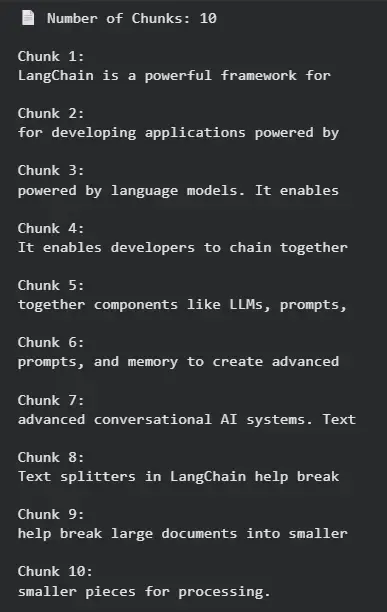
The CharacterTextSplitter divides text into chunks of a fixed character length using a specified separator like spaces or newlines. It’s simple, fast and suitable for unstructured text where consistent chunk size is important.
- Use Case: Ideal for short, unstructured text like FAQs or chatbot prompts.
- Advantage: Very fast and lightweight. It provides strict control over chunk length.
- Limitation: May split sentences mid-way, causing partial loss of meaning.
Example: Let's see an example to understand how CharacterTextSplitter works.
- chunk_size defines the max characters per chunk.
- chunk_overlap ensures continuity between splits.
- separator=" " prevents breaking words abruptly.
- Output produces evenly sized chunks for basic use cases.
from langchain_text_splitters import CharacterTextSplitter

text = """LangChain is a powerful framework for developing applications powered by language models.
It enables developers to chain together components like LLMs, prompts, and memory to create advanced conversational AI systems.
Text splitters in LangChain help break large documents into smaller pieces for processing."""

splitter = CharacterTextSplitter(
    chunk_size=40,
    chunk_overlap=10,
    separator=" "
)

chunks = splitter.split_text(text.replace("\n", " "))

print("📄 Number of Chunks:", len(chunks))
for i, chunk in enumerate(chunks):
    print(f"\nChunk {i+1}:\n{chunk}")
Output:
2. RecursiveCharacterTextSplitter
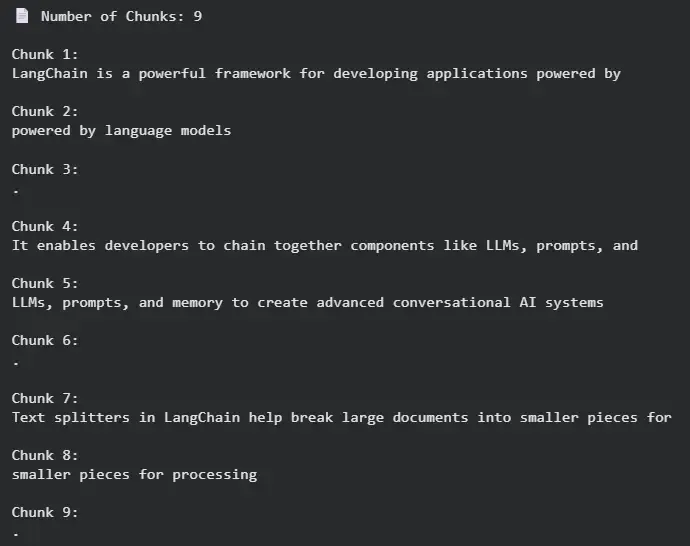
RecursiveCharacterTextSplitter intelligently divides text by prioritizing larger boundaries like paragraphs or sentences before resorting to smaller ones like spaces. It recursively ensures chunks are as meaningful as possible without exceeding size limits.
- Use Case: Best for articles, reports or long documents where maintaining readability and context is crucial.
- Advantage: Produces semantically coherent chunks that preserve flow and structure.
- Limitation: Slightly slower due to recursive boundary checks.
Example: Let's see an example to understand how RecursiveCharacterTextSplitter works.
- separators defines priority likeparagraphs, sentences, words.
- Recursive splitting preserves meaning and readability.
- Produces natural, context-aware chunks perfect for retrieval systems.
from langchain_text_splitters import RecursiveCharacterTextSplitter

text = """LangChain is a powerful framework for developing applications powered by language models.
It enables developers to chain together components like LLMs, prompts, and memory to create advanced conversational AI systems.
Text splitters in LangChain help break large documents into smaller pieces for processing."""

splitter = RecursiveCharacterTextSplitter(
    chunk_size=80,
    chunk_overlap=20,
    separators=["\n\n", "\n", ".", " ", ""]
)

chunks = splitter.split_text(text)

print("📄 Number of Chunks:", len(chunks))
for i, chunk in enumerate(chunks):
    print(f"\nChunk {i+1}:\n{chunk}")
Output:
3. TokenTextSplitter
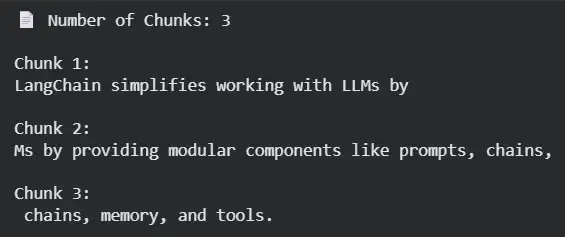
The TokenTextSplitter divides text based on token count instead of characters. It aligns chunking with how LLMs interpret text, ensuring the model doesn’t exceed token limits during processing.
- Use Case: Suitable for LLM applications where token limits (e.g 4096 tokens) must be respected.
- Advantage: Token-aware splitting ensures model compatibility and prevents truncation errors.
- Limitation: Depends on tokenizers hence slightly slower than character-based methods.
Example: Let's see an example to understand how TokenTextSplitter works,
- chunk_size = tokens per chunk.
- chunk_overlap ensures smoother context transition.
- Best for embedding, summarization or LLM prompt pipelines.
from langchain_text_splitters import TokenTextSplitter

text = """LangChain simplifies working with LLMs by providing modular components like prompts, chains, memory, and tools."""

splitter = TokenTextSplitter(
    chunk_size=10,
    chunk_overlap=2
)

chunks = splitter.split_text(text)

print("📄 Number of Chunks:", len(chunks))
for i, chunk in enumerate(chunks):
    print(f"\nChunk {i+1}:\n{chunk}")
Output:
4. MarkdownTextSplitter
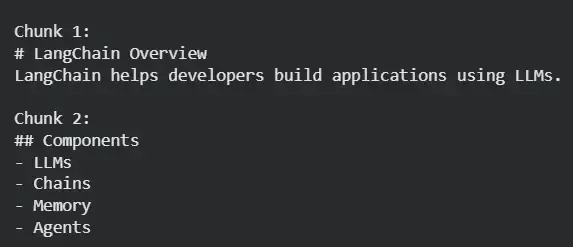
The MarkdownTextSplitter is designed to handle Markdown documents by splitting them along structural elements like headings, subheadings and lists—preserving the original hierarchy and readability.
- Use Case: Ideal for blogs, documentation or technical reports in Markdown format.
- Advantage: Retains Markdown formatting and hierarchy for better retrieval.
- Limitation: Applicable only to .md-formatted text.
Example: Let's see an example to understand hoe MarkdownTextSplitter works.
- Preserves Markdown hierarchy and structure.
- Each chunk aligns with a logical section.
- Ideal for Q&A systems on structured documentation.
from langchain_text_splitters import MarkdownTextSplitter

md_text = """
# LangChain Overview
LangChain helps developers build applications using LLMs.

## Components
- LLMs
- Chains
- Memory
- Agents
"""

splitter = MarkdownTextSplitter(chunk_size=100, chunk_overlap=10)
chunks = splitter.split_text(md_text)

for i, chunk in enumerate(chunks):
    print(f"\nChunk {i+1}:\n{chunk}")
Output:
You can download sourcce code from here.
Choosing the Right Splitter
Selecting the right Text Splitter depends on your document type, processing goal and the language model’s context limits. Each splitter serves a specific use case, balancing performance, context preservation and readability.
| Splitter | Best For | Key Advantage | Limitation |
|---|---|---|---|
| CharacterTextSplitter | Short or unstructured text (FAQs, chat logs) | Fast, lightweight and simple to use | May cut sentences mid-way, reducing coherence |
| RecursiveCharacterTextSplitter | Long-form content (articles, reports, transcripts) | Maintains structure and readability | Slightly slower due to recursive checks |
| TokenTextSplitter | LLM pipelines (summarization, embeddings, RAG) | Token-aware, prevents exceeding model token limits | Relies on tokenizer accuracy and performance |
| MarkdownTextSplitter | Markdown-based docs (blogs, documentation) | Preserves hierarchy and formatting | Works only with Markdown files |
Applications
- Retrieval-Augmented Generation (RAG): Split large documents before embedding and retrieval.
- Document Summarization: Create context-aware chunks for accurate summaries.
- Chatbots and Q&A Systems: Preserve logical sections for better context handling.
- Search Indexing: Improve semantic vector storage by chunking text effectively.
- LLM Prompt Management: Control token usage while keeping relevant context.
Advantages
- Maintain readability and context across text chunks.
- Enable large document handling within model context limits.
- Improve search accuracy in vector stores and retrieval pipelines.
- Support flexible chunking strategies for different data types.
Disadvantages
- Improper configuration like too small chunks may break semantic flow.
- Some methods are slower especially recursive and token-based.
- Token-based splitting requires compatible tokenizers.
- Markdown splitter works only with specific file formats.