
LangChain Document Loaders convert data from various formats such as CSV, PDF, HTML and JSON into standardized Document objects. These objects contain the raw content, metadata and optional identifiers, allowing LLMs to process and analyze the data efficiently.
Document loaders also enable developers to manage and standardise content across multiple workflows, supporting a wide range of file types and sources including YouTube, Wikipedia and GitHub.
Document Object in LangChain
Before exploring loaders, we must understand the Document object which stores the content and metadata.
- page_content: Stores the textual content of the document.
- metadata: Provides additional information about the document like source or category.
- id: Uniquely identifies the document object
from langchain_core.documents import Document

data = Document(
    page_content='This is an article about LangChain Document Loaders',
    id=1,
    metadata={'source': 'AV'}
)

print(data)

print(data.page_content)

data.id = 2
Output:

This structure allows loaders to consistently format data regardless of its original source.
Types of Document Loaders
LangChain provides over 200 document loaders, categorized as follows:
- By File Type: CSV, PDF, HTML, Markdown, MS Office documents, JSON.
- By Data Source: YouTube, Wikipedia, GitHub.
Data sources can also be public i.e no authentication needed or private that requires credentials like AWS or Azure.
1. CSV (Comma-Separated Values)
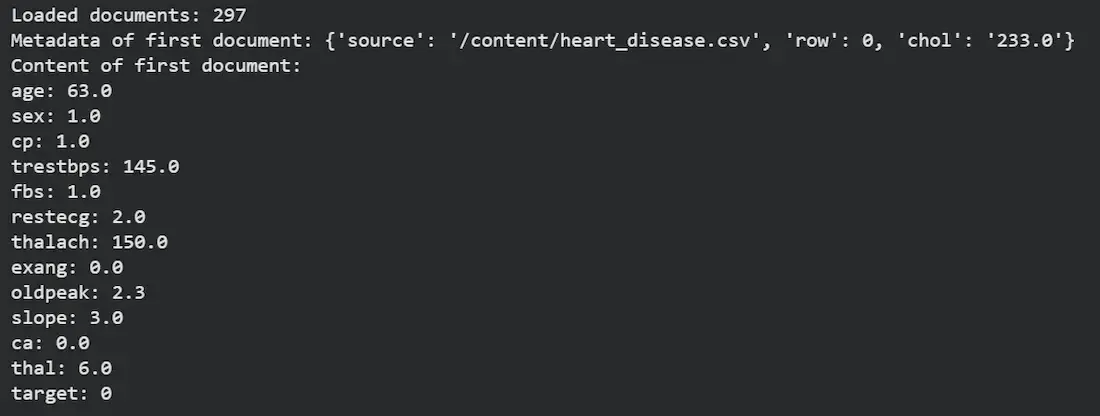
CSVLoader loads each row of a CSV file as a separate Document object.
- file_path: Path to the CSV file.
- metadata_columns: Columns to include in the metadata of each Document.
- csv_args: Arguments for CSV parsing (e.g., delimiter).
- source_column (optional): Can replace the file name as the source identifier.
from langchain_community.document_loaders.csv_loader import CSVLoader

loader = CSVLoader(
    file_path="./iris.csv",
    metadata_columns=['species'],
    csv_args={"delimiter": ","}
)
data = loader.load()

print(len(data))
print(data[0].metadata)
Output:
2. HTML (HyperText Markup Language)
HTML pages can be loaded either from a saved file or directly from a URL.
- urls: List of URLs to load.
- mode='single': loads the entire HTML as one Document.
- mode='elements': splits the page into multiple documents based on HTML tags.
- Metadata includes file type, URL and parent element identifiers.
from langchain_community.document_loaders import UnstructuredHTMLLoader, UnstructuredURLLoader

loader = UnstructuredURLLoader(urls=['https://www.geeksforgeeks.org'], mode='elements')
data_html = loader.load()

print(len(data_html))

print(data_html[0].page_content)
print(data_html[1].page_content)
print(data_html[2].page_content)

print(data_html[0].metadata)
Output:

3. Markdown
MarkdownLoader loads Markdown files, optionally splitting by elements or pages.
- file_path: Path to the Markdown file.
- mode: 'single', 'elements' or 'paged' for splitting.
- Metadata includes last modified date, file type and section category.
from langchain_community.document_loaders import UnstructuredMarkdownLoader

loader = UnstructuredMarkdownLoader('/content/readme.md', mode='elements')
data_md = loader.load()

print(f"Loaded elements: {len(data_md)}")

print(data_md[1].page_content)
print(data_md[1].metadata)
Output:

4. JSON
JSONLoader parses JSON files into Document objects.
- file_path: Path to the JSON file.
- jq_schema: JQ query to select content. '.' loads all content.
- text_content: Whether to convert JSON fields to text.
from langchain_community.document_loaders import JSONLoader

loader = JSONLoader(file_path='chat.json', jq_schema='.', text_content=False)
data = loader.load()
Output:

5. MS Office Documents
MS Word documents can be loaded using the Docx2txtLoader
- file_path: Path to the Word document.
from langchain_community.document_loaders import Docx2txtLoader

loader = Docx2txtLoader(file_path='/content/GenAI.docx')
data_word = loader.load()

print(data_word[0].page_content[:150])
Output:

6. PDF (Portable Document Format)
PDF files can be loaded with multiple parsers.
- file_path: Path to the PDF.
- mode: 'single' or 'elements'.
- strategy: 'hi_res', 'ocr_only', 'fast' or 'auto' for parsing method.
from langchain_community.document_loaders import UnstructuredPDFLoader

loader = UnstructuredPDFLoader('business_strategy.pdf', mode='elements', strategy="auto")
data = loader.load()

print(len(data))
Output:

7. Loading Multiple Files
We can load all files in a directory using DirectoryLoader.
- glob: File pattern to match.
- loader_cls: Loader class for matched files.
- loader_kwargs: Arguments for the loader class.
- show_progress: Show loading progress.
- use_multithreading: Enable multithreaded loading.
from langchain_community.document_loaders import DirectoryLoader

loader = DirectoryLoader(
    ".",
    glob="**/*.json",
    loader_cls=JSONLoader,
    loader_kwargs={'jq_schema': '.', 'text_content': False},
    show_progress=True,
    use_multithreading=True
)
docs = loader.load()
print(f"Loaded documents from directory: {len(docs_dir)}")
if len(docs_dir) > 0:
    print(f"First loaded document content: {docs_dir[0].page_content}")
Output:

8. Wikipedia
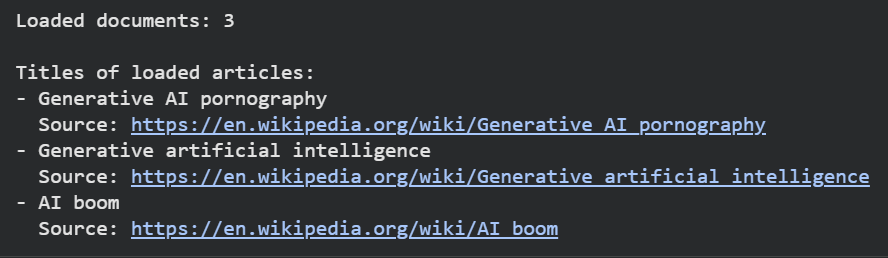
WikipediaLoader fetches articles based on search queries.
- query: Search term for Wikipedia articles.
- load_max_docs: Maximum number of articles to load.
- doc_content_chars_max: Maximum characters per article content.
- load_all_available_meta: Include metadata like categories, references and image URLs.
from langchain_community.document_loaders import WikipediaLoader

loader = WikipediaLoader(query='Generative AI', load_max_docs=5, doc_content_chars_max=5000, load_all_available_meta=True)
data = loader.load()

for doc in data:
    print(doc.metadata['title'])
Output:
With these methods we can easily load and process different types of documents in LangChain which can then be used for tasks like text analysis, question answering, summarization and building intelligent retrieval-based applications.