
Creating a custom dataset is useful when existing datasets do not meet specific requirements. Hugging Face provides simple tools to create, manage and share datasets for machine learning tasks. It supports formats like CSV, JSON and text.
- Building chatbots with personalised responses
- Image classification using custom images
- Recommendation systems based on user data
Implementation
Step 1: Importing Libraries for dataset creation and data handling.
- pandas is used to structure data
- datasets is used to convert them into Hugging Face format
from datasets import Dataset
import pandas as pd
Step 2: Creating a Sample Dataset with multiple text samples and labels
data = {
    "text": [
        "I love machine learning",
        "Hugging Face makes AI easy",
        "Natural language processing is interesting",
        "Deep learning models are powerful",
        "AI is transforming industries",
        "Data science is exciting",
        "Python is widely used in AI",
        "Models require good datasets",
        "Learning AI step by step is helpful",
        "Custom datasets improve performance"
    ],
    "label": [1, 1, 1, 1, 1, 1, 1, 1, 1, 1]
}
Step 3: Converting into DataFrame so to provide data a structured tabular format for easier processing.
df = pd.DataFrame(data)
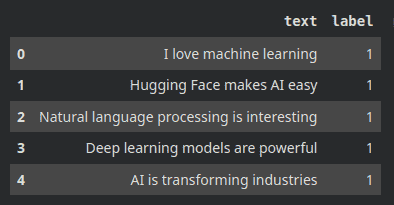
Step 4: Converting the DataFrame into a Hugging Face dataset for using it in ML tasks.
dataset = Dataset.from_pandas(df)
Step 5: Viewing the dataset structure and verifying the data.
print(dataset)

Step 6: Saving the dataset locally so it can be reused later.
dataset.save_to_disk("my_dataset")
Step 7: Uploading the dataset to Hugging Face so it can be shared and accessed online.
- Go to your Hugging Face account settings
- Navigate to the Access Tokens section
- Click on New Token and generate one
- Select Write permission while creating the token
- Copy the generated token
from huggingface_hub import login

login()
dataset.push_to_hub("your-username/my_dataset")
Note: Make sure the access token has write permission, otherwise upload will fail.
The complete source code can be accessed here.