
Hugging Face provides AutoClasses, a system that automatically loads the correct transformer architecture based on the pre-trained model name. You do not need to manually import classes like BERT or GPT. This keeps the code simple and flexible.
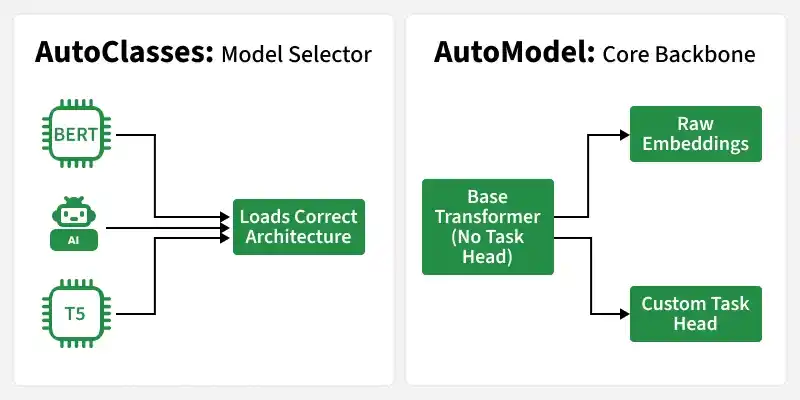
One important AutoClass is AutoModel. It loads only the base transformer without any task-specific prompt. It returns raw hidden states (embeddings), not final predictions. It automatically
- Detect the correct model architecture
- Load the appropriate tokeniser
- Configure everything based on the model name
Manual Model Loading vs AutoClasses
AutoClasses are dynamic model loaders provided by the Hugging Face Transformers library. For example, instead of manually loading a specific model like this:
from transformers import BertModel
model = BertModel.from_pretrained("bert-base-uncased")
You can use a generic AutoClass:
from transformers import AutoModel
model = AutoModel.from_pretrained("bert-base-uncased")
Here, AutoModel internally detects that the model name corresponds to a BERT architecture and loads the appropriate class automatically. This makes the code cleaner, more flexible and easier to scale when experimenting with different models.
Types of Auto Classes
Hugging Face provides different AutoClasses made for specific tasks. Each one automatically loads the correct architecture and attaches the appropriate task head when needed.
- AutoTokenizer: Loads the correct tokenizer for a pretrained model and converts text into model compatible token IDs.
- AutoConfig: Loads the model configuration, including details like hidden size, layers and attention heads.
- AutoModel: Loads the base transformer model without any task specific head. It returns raw embeddings.
- AutoModelForSequenceClassification: Loads a model with a classification head for tasks like sentiment analysis.
- AutoModelForCausalLM: Loads a model for text generation using next token prediction.
- AutoModelForSeq2SeqLM: Loads a sequence to sequence model for translation and summarization.
- AutoModelForTokenClassification: Loads a model for token level tasks such as Named Entity Recognition.
- AutoModelForAudioClassification: Loads a model designed for audio classification tasks.
How Auto Classes Work Internally
Hugging Face AutoClass system is designed to be architecture aware, meaning it understands which model type to initialize without requiring manual input.
- Reads the configuration file stored in the pretrained checkpoint
- Identifies the architecture type (such as BERT, GPT or T5)
- Maps the architecture to the correct internal model class
- Loads the pretrained weights into that model
Implementation Using Auto Classes
Step 1: Install Required Libraries
Run the following command in your command prompt
pip install transformers torch
Step 2: Import Required Libraries
We install the required libraries and import AutoTokenizer and a task specific AutoModel.
- AutoTokenizer handles text preprocessing
- AutoModelForSequenceClassification loads a model with a classification head
from transformers import AutoTokenizer, AutoModelForSequenceClassification
import torch
Step 3: Load Pretrained Model and Tokenizer
- The model name is provided.
- AutoTokenizer automatically loads the correct tokenizer.
- AutoModelForSequenceClassification detects the architecture and loads the appropriate classification model with pretrained weights.
model_name = "distilbert-base-uncased"

tokenizer = AutoTokenizer.from_pretrained(model_name)
model = AutoModelForSequenceClassification.from_pretrained(model_name)
Output:

Step 4: Prepare Input Text
- The tokenizer converts the text into token IDs and attention masks.
- These tensors are formatted so that they can be directly passed into the model.
text = "AutoClasses simplify model loading."

inputs = tokenizer(text, return_tensors="pt")
Step 5: Run Inference
- The model processes the tokenized input.
- Since this is a classification model, it returns logits (raw prediction scores).
- These logits can be converted into probabilities using softmax.
with torch.no_grad():
    outputs = model(**inputs)

logits = outputs.logits
print(logits)
Output:

You can download the full code from here
Advantages
- Eliminates the need for architecture specific imports, keeping implementations simple and readable.
- Allows you to experiment with different models by changing only the model name, without modifying the overall logic.
- Removes dependency on specific model classes, making the code more flexible and reusable.
- Encourages modular design, which is easier to maintain, scale and deploy.
- Works seamlessly with hundreds of pretrained models available on the Hugging Face Hub.
Disadvantages
While AutoClasses simplify development, they also introduce certain trade offs.
- Exact underlying model class is not directly visible, which may reduce architectural transparency.
- New users might rely on abstraction without fully understanding how the underlying model works.
- Since much of the setup is handled automatically, deeper architectural mechanics may remain hidden unless explicitly explored.