Microsoft 365 Apps Security Baseline
The security baseline for Microsoft 365 Apps for enterprise is published twice a year, usually in June and December. Use the Harden System Security App to effortlessly apply them onto your system.
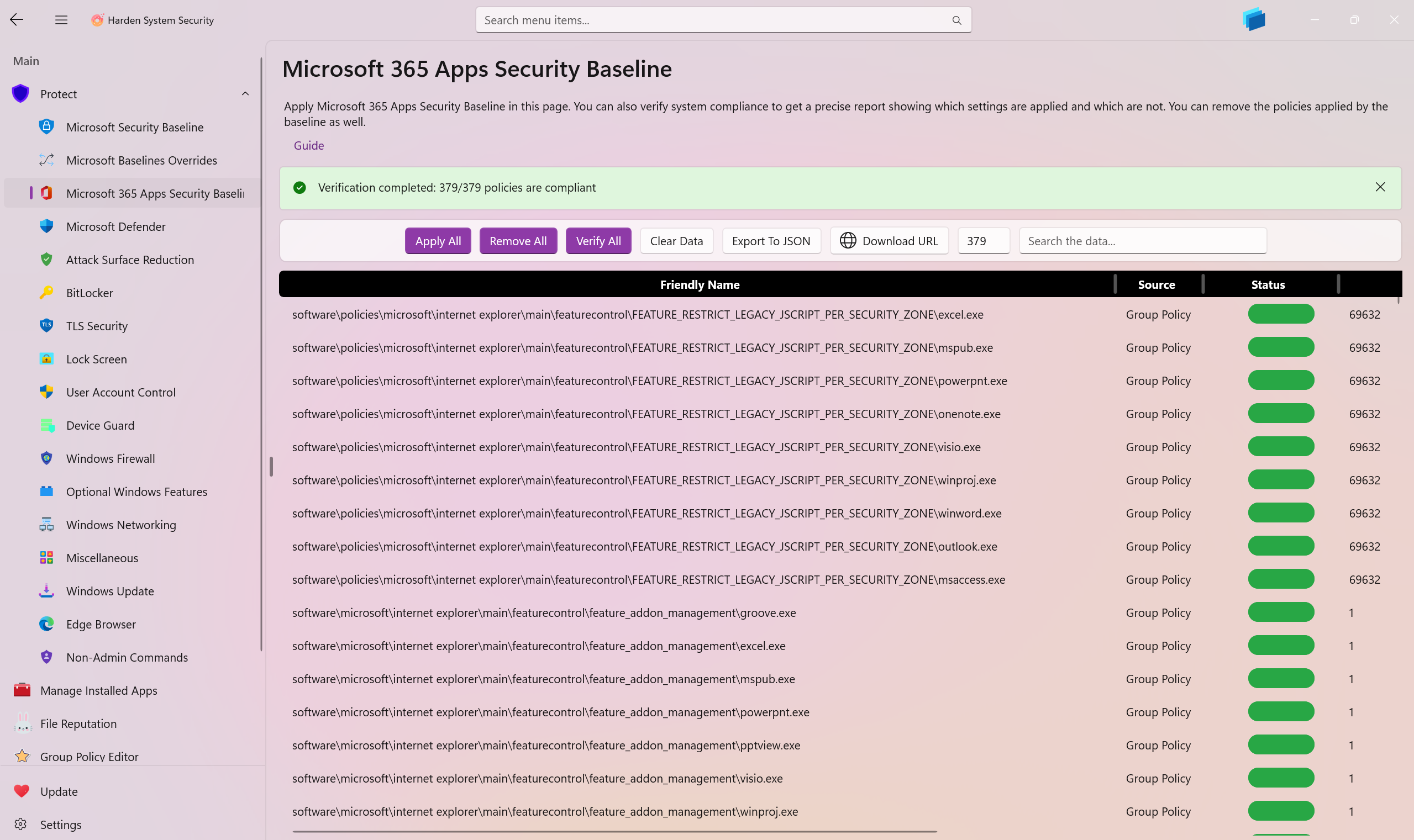
On this page, the Harden System Security app enables you to apply the Microsoft 365 Apps Security Baselines on your system, verify compliance, and remove the applied policies.
You can measure the compliance level of your system using the built-in compliance assessment functionality by simply pressing the Verify button on this page. You will receive a detailed report of every security measure inside the Microsoft 365 Apps Security Baseline and you will be able to export this security report to a properly formatted JSON file as well.
Each security measure has the following details:
-
Friendly Name: Helps you easily identify the security measure and its purpose. -
Source: Shows you which part of the Microsoft 365 Apps Security Baseline this security measure belongs to. -
Status: Whether the current system applies the security measure or not. -
Current Value: The current value of the security measure on the system. -
Expected Value: The correct and secure value the security measure should be in order to be compliant.
-
You can use the Baseline selector Dropdown button to select an older or newer baseline to be applied, removed or verified on your system.
-
Use the
Browsebutton to browse for a Microsoft 365 Apps Security Baseline ZIP file that you've already downloaded on your device, this way you can use it on systems that have no Internet connectivity.- The
Rememberoption which is on by default, will remember the file path you select so that when you close and reopen the app, you won't have to browse and select it again.
- The
-
When the results are loaded, you can right-click or tap + hold on each security measure in this page to access additional options such as
DeleteorApplyin order to selectively remove it from your system or apply it to your system. TheDeletekey on your keyboard can also be used as a shortcut for removal. These functionalities allow you to fine-tune the Microsoft 365 Apps Security baseline policies so that if you don't want or need some of the policies it offers, you can undo and remove them from your system or apply only a subset of them.
Note
Either when downloading the Microsoft 365 Apps Security Baseline from Microsoft Servers or when browsing for the zip file manually, the Harden System Security app will process it entirely in memory, and apply it without writing any temporary files to disk. The same is true for verification or removal processes.
While this approach increases development complexity, it significantly improves security by preventing malicious interference with temporary files before application.
The app caches the baseline in memory to avoid unnecessary re-downloads and/or re-reads. The cache expires every 2 hours, after which it is refreshed with the latest data from the Microsoft Server/File path you provided, and this only happens if the app is open. The cache is compressed to minimize memory usage.




- Create AppControl Policy
- Create Supplemental Policy
- System Information
- Configure Policy Rule Options
- Policy Editor
- Simulation
- Allow New Apps
- Build New Certificate
- Create Policy From Event Logs
- Create Policy From MDE Advanced Hunting
- Create Deny Policy
- Merge App Control Policies
- Deploy App Control Policy
- Get Code Integrity Hashes
- Get Secure Policy Settings
- Update
- Sidebar
- Validate Policies
- View File Certificates
- Microsoft Graph
- Firewall Sentinel
- Data Analysis in AppControl Manager

- Protect
- Microsoft Security Baselines
- Microsoft Security Baselines Overrides
- Microsoft 365 Apps Security Baseline
- Microsoft Defender
- Attack Surface Reduction
- Bitlocker
- Device Guard
- TLS Security
- Lock Screen
- User Account Control
- Windows Firewall
- Optional Windows Features
- Windows Networking
- Miscellaneous Configurations
- Windows Update
- Edge Browser
- Certificate Checking
- Country IP Blocking
- Non Admin Measures
- Group Policy Editor
- Manage Installed Apps
- File Reputation
- Audit Policies
- Cryptographic Bill of Materials
- Intune
- Configuration Service Provider (CSP)
- Service Manager
- Exploit Mitigations
- Sandbox Maker
- Duplicate Photos Finder
- EXIF Manager
- Download Manager
- Bootable Drive Maker

- Introduction
- How To Generate Audit Logs via App Control Policies
- How To Create an App Control Supplemental Policy
- The Strength of Signed App Control Policies
- How To Upload App Control Policies To Intune Using AppControl Manager
- How To Create and Maintain Strict Kernel‐Mode App Control Policy
- How to Create an App Control Deny Policy
- App Control Notes
- How to use Windows Server to Create App Control Code Signing Certificate
- Fast and Automatic Microsoft Recommended Driver Block Rules updates
- App Control policy for BYOVD Kernel mode only protection
- EKUs in App Control for Business Policies
- App Control Rule Levels Comparison and Guide
- Script Enforcement and PowerShell Constrained Language Mode in App Control Policies
- How to Use Microsoft Defender for Endpoint Advanced Hunting With App Control
- App Control Frequently Asked Questions (FAQs)
- System Integrity Policy Transformations | XML to CIP and Back
- About Code Integrity Policy Signing

- How To Install Microsoft Store Apps Completely Offline
- Create Bootable USB flash drive with no 3rd party tools
- Event Viewer
- Group Policy
- How to compact your OS and free up extra space
- Hyper V
- Git GitHub Desktop and Mandatory ASLR
- Signed and Verified commits with GitHub desktop
- About TLS, DNS, Encryption and OPSEC concepts
- Things to do when clean installing Windows
- Comparison of security benchmarks
- BitLocker, TPM and Pluton | What Are They and How Do They Work
- How to Detect Changes in User and Local Machine Certificate Stores in Real Time Using PowerShell
- Cloning Personal and Enterprise Repositories Using GitHub Desktop
- Only a Small Portion of The Windows OS Security Apparatus
- Rethinking Trust: Advanced Security Measures for High‐Stakes Systems

- Clean Source principle, Azure and Privileged Access Workstations
- How to Securely Connect to Azure VMs and Use RDP

- Basic PowerShell tricks and notes
- Basic PowerShell tricks and notes Part 2
- Basic PowerShell tricks and notes Part 3
- Basic PowerShell tricks and notes Part 4
- Basic PowerShell tricks and notes Part 5
- How To Access All Stream Outputs From Thread Jobs In PowerShell In Real Time
- PowerShell Best Practices To Follow When Coding
- How To Asynchronously Access All Stream Outputs From Background Jobs In PowerShell
- Powershell Dynamic Parameters and How to Add Them to the Get‐Help Syntax
- RunSpaces In PowerShell
- How To Use Reflection And Prevent Using Internal & Private C# Methods in PowerShell