
SQL Date Functions are built-in tools used to handle, modify and analyze date/time values in a database. They help perform tasks like retrieving current dates, calculating differences and formatting results effectively.
- Extract specific parts of a date (year, month, day).
- Format dates for user-friendly display.
- Track trends, deadlines or schedules in business processes.
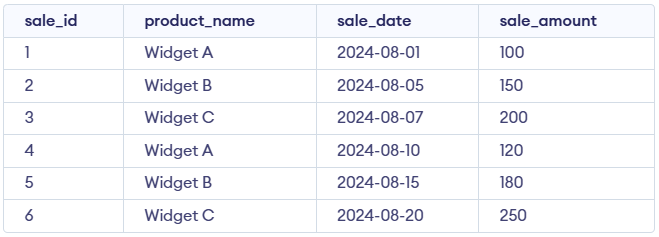
Let's use the sales table as the base for demonstrating each of the SQL Date Functions mentioned. Here’s the structure of the sales table:
1. NOW()
The NOW() function retrieves the server’s current date and time, making it useful for capturing exact event moments such as transaction timestamps, as well as for logging and comparing time-based records.
Query:
SELECT NOW() AS current_datetime;Output:

- Returns the current system date and time.
- Shows both date and time in one value.
2. CURDATE()
The CURDATE() function returns today’s date in YYYY-MM-DD format and is useful when only the current date is needed, especially for reporting or filtering records by date.
Query:
SELECT CURDATE() AS current_date;Output:

- Returns today’s date only.
- Time part is not included.
3. CURTIME()
The CURTIME() function returns the current time in HH:MM:SS format and is useful for time-based operations, such as scheduling or performing precise time comparisons.
Query:
SELECT CURTIME() AS current_time;Output:

- Returns the current system time.
- Shows hours, minutes and seconds only.
4. DATE()
The DATE() function extracts only the date from a date or datetime value, making it useful for situations where the time component should be ignored, such as date-only comparisons or aggregations.
Query:
SELECT
    sale_id,
    product_name,
    DATE(sale_date) AS sale_date_only
FROM sales;
Output
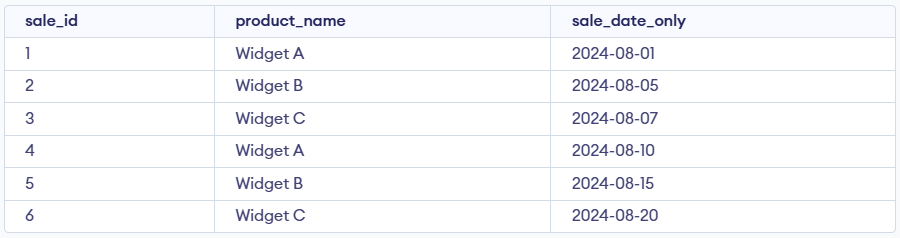
- Extracts only the date part from sale_date.
- Removes any time portion if present.
5. EXTRACT()
The EXTRACT() function retrieves a specific part of a date such as the year, month or day, making it useful for grouping, filtering or performing time-based analysis including year-over-year reports.
Query:
SELECT sale_id, product_name,
EXTRACT(YEAR FROM sale_date)
AS sale_year FROM sales;
Output:
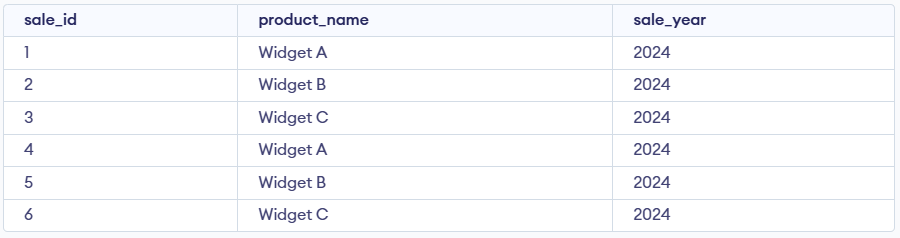
- Pulls out the year from the sale date.
- Useful for grouping or filtering by year.
6. DATE_ADD()
The DATE_ADD() function adds a chosen time interval such as days, months or years to a date, making it useful for calculating future dates and simplifying planning or scheduling tasks.
Query:
SELECT sale_id, product_name,
DATE_ADD(sale_date, INTERVAL 7 DAY) AS sale_date_plus_7_days
FROM sales;
Output:
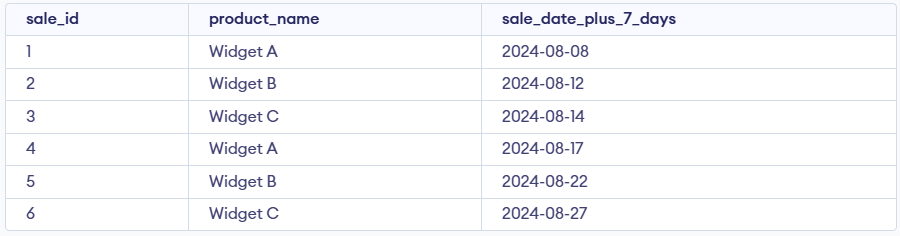
- Adds 7 days to the sale date.
- Returns the new future date.
7. DATE_SUB()
The DATE_SUB() function subtracts a chosen time interval from a date, making it useful for determining past dates and performing retrospective data analysis.
Query:
SELECT sale_id, product_name,
DATE_SUB(sale_date, INTERVAL 3 DAY)
AS sale_date_minus_3_days
FROM sales;
Output:
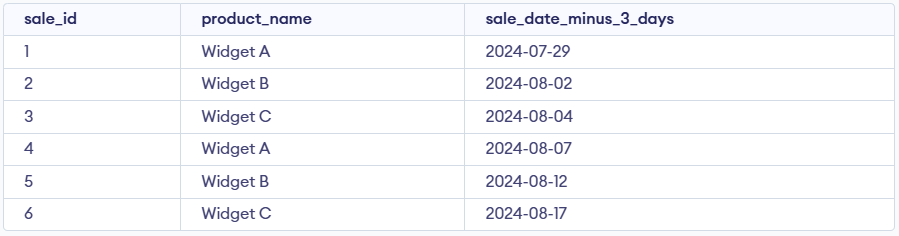
- Subtracts 3 days from the sale date.
- Returns an earlier date.
8. DATEDIFF()
The DATEDIFF() function returns the number of days between two dates, making it useful for calculating durations such as deadlines or overdue periods. In this case, it shows how many days remain from each sale date until August 15, 2024.
Query:
SELECT sale_id, product_name, sale_date,
DATEDIFF('2024-08-15', sale_date) AS days_until_aug15
FROM sales;
Output:
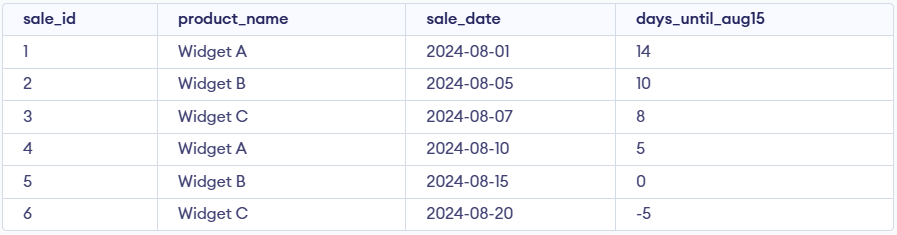
- Calculates days between two dates.
- Shows how many days until 15-Aug-2024.
9. DATE_FORMAT()
The DATE_FORMAT() function formats a date using a specified pattern, allowing customized output such as full day or month names and is useful for making reports clearer and more readable.
Query:
SELECT sale_id, product_name,
DATE_FORMAT(sale_date, '%W, %M %d, %Y')
AS formatted_sale_date FROM sales;
Output:
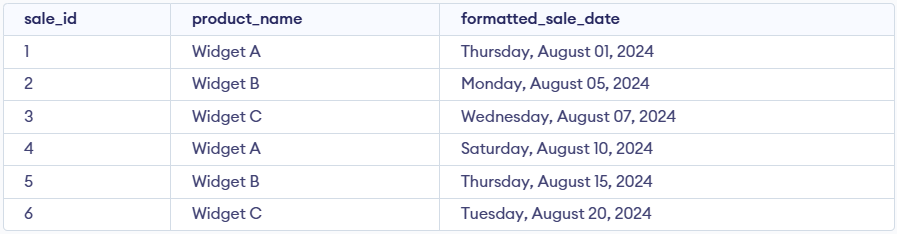
- Converts date into a readable text format.
- Displays weekday, month name, day and year.
10. ADDDATE()
The ADDDATE() function adds a specified time interval to a date. It is useful for calculating future or past dates based on a given date.
Query:
SELECT sale_id, product_name,
ADDDATE(sale_date, 10)
AS sale_date_plus_10_days
FROM sales;
Output:
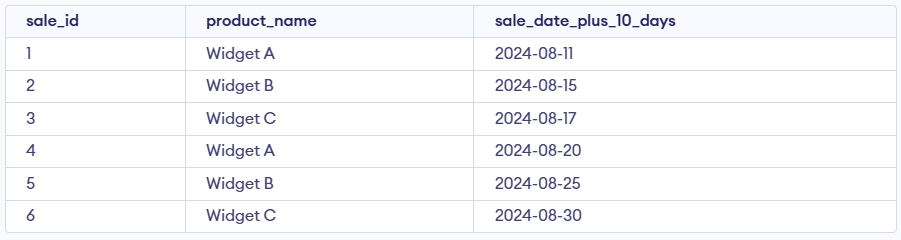
- Adds 10 days to the sale date.
- Same as DATE_ADD but without INTERVAL.
11. ADDTIME()
The ADDTIME() function adds a specified time interval to a time or datetime value. It is useful for adjusting times by adding hours, minutes or seconds.
Query:
SELECT sale_id, product_name,
 ADDTIME('10:30:00', '02:30:00') AS sale_time_plus_2hrs_30min
 FROM sales;
Output:
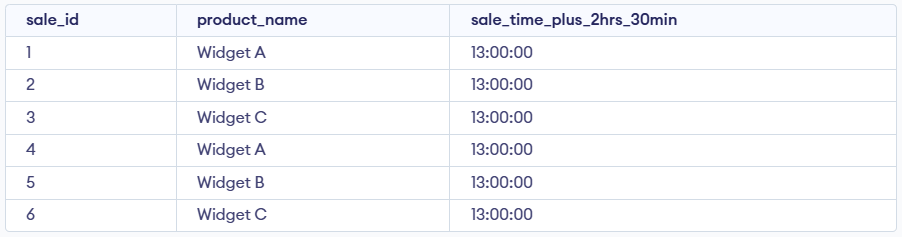
- Adds two time values together.
- Returns the new time after addition.