
The CREATE TABLE statement in SQL is used to define a new table in a database. It specifies the table structure including column names and their data types.
- It is used to create a new table in a database.
- It defines column names and their data types.
- It helps in organizing and storing data systematically
Syntax:
CREATE TABLE table_name
(
Column1 datatype (size),
column2 datatype (size),
.
.
columnN datatype(size)
);
- table_name: The name you assign to the new table.
- column1, column2, ... : The names of the columns in the table.
- datatype(size): Defines the data type and size of each column.
Example: Create a Customer Table
eLet’s walk through a practical example where we create a Customer table that stores customer data. We will define various columns such as CustomerID, FirstName,lastName , Country, Age and Phone with appropriate data types and constraints.
Query:
CREATE TABLE Customer(
    CustomerID INT PRIMARY KEY,
    FirstName VARCHAR(50),
    LastName VARCHAR(50),
    Country VARCHAR(50),
    Age INT CHECK (Age >= 0 AND Age <= 99),
    Phone int(10)
);
Output:

- CustomerID is an integer and serves as the PRIMARY KEY, ensuring each record is unique.
- FirstName, LastName and Country are VARCHAR fields to store variable-length text.
- Age has a CHECK constraint, ensuring it’s within the range of 0 to 99.
- Phone is an integer field, although in real scenarios, a VARCHAR would often be used for storing phone numbers to allow for leading zeros and formatting.
Inserting Data into the Table
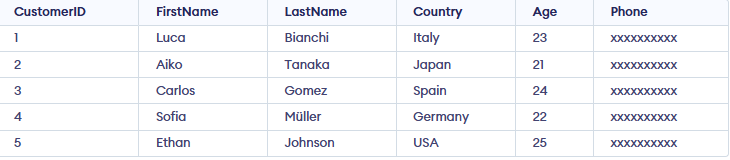
After creating the table, you can use INSERT INTO command to add data into it. Here is how to add some sample records into the Customer table:
INSERT INTO Customer (CustomerID, FirstName, LastName, Country, Age, Phone)
VALUES
(1, 'Luca', 'Bianchi', 'Italy', 23, 'xxxxxxxxxx'),
(2, 'Aiko', 'Tanaka', 'Japan', 21, 'xxxxxxxxxx'),
(3, 'Carlos', 'Gomez', 'Spain', 24, 'xxxxxxxxxx'),
(4, 'Sofia', 'Müller', 'Germany', 22, 'xxxxxxxxxx'),
(5, 'Ethan', 'Johnson', 'USA', 25, 'xxxxxxxxxx');
Output:
Note: If you are working with a large amount of data, consider using bulk inserts or importing data from external files to optimize performance.
Create Table from Existing Table
We can also create a new table based on the structure (and optionally the data) of an existing table. The CREATE TABLE AS SELECT command allows us to duplicate an entire table or select specific columns to form a new one. The following query creates a new table called SubTable that contains CustomerID and CustomerName from the existing Customer table.
Syntax:
CREATE TABLE new_table_name AS
SELECT column1, column2, ...
FROM existing_table_name
WHERE ...;
In this example, we create a new table SubTable that contains just the CustomerID and CustomerName columns from the Customer table. This method is useful for creating backups or performing quick data migrations.
Note:
CREATE TABLE ... AS SELECTdoes NOT copy constraints, indexes or keys
Query:
CREATE TABLE SubTable AS
SELECT CustomerID, CustomerName
FROM customer;
Output:

Note: We can use * instead of column name to copy whole table to another table.
Tips for Using CREATE TABLE in SQL
To ensure the smooth creation and management of your tables, keep these points in mind:
1. The CREATE TABLE statement can also define constraints like NOT NULL, UNIQUE and DEFAULT.
2. If you attempt to create a table that already exists, SQL will throw an error. To avoid this, you can use the IF NOT EXISTS clause.
CREATE TABLE IF NOT EXISTS Customer (...);3. Always define appropriate data types for each column (e.g., VARCHAR(50) for names and INT for IDs) to optimize performance and storage.
4. After creating a table, use the following command to view the structure of your table:
DESC table_name;5. If you need to change the table’s structure after creation (e.g., renaming a column, adding a new column), use the ALTER TABLE statement.