
The USE DATABASE statement in SQL sets a specific database as the default for the current session. It helps users run queries and manage objects within that selected database.
- Used to select and activate a database for the current session.
- Ensures all queries run within the chosen database context.
- Supported by MySQL and SQL Server.
Syntax:
USE database_name;Create a database and set it as the active database for the current session.
1. Create a Database: To begin, you can create a new database if it doesn’t already exist
CREATE DATABASE GeeksforGeeks;2. Select the Database: To set GeeksforGeeks as the active database, use the USE command
USE GeeksforGeeks;Once you’ve selected the database, any queries you execute will be performed within the context of GeeksforGeeks until you select another database.
Querying Data from the Selected Database
The SELECT statement in SQL is used to query and retrieve data from the tables within the selected database. Here are some key ways to use the SELECT statement effectively.
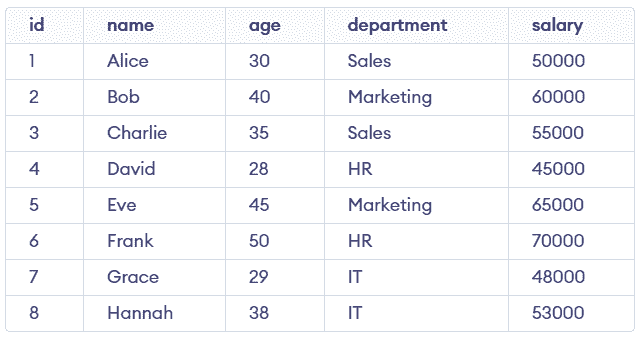
Example: First, we will create a demo SQL database and table. Consider the following table, Employees as an example:
1. Basic SELECT Statement
The most basic form of a query is the SELECT statement. It is used to retrieve all columns and rows from a table.
Query:
SELECT * FROM Employees;Output:
Retrieves all columns and all rows from the Employees table.
2. Selecting Specific Columns
We can select specific columns instead of retrieving all columns.
Query:
SELECT name, age FROM Employees;Output:
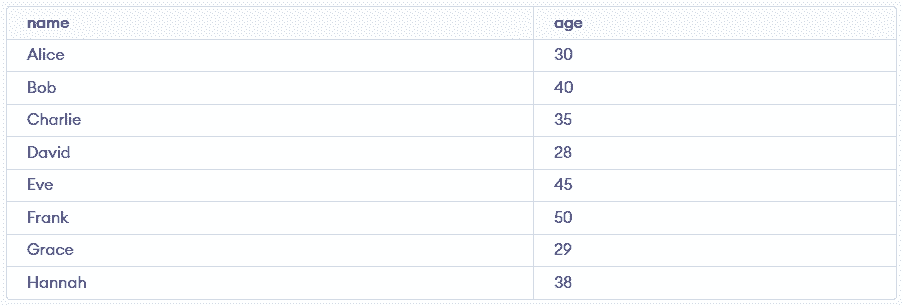
Retrieves only the name and age columns for all rows.