
Volume Testing is a type of non-functional testing that evaluates how a system performs when handling a large amount of data. It ensures the application can manage high data volumes without performance degradation or failure.
- Focuses on database capacity and data handling capability
- Identifies performance issues under large data loads
- Ensures system stability when data volume increases
Types of Volume Testing
Different types of volume testing evaluate how a system handles large amounts of data across various components and operations.
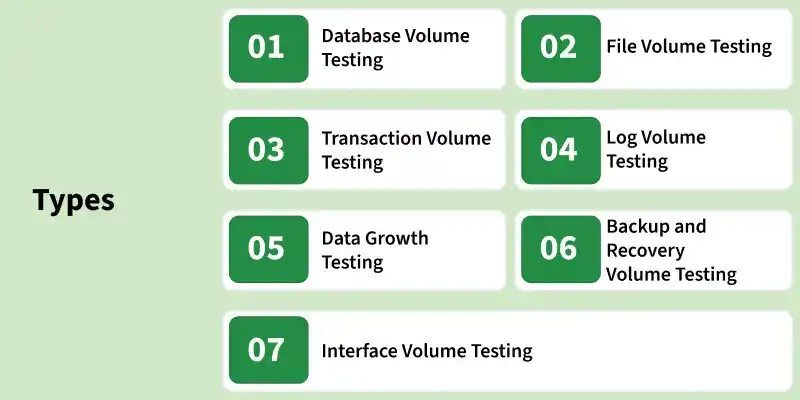
Database Volume Testing
- Tests system performance with large amounts of database records and identifies issues like slow queries and data retrieval delays.
- Example: Testing an app with millions of user records.
File Volume Testing
- Evaluates system behavior when handling large file sizes and checks upload, download, and processing efficiency.
- Example: Uploading and processing large video or image files.
Transaction Volume Testing
- Measures system performance when the number of transactions increases significantly and ensures stability under heavy operations.
- Example: Banking system processing thousands of transactions per second.
Log Volume Testing
- Tests the system’s ability to handle large volumes of log data without affecting performance.
- Example: Applications generating massive server logs daily.
Data Growth Testing
- Examines how system performance is affected as data continuously grows over time.
- Example: Social media platforms storing increasing user data.
Backup and Recovery Volume Testing
- Evaluates system performance during large data backup and restoration processes to ensure data integrity and minimal downtime.
- Example: Restoring a large enterprise database.
Interface Volume Testing
- Tests data transfer performance between systems when handling large data volumes.
- Example: Data exchange between CRM and ERP systems.
Volume Testing Process
The volume testing process defines the steps to evaluate system performance with large amounts of data. It helps identify performance issues and ensures system stability.
- Test Environment Setup: Prepare a production-like environment by configuring the database, servers, and tools to ensure accurate and realistic testing.
- Test Data Preparation: Generate large, realistic, and diverse datasets to simulate real-world data conditions.
- Test Scenario Design: Define key operations such as insert, update, delete, and retrieve on large datasets, focusing on critical business workflows.
- Test Execution: Execute test cases by gradually increasing data volume and continuously monitoring system behavior and performance metrics.
- Result Analysis: Analyze collected metrics to identify bottlenecks, performance degradation, and system limitations.
- Optimization and Retesting: Resolve identified issues (e.g., indexing, query tuning) and re-execute tests to validate improvements and ensure stability.
Tools Used for Volume Testing
Volume testing requires specialized tools to generate large datasets, simulate data-heavy operations, and monitor system performance under high data volume.
- LoadRunner: Enterprise-level tool used to test system behavior under large volumes of data and users.
- IBM Rational Performance Tester: Tool used to evaluate application scalability and performance with large datasets.
- NeoLoad: Modern testing tool used for fast and continuous volume testing with real-time analytics.
- BlazeMeter: Cloud-based platform used for large-scale volume testing, compatible with JMeter.
- Silk Performer: Tool used to measure system performance and identify bottlenecks under heavy data loads.
Volume Testing Attributes
Following are the important attributes that are checked during the volume testing:
- Response Time: Ensures the system responds within acceptable time limits under large data volumes.
- Data Loss: Verifies that no data is lost during high-volume processing.
- Data Storage: Confirms that data is stored and retrieved accurately.
- Data Overwriting: Ensures data is not unintentionally overwritten without proper authorization.
Advantages of Volume Testing
Volume testing provides several benefits by ensuring that applications can efficiently handle large amounts of data while maintaining stability and performance.
- Early Issue Detection: Identifies performance bottlenecks and database issues at an early stage.
- Cost Efficiency: Reduces long-term maintenance costs by fixing problems before production.
- Improved Scalability Planning: Helps design systems that can handle future data growth efficiently.
- Better Performance: Ensures smooth system performance even with large volumes of data.
- Real-World Readiness: Prepares the system to handle actual production data conditions.
Limitations of Volume Testing
Volume testing has certain limitations and challenges because it involves handling large datasets and complex testing environments.
- Requires skilled professionals and specialized tools for execution and analysis.
- Creating large and realistic datasets can be difficult and time-consuming.
- Test setup and execution may take a significant amount of time.
- Can be costly due to infrastructure and tool requirements.
- It is difficult to accurately simulate real-world data patterns and memory usage.
Common Issues Uncovered by Volume Testing
Volume testing helps identify several critical issues that may occur when applications process large amounts of data.
- Slow full-table scans due to missing or unused database indexes
- Out-of-memory errors in applications loading entire datasets into RAM
- Log file bloat that fills disk and causes service failures
- Connection pool exhaustion under sustained data-heavy operations
- Pagination bugs that work for 100 records but fail at 100,000
- Backup and restore timeouts that exceed maintenance windows
- Hard-coded limits (e.g., VARCHAR(255) fields that truncate long data)