
Mutation Testing is an advanced white-box testing technique used to evaluate the quality and effectiveness of test cases. It involves introducing small changes (mutations) into the source code and checking whether the existing tests can detect them. This helps ensure that the software is thoroughly tested and capable of identifying defects.
- Improves the effectiveness of test cases by identifying weak or missing tests.
- Measures test quality using the mutation score.
- Helps increase software reliability by detecting hidden defects.
Objective of Mutation Testing
The main objectives of mutation testing are:
- To identify portions of code that are not adequately tested.
- To detect hidden defects that other testing techniques may miss.
- To uncover new types of potential errors or logical flaws.
- To calculate the mutation score and measure test effectiveness.
- To analyze how faults propagate through the program.
- To evaluate and strengthen the overall quality of test cases.
Types of Mutation Testing
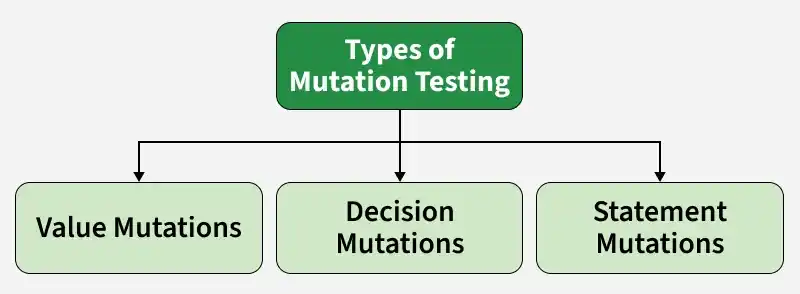
Mutation Testing can be classified into three main types based on the nature of the changes (mutations) introduced into the source code.
Value Mutations
Value mutation changes the values of constants, variables, or literals in the program. It helps verify whether test cases can detect incorrect data values.
Example: Replacing
10with100or changingtruetofalse.
Decision Mutations
Decision mutation modifies conditional or logical operators used in decision-making statements. It checks whether tests can identify errors in program logic.
Example: Replacing
>with<or&&with||.
Statement Mutations
Statement mutation alters, removes, or replaces program statements. It ensures that test cases can detect incorrect or missing program instructions.
Example: Deleting a statement or replacing an assignment statement with another operation.
Process of Mutation Testing
Mutation testing is performed by introducing small changes into the program and checking whether the existing test cases can detect those changes. The process generally involves the following steps:
- Select the Program: Start with the original source code that needs to be tested.
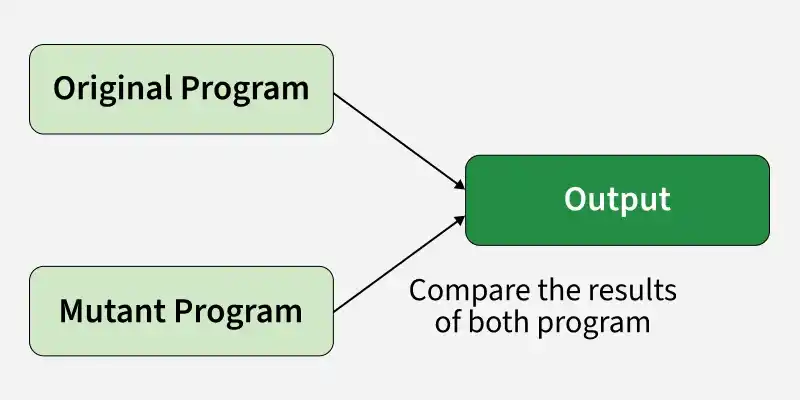
- Generate Mutants: Create multiple versions of the program by introducing small changes (mutations) such as changing operators, constants, or conditions.
- Run Test Cases on Original Program: Execute the existing test cases on the original program to ensure it works correctly.
- Run Test Cases on Mutants: Execute the same test cases on each mutated version of the program.
- Compare Results: Compare the outputs of the original program and mutants. If outputs differ, the mutant is killed; if not, it survives.
- Analyze Mutation Score: Calculate the mutation score to measure test effectiveness. A higher score indicates stronger test cases.
- Improve Test Cases (if required): Add or modify test cases to kill surviving mutants and improve test coverage.
Mutation Score (Evaluation Metric)
Mutation Score is a metric used to measure the effectiveness of a test suite by determining how many mutants are detected (killed) by the test cases.
Formula:
Mutation Score = (Killed Mutants / (Total Mutants − Equivalent Mutants)) × 100
Explanation
- Killed Mutants: Mutants detected by the test cases.
- Total Mutants: Total number of mutants generated.
- Equivalent Mutants: Mutants that behave exactly like the original program and cannot be detected.
Interpretation
- High Mutation Score: Indicates strong and effective test cases.
- Low Mutation Score: Indicates weak test cases that may miss defects.
Example: If 72 mutants are killed out of 100 total mutants and 10 are equivalent mutants, then:
Mutation Score = (72 ÷ (100 − 10)) × 100 = (72 ÷ 90) × 100 = 80%
Result: The mutation score is 80%, indicating that the test suite detected 80% of the non-equivalent mutants.
Tools for Mutation Testing
Several tools are available to perform mutation testing across different programming languages and environments:
- Judy:A Java-based mutation testing tool used to evaluate the effectiveness of JUnit test cases by generating and analyzing mutants.
- Jester: A mutation testing tool for Java that introduces simple code changes to determine whether existing test cases can detect faults.
- Jumble: A Java mutation testing tool that integrates with the JUnit framework and helps assess the quality of unit tests.
- PIT: One of the most popular mutation testing tools for Java, known for its speed, accuracy, and seamless integration with Maven, Gradle, and popular IDEs.
- MuClipse: An Eclipse plugin that provides support for mutation testing within the Eclipse IDE, making mutation analysis easier for Java developers.
Advantages of Mutation Testing
- Enhances defect detection by identifying weak or ineffective test cases.
- Reveals ambiguities and logical flaws in the source code.
- Improves test quality by encouraging stronger and more comprehensive test cases.
- Increases overall software reliability and code robustness.
Limitations of Mutation Testing
- Time-Consuming: Generating and testing a large number of mutants requires significant time.
- High Computational Cost: Running test cases on every mutant consumes considerable system resources.
- Large Number of Mutants: Even small programs can produce hundreds or thousands of mutants.
- Equivalent Mutants: Some mutants behave exactly like the original program and cannot be detected by any test case.
- Difficult to Analyze Results: Identifying and managing surviving mutants can be complex.
- Requires Strong Test Suites: Mutation testing is effective only when a reasonably good test suite already exists.
- Not Suitable for Large Projects: The cost and effort of mutation testing can become impractical for very large software systems.