
Control Flow Testing is a white-box testing technique that uses the program’s control flow to design test cases. It focuses on the logical execution paths of the code to ensure correct program behavior.
- It is a structural testing technique under white-box testing.
- Test cases are designed based on program structure, design, and code flow.
- It is mainly used to verify the logic and execution paths of the program.
Example: Control flow testing is important in systems like online banking to ensure all decision paths and loops are tested, helping to detect logical errors that could lead to financial losses.
Control Flow Graph
A Control Flow Graph (CFG) is a graphical representation of a program that shows the flow of execution through different statements, decisions, and blocks of code.
It is used in white-box testing to analyze all possible execution paths and design effective test cases.
- CFG represents a program using nodes and edges
- Nodes -> statements or blocks of code
- Edges -> flow of control between nodes
- Helps in identifying all possible execution paths
- Used in control flow testing and program analysis
Cyclomatic Complexity
Cyclomatic Complexity is the quantitative measure of the number of linearly independent paths in it. It is a software metric used to describe the complexity of a program. It is computed using the Control Flow Graph of the program.
M = E - N + 2P
Where:
M = Cyclomatic complexity
E = Number of edges
N = Number of nodes
P = Number of connected components (usually 1)
A high cyclomatic complexity indicates a more complex code, requiring thorough testing and potential refactoring. Tools like SonarQube and NDepend help calculate and analyze this metric.
Types of Control Flow Testing Coverage
Control Flow Testing uses different coverage criteria to ensure that all parts of the program are tested.
- Statement Coverage: Ensures that each statement in the program is executed at least once during testing.
- Branch (Decision) Coverage: Ensures that every decision point (True/False outcomes) is executed at least once.
- Condition Coverage: Ensures that each individual condition in a decision evaluates to both True and False at least once.
- Path Coverage: Ensures that all possible execution paths in the program are executed at least once.
- Loop Coverage: Ensures that loops are tested for different iterations such as 0, 1, and multiple executions.
- Multiple Condition Coverage: Ensures that all possible combinations of conditions in a decision are tested.
Control Flow Testing Process
Control flow testing involves analyzing a program’s flow of execution through a Control Flow Graph (CFG).
Following are the steps involved in the process of control flow testing:
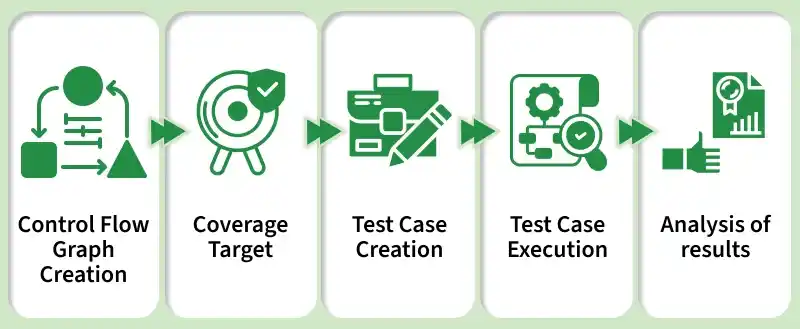
- Control Flow Graph Creation: A Control Flow Graph (CFG) is created from the source code manually or using tools like IntelliJ IDEA or GraphWalker.
- Coverage Target: Coverage targets are defined based on the CFG to ensure all nodes, edges, branches, and paths are tested.
- Test Case Creation: Test cases are designed to achieve full coverage of the defined targets.
- Test Case Execution: The test cases are executed, often using automation tools or CI/CD pipelines like Jenkins or GitLab CI.
- Analysis: Test results are analyzed to identify defects and verify correct program behavior across all paths.
Read More: Complete Guide to Software Testing
Objectives of Control Flow Testing
- Path Coverage: It ensures every possible execution path in the program is tested at least once.
- Branch Coverage: It confirms that all decision points (branches) are evaluated as both true and false.
- Decision Coverage: It verifies that all potential outcomes of decision points are executed.
- Loop Testing: It checks program behavior for loops with zero, single, and multiple iterations.
- Error-Handling Testing: It validates all error and exception-handling paths.
- Multiple Condition Testing: It tests simple and complex condition combinations at decision points.
- Boundary Value Testing: It evaluates program behavior at the edges of input ranges.
- Integration Testing: It examines interactions between different modules or components.
- Cyclomatic Complexity Management: It identifies and reduces overly complex code paths for easier testing and maintenance.
Types of Testing in Control Flow
- Path Testing: It focuses on testing all possible paths through the program. This is essential for ensuring that every unique route through the code is executed, catching edge cases that might be missed by manual testing.
- Branch Testing: This tests each decision point (branch) for both true and false outcomes. This is a key form of testing to ensure that logical conditions (such as if-else statements) are verified from both perspectives.
- Condition Testing: It specifically tests each condition within decision points to ensure that each condition within a decision is true and false at least once.
- Loop Testing: This ensures that loops are tested for zero iterations, one iteration, and multiple iterations. It’s critical for catching logical errors in loop conditions.
Tools for Control Flow Testing
- JaCoCo: A Java code coverage tool used to measure how much code is tested during execution.
- SonarQube: A tool for analyzing code quality and detecting bugs, vulnerabilities, and complexity. .
- Clover: A code coverage tool that provides detailed test coverage reports for Java applications.
- Pytest-Cov: A Python plugin that measures test coverage when using Pytest framework.
- IntelliJ IDEA: An IDE with built-in features to support code analysis and control flow visualization.
Advantages of Control Flow Testing
- Comprehensive Coverage: Tests all execution paths, reducing undetected defects.
- Early Bug Detection: Catches logic errors early, saving time in debugging.
- Code Optimization: Identifies complex or redundant paths for potential refactoring.
- CI/CD Integration: Easily integrates into continuous testing pipelines.
- Better Maintainability: Reduces code complexity, making maintenance easier.
Limitations of Control Flow Testing
Control Flow Testing focuses on the structure and flow of a program, but it has several limitations:
- Does not detect missing functionality: It ensures code execution but cannot verify whether all required features are implemented correctly.
- High complexity for large programs: For large systems, creating and analyzing Control Flow Graphs becomes difficult and time-consuming.
- Does not ensure input/output correctness: It focuses on program paths, not whether outputs are correct for given inputs.
- May miss logical errors: Even if all paths are tested, some logical mistakes may still remain.
- Path explosion problem: The number of execution paths increases rapidly with program size, making full testing impractical.
- Requires source code access: It is a white-box technique, so testers must know the internal code structure.
Control Flow vs Data Flow
| Feature | Control Flow Testing | Data Flow Testing |
|---|---|---|
| Definition | Focuses on the sequence of execution of statements in a program | Focuses on how data values are defined, used, and modified in a program |
| Main Idea | Tests the flow of control (execution paths) | Tests the flow of data (variables usage) |
| Based on | Control Flow Graph (CFG) | Data Flow Graph (DFG) |
| Focus Area | Statements, branches, loops, paths | Variable definition and usage |
| Goal | Ensure all code paths are executed | Ensure correct usage of variables and data |
| Testing Type | White-box testing | White-box testing |
| Common Errors Found | Logical errors in flow, unreachable code | Data misuse, uninitialized variables, incorrect variable usage |
| Example | Testing if-else and loop paths | Checking if variable is defined before use |