
User Acceptance Testing (UAT) is the final phase of software testing where end-users validate the system in real-world scenarios to ensure it meets business requirements. It focuses on verifying whether the application is ready for release from a user’s perspective.
- Ensures the software meets business needs and user expectations.
- Validates functionality, usability, and overall user experience.
- Helps identify gaps between expected and actual results before deployment.
Example: In an e-commerce application, end-users test whether they can successfully browse products, add items to the cart, and complete the checkout process before the final release.
Acceptance Criteria in UAT
Acceptance criteria define the conditions that the software must meet to be approved by end-users.
- Completeness: All required features and functionalities are implemented.
- Accuracy: The system produces correct and expected results.
- User-Friendliness: The application is easy to use and understand.
- Performance: The system performs efficiently under expected workloads.
- Reliability: The application works consistently without failures.
- Security: Data and system access are properly protected.
- Scalability: The system can handle growth in users or data.
- Compatibility: Works smoothly across different devices, browsers, and environments.
Participants in UAT
User Acceptance Testing (UAT) is performed by end-users or stakeholders who will use the software in real-world scenarios. Their role is to validate whether the application meets business requirements and is ready for deployment.
- End-Users: Actual users who interact with the system in daily operations.
- Clients or Business Stakeholders: Ensure the software aligns with business goals and expectations.
- Subject Matter Experts (SMEs): Validate domain-specific functionality and workflows.
Types of User Acceptance Testing
User Acceptance Testing can be categorized into different types based on the purpose and environment in which the testing is performed.
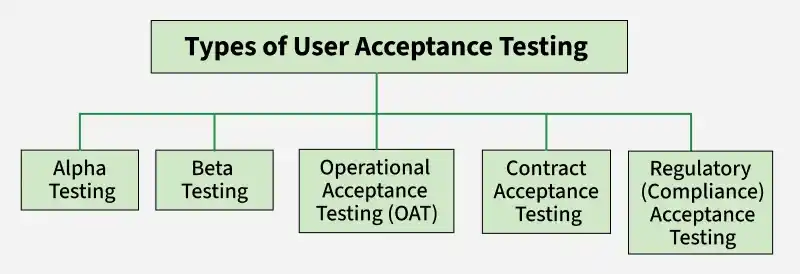
1. Alpha Testing
Alpha testing is performed internally by developers or testers before releasing the product to external users.
- Conducted in a controlled environment within the organization.
- Helps identify major issues early in the development phase.
- Ensures the product is stable before external testing.
2. Beta Testing
Beta testing is performed by real users in a real-world environment before the final release.
- Conducted by a limited group of external users.
- Helps gather real-world feedback and uncover hidden issues.
- Improves product quality and user satisfaction.
3. Operational Acceptance Testing (OAT)
OAT ensures that the system is ready for production in terms of operational aspects.
- Validates system performance, backups, and recovery processes.
- Ensures proper workflows, maintenance, and monitoring.
- Confirms readiness for real-world operational use.
4. Contract Acceptance Testing
This type ensures that the software meets the agreed-upon contract requirements.
- Validates features against predefined specifications.
- Ensures compliance with business agreements.
- Confirms delivery aligns with client expectations.
5. Regulatory (Compliance) Acceptance Testing
This testing ensures that the system complies with legal and regulatory standards.
- Verifies adherence to industry laws and guidelines.
- Important for domains like banking, healthcare, and finance.
- Ensures the product is legally safe for release.
UAT Process
The UAT process defines the step-by-step approach followed to validate software before release.

1. Requirement Analysis
This step focuses on understanding business requirements to define what needs to be tested.
- Review documents like BRD, SRS, use cases, and process flows.
- Identify key business scenarios and user expectations.
- Define scope and objectives of UAT.
2. UAT Test Planning
A detailed test plan is created to guide the UAT process effectively.
- Define test strategy, scope, timelines, and responsibilities
- Set entry and exit criteria for UAT
- Identify test scenarios and overall approach
3. Identify Test Scenarios
Test scenarios are created based on business requirements.
- Identify real-world user scenarios and workflows.
- Ensure coverage of all critical business functionalities.
- Align scenarios with business use cases.
4. Create UAT Test Cases
Detailed test cases are developed to validate each scenario.
- Write clear steps, expected results, and conditions
- Cover positive, negative, and edge cases
- Use business requirements as the base
5. Prepare Test Data
Relevant data is prepared to simulate real-world conditions.
- Use realistic or production-like data where possible.
- Ensure data covers different test scenarios.
- Validate data accuracy before execution.
6. Execute Test Cases
Testers execute the test cases and record results.
- Run test cases and validate expected outcomes.
- Log defects for any failures identified.
- Re-test after bug fixes to ensure resolution.
7. Confirm Business Objectives
Final step where stakeholders approve the product for release.
- Verify that all requirements are met.
- Ensure critical defects are resolved.
- Provide formal approval for production deployment.
Challenges of User Acceptance Testing (UAT)
User Acceptance Testing involves real users and business validation, which can introduce several practical challenges.
- Users may provide inconsistent, unclear, or conflicting feedback, making it difficult to identify actual issues and prioritize improvements.
- End-users are often not fully available due to business responsibilities, which can delay testing and reduce overall test coverage.
- Test scenarios may not fully reflect real-world business workflows, leading to gaps in validation of critical functionalities.
- Lack of a proper test environment or realistic data can result in inaccurate testing outcomes and missed defects.
Importance of UAT
User Acceptance Testing ensures that the software meets real user expectations and is ready for deployment in a practical environment.
- Ensures usability by validating that the application is easy to use, intuitive, and aligned with real user workflows and expectations.
- Provides a reliable feedback mechanism where end-users can identify issues, suggest improvements, and confirm whether requirements are correctly implemented.
- Helps identify real-world issues that may not be detected during earlier testing phases, improving overall product quality and reliability.
- Validates business requirements by ensuring that the software performs actual business tasks correctly before final release.
Tools for UAT
Various tools are used in UAT to collect user feedback, track behavior, and identify issues in real-world usage scenarios.
- Marker.io – Allows users and testers to report visual bugs directly from a website with screenshots and annotations, making it easier to communicate issues with developers.
- FullStory – Captures user sessions and interactions in detail, helping teams understand real user behavior, identify usability issues, and analyze user journeys.
- Hotjar – Provides heatmaps, session recordings, and feedback polls to understand how users interact with the application and improve user experience.
- Crazy Egg – Offers click tracking and heatmaps to visualize where users click and how they navigate, helping identify usability and design issues.
- Qualaroo – Collects real-time user feedback through surveys and polls, helping teams understand user expectations and improve product decisions.
- Sentry – Tracks real-time errors and performance issues in applications, helping identify problems that users face during actual usage.
Exit Criteria for (UAT)
Exit criteria define the conditions that must be satisfied before completing UAT and approving the software for production release.
- All critical and high-priority defects identified during UAT are fixed, re-tested, and verified to ensure the system works as expected without major issues.
- The application successfully meets all defined business requirements and acceptance criteria, confirming that it supports real-world user workflows.
- End-users or stakeholders validate the system and provide formal approval (sign-off), indicating their confidence in the system’s functionality and usability.
- Test scenarios and test cases are executed successfully with expected results, ensuring that key functionalities perform correctly under real usage conditions.
- No major usability issues exist, and users are able to perform tasks easily and efficiently without confusion or errors.
- UAT documentation, including test results, defect logs, and reports, is completed and reviewed for accuracy and completeness.
- The system is stable and ready for deployment, with minimal risk of failure in the production environment.
User Acceptance Testing Vs System Testing
Here are the Difference between User Acceptance Testing vs System Testing
Parameters | UAT | System Test |
|---|---|---|
Testing Method | It is based on User Convenience and Feedback. Testing is done based on meeting customer requirements. | It is based on the System/Feature Milestone - Testing is done based on meeting system/specs requirements. |
Usage | UAT is done by Clients, Stakeholders, and Testers. | System testing is done by the Developer and Testers. |
Types | Alpha UAT, Beta UAT, Operational acceptance testing, Contract AT, Regulation AT. | System and Integration Tests. |
Test Cases | Test cases are based on real-world business scenarios and user workflows | Includes positive, negative, and edge test cases based on system specifications |
Testing Methodology | The testing methodology of UAT is based on Functional Tests. | Functional / Performance/ Other Tests. |
Order of Execution | UAT is done after the System Test. | The system Test is done first. |