
A Test Plan Template is a standardized document that outlines the structure and components required to plan testing activities in a project. It helps ensure consistency, completeness, and proper organization of the testing process.
- Provides a predefined structure for creating test plans.
- Ensures all important testing aspects are covered.
- Improves clarity, consistency, and documentation quality.
Test Plan Template Format
Below is a simple and easy-to-understand test plan template format that can be customized according to the project requirements.
Responsibility for Preparing
Responsibility for preparing the test plan usually lies with the Test Manager or QA Lead who oversees the testing activities. They ensure the test plan is complete, accurate, and aligned with project requirements.
- Prepared by Test Manager or QA Lead.
- Involves input from developers, testers, and stakeholders.
- Ensures proper planning and coordination of testing activities.
Steps to Create an Efficient Test Plan
Creating an efficient test plan involves defining a clear testing approach, resources, and timelines to ensure successful testing.
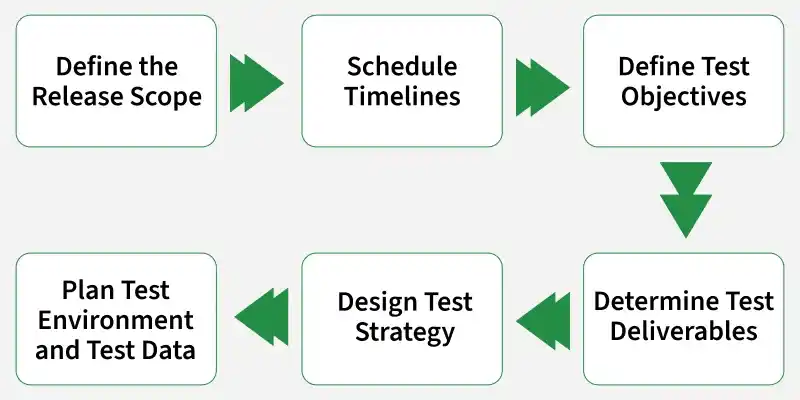
Step 1: Define the Release Scope
- Clearly outline the features, functionalities, and components that need to be tested in this release.
- Identify any features that are out of scope to avoid unnecessary testing.
Step 2: Schedule Timelines
- Set realistic deadlines for each phase of the testing process.
- Include buffer time for unexpected delays or issues.
Step 3: Define Test Objective
- Specify the goals of the testing process, such as verifying functionality, performance, and security.
- Align these objectives with the overall project requirements.
Step 4: Determine Test Deliverables
- Before Testing: Create and review the test plan, test cases, and test environment setup.
- During Testing: Execute test cases, log defects, and monitor progress.
- After Testing: Provide test reports, defect logs, and sign-off documents.
Step 5: Design the Test Strategy
- Choose the appropriate testing methodologies, such as manual testing, automation, or performance testing.
- Outline the tools and techniques to be used for each type of testing.
Step 6: Plan the Test Environment and Test Data
- Define the hardware, software, and network requirements for the test environment.
- Prepare the necessary test data, including both valid and invalid data sets, to ensure comprehensive testing.
One-Page Test Plan Template
For a quick overview, a one-page test plan template can include:
- Project Name: [Software Name]
- Test Manager: [Name]
- Test Objectives: [List Key Objectives]
- Scope: [In Scope/Out of Scope]
- Test Strategy: [Testing Types, Tools, etc.]
- Schedule: [Start Date, End Date, Milestones]
- Resources: [Testers, Developers, Tools]
- Risks: [Identify Potential Risks]
- Deliverables: [Test Cases, Reports, etc.]
Example
This test plan is for an e-commerce platform to ensure functionality, security, and performance before release. It covers key features, testing approach, and execution plan.
Test Plan Details
- Project: E-commerce platform
- Scope: Login, search, cart, payment, orders
- Out-of-Scope: Social media, advanced analytics
Plan & Objectives
- Phases: Planning -> Design -> Execution -> Closure
- Objectives: Functional, performance, security, usability testing
Strategy & Deliverables
- Strategy: Manual, automation, load, and security testing
- Deliverables: Test cases, reports, defect logs
Environment & Metrics
- Environment: Production-like setup with test data
- Metrics: Defect density, test coverage, efficiency
Importance
A Test Plan Template provides a structured approach to planning and managing testing activities in a project. It ensures consistency, clarity, and completeness in the testing process.
- Ensures all testing aspects are properly planned and documented.
- Improves communication among team members and stakeholders.
- Helps in better resource, time, and risk management.
- Maintains consistency across different projects.
Preparation of an Effective Test Plan
An effective test plan ensures structured and goal-oriented testing by defining objectives, scope, and execution approach. It helps improve test coverage and overall software quality.
1. Define Objectives
Clearly define what you want to achieve through testing so that all efforts are focused and aligned with project goals.
- Identify goals such as finding bugs, checking performance, and verifying functionality.
- Align testing objectives with project requirements.
- Ensure all critical aspects of the application are covered.
2. Break Down the Application
Divide the application into smaller parts to make testing more organized and manageable.
- Split the application into modules or components.
- Identify critical and high-risk areas for focused testing.
- Ensure complete coverage of all important sections.
3. Design Test Scenarios
Create realistic test cases to check how the application behaves in different situations.
- Develop scenarios based on real user interactions.
- Include edge cases to detect hidden issues.
- Prioritize scenarios based on importance and impact.
4. Select Testing Techniques
Choose the right testing methods to ensure efficient and accurate results.
- Use manual, automated, and performance testing where needed.
- Select techniques based on project complexity.
- Ensure effective and optimized test execution.
5. Create a Master Schedule
Plan the testing timeline to ensure all activities are completed on time.
- Define all testing phases: preparation, execution, and reporting.
- Set realistic timelines for each activity.
- Prioritize scenarios based on importance and impact.
Test Planning in a Test Management Tool
Using a test management tool can streamline the test planning process by allowing teams to:
- Milestones: Track important deadlines and progress.
- Collaboration: Share the test plan with all stakeholders and receive feedback in real-time.
- Reporting: Automatically generate reports on testing progress, defects, and coverage.