
A Data-Driven Framework in Selenium is an automation approach where test data is separated from test scripts, allowing the same test logic to run with multiple input data sets. It enables efficient execution of test cases using external data sources like Excel, CSV files, or databases for better coverage and flexibility.
- Executes the same test script with multiple sets of input data.
- Uses external data sources like Excel, CSV, or databases for testing.
- Improves test coverage while reducing code duplication and maintenance effort.
Data-Driven Testing Framework in Selenium
A Data-Driven Testing Framework in Selenium is an automation approach where test data is stored externally and the same test script is executed with multiple data sets to validate different scenarios efficiently.
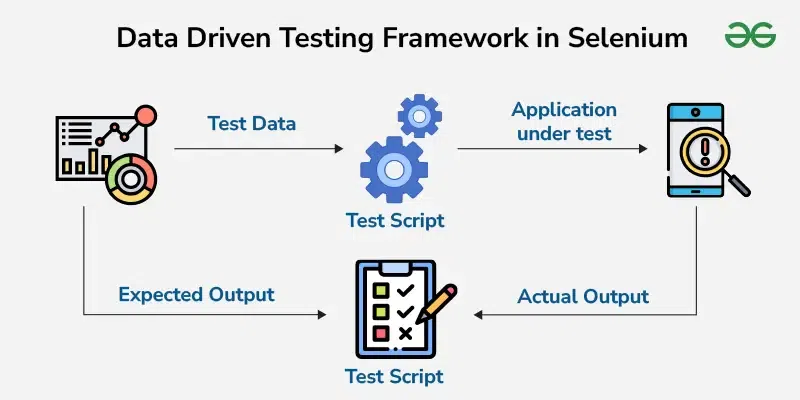
- Test data is stored externally (Excel, CSV, XML, or databases) instead of being hard-coded in scripts.
- Test scripts read input data and run multiple times with different data sets.
- Application under test is executed using these inputs to generate actual results.
- Expected output is defined separately and compared with actual output for validation.
- Helps identify defects across various data combinations and improves test coverage.
- Separates test data from test logic, making scripts easier to maintain and update.
- Supports scalability by allowing new test cases to be added just by updating data files without changing code.
Data Driven Testing Example
A data-driven framework executes test scenarios with multiple input data sets, improving test coverage and efficiency. It follows automation best practices by promoting reusability and avoiding duplication, making testing more scalable and reliable.
For example, in a Selenium login test, the script reads usernames and passwords from an external source like Excel and attempts login with each credential set.
Step 1: Prepare the Test Data
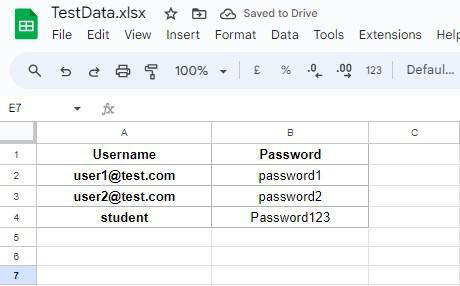
First, we need an Excel sheet on which we will have the test information. The Excel sheet shall contain two columns—Username and Password—with different rows representing different test cases. For instance:
TestData.xlsx
Step 2: Set Up the Test Code
Here is the code in Java. Tested on: https://practicetestautomation.com/practice-test-login/
DataDrivenTest.java
import org.apache.poi.ss.usermodel.*;
import org.apache.poi.xssf.usermodel.XSSFWorkbook;
import org.openqa.selenium.By;
import org.openqa.selenium.WebDriver;
import org.openqa.selenium.chrome.ChromeDriver;

import java.io.File;
import java.io.FileInputStream;
import java.io.IOException;

public class DataDrivenTest {

    public static void main(String[] args) throws IOException {

        System.setProperty("webdriver.chrome.driver", "path_to_chromedriver");
        WebDriver driver = new ChromeDriver();

        // Load the Excel file
        FileInputStream file = new FileInputStream(new File("TestData.xlsx"));
        Workbook workbook = new XSSFWorkbook(file);
        Sheet sheet = workbook.getSheetAt(0);

        // Iterate through the rows of the Excel file
        for (int i = 1; i <= sheet.getLastRowNum(); i++) {
            Row row = sheet.getRow(i);

            // Read data from the Excel sheet
            String username = row.getCell(0).getStringCellValue();
            String password = row.getCell(1).getStringCellValue();

            // Navigate to the login page
            driver.get("https://practicetestautomation.com/practice-test-login/");

            // Perform login action
            driver.findElement(By.id("username")).sendKeys(username);
            driver.findElement(By.id("password")).sendKeys(password);
            driver.findElement(By.id("submit")).click();

            // Verify login success or failure
            String currentURL = driver.getCurrentUrl();
            if (currentURL.equals("https://practicetestautomation.com/logged-in-successfully/")) {
                System.out.println("Login successful for: " + username);
            } else {
                System.out.println("Login failed for: " + username);
            }
        }

        // Close the browser after testing
        driver.quit();

        // Close the workbook and the file
        workbook.close();
        file.close();
    }
}
Step 3: Execute the Test Script
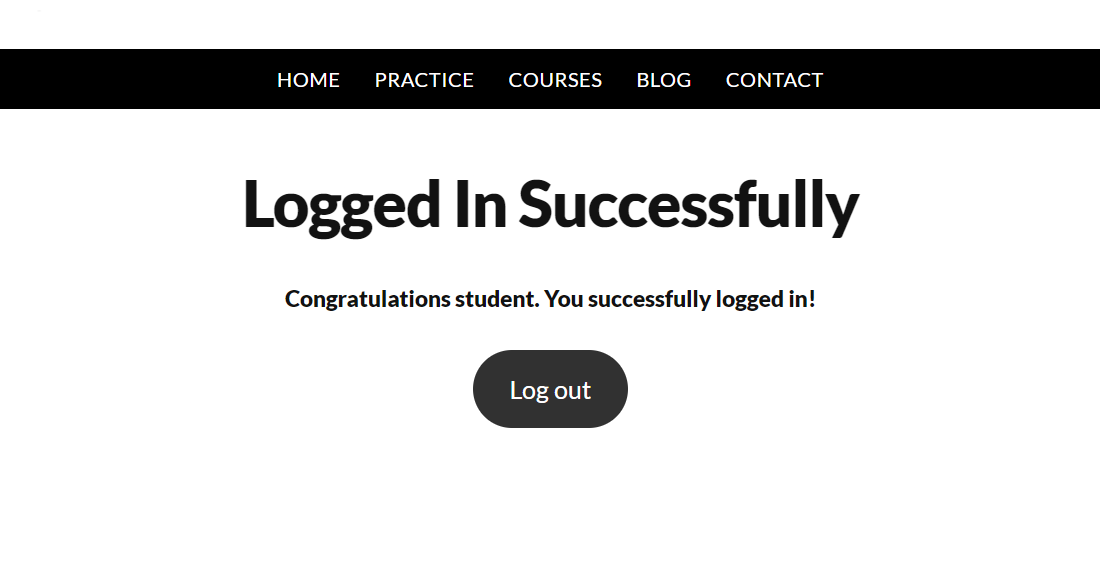
This script reads each row from an Excel file, uses the data to attempt login, and records whether each test passes or fails. This helps verify how the login function behaves with different input values.
Here is the output for the above code

TestNG DataProvider in Data-Driven Testing
In Selenium, TestNG provides a built-in feature called DataProvider that supports data-driven testing without relying on external files like Excel or CSV.
- DataProvider allows passing multiple sets of data directly from code to the test method.
- It reduces dependency on external data sources and simplifies test setup.
- Test cases run multiple times with different input values automatically.
- It improves execution speed and makes test scripts easier to manage.
Example use case: A login test can be executed with multiple username and password combinations using a DataProvider instead of reading data from Excel files.
Advantages of Data Driven Testing Framework
It improves overall test efficiency by separating test data from test scripts.
- Reusability: By reusing test scripts to test different sets of data, it reduces the number of test scripts that would need to be written.
- Maintainability: Since the test data are maintained outside the test script, it is far easier to do so.
- Scalability: New test cases can be added simply by updating the external data file.
- Effectiveness: It reduces the number of scripts to be written and, in the long run, cuts down execution time and effort.
Limitations of Data-Driven Testing Framework
Although data-driven testing improves efficiency and coverage, it also has certain limitations that can impact implementation and maintenance.
- Requires proper setup of external data sources like Excel, CSV, or databases, which adds initial complexity.
- Debugging becomes difficult when test failures occur due to data issues rather than script errors.
- High dependency on test data quality; incorrect or incomplete data can lead to false results.
- Not suitable for test cases where logic changes frequently or requires dynamic decision-making.
- Increased maintenance effort when large volumes of test data need to be updated or managed.