
Continuous Testing in DevOps is a process of testing software throughout development and deployment using automated testing practices. It uses automated testing to detect defects early and ensure faster, high-quality software delivery.
- Testing is integrated into the CI/CD pipeline.
- Automated tests provide quick feedback on code changes.
- Helps improve software quality and reduce release risks.
Example: In an e-commerce application, automated tests are triggered whenever changes are made to the payment module. This helps verify checkout functionality, payment processing, and order confirmation before deployment.
Types of Testing in Continuous Testing
Different types of testing are used in Continuous Testing to ensure software quality, performance, and reliability throughout the DevOps lifecycle. These tests help identify defects early and support faster delivery.
- Unit Testing: Unit Testing checks individual functions or components of an application. It helps developers identify coding errors early and ensures each module works correctly.
- Integration Testing: Integration Testing verifies the interaction between different modules or services. It ensures data flows properly and connected components work together without issues.
- Functional Testing: Functional Testing checks whether the application functions according to business and user requirements. It validates features, workflows, and expected outputs.
- Performance Testing: Performance Testing measures the speed, stability, and responsiveness of an application under different workloads. It helps identify bottlenecks and scalability issues.
- Security Testing: Security Testing identifies vulnerabilities, threats, and weaknesses in the application. It helps protect data and ensures secure software deployment.
Continuous Testing Lifecycle
The Continuous Testing Lifecycle is a process where testing activities are performed continuously throughout software development and deployment. It helps identify defects early, improve software quality, and support faster releases in DevOps.
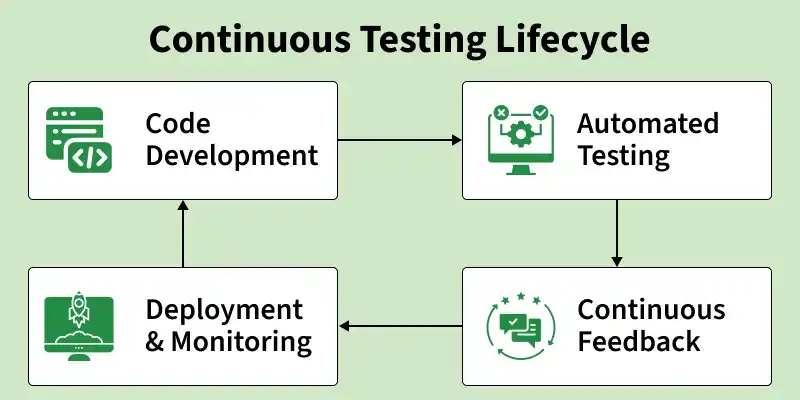
- Code Development: Developers create and modify application code based on project requirements. Code changes are regularly committed to the version control system for continuous integration and testing.
- Automated Testing: Automated tests are executed after every build or code change to verify application functionality and quality. These tests help quickly detect defects and reduce manual testing effort.
- Continuous Feedback: Test results are shared immediately with developers and testers. Quick feedback helps teams fix issues early and improve the overall development process.
- Deployment & Monitoring: After successful testing, the application is deployed to production or staging environments. Continuous monitoring helps identify performance issues, failures, and security risks in real time.
Implementing Continuous Testing in DevOps
Implementing Continuous Testing requires proper planning, automation, and coordination across the DevOps pipeline to ensure continuous software quality.

- Define Objectives: Identify testing goals such as improving quality, reducing defects, and supporting faster releases.
- Select Testing Tools: Choose appropriate automation and testing tools based on project requirements and technology stack.
- Automate Tests in CI/CD: Configure automated test execution within the CI/CD pipeline for continuous validation.
- Implement Quality Gates: Apply quality checks and validation rules before moving builds to the next stage.
- Establish Feedback Loops: Share test execution results quickly to help teams resolve issues efficiently.
- Test Prioritization: Execute critical and high-risk test cases first to provide faster feedback and reduce CI/CD pipeline execution time.
- Set Up Staging: Create a production-like environment for final validation before deployment.
- Foster Collaboration: Encourage coordination between development, testing, and operations teams throughout the process.
Tools Used for Continuous Testing
Continuous Testing uses various automation and testing tools to ensure software quality throughout the DevOps lifecycle. These tools help automate testing, manage builds, and provide continuous feedback.
- Selenium: Selenium is an open-source automation testing tool used for web application testing. It supports multiple programming languages and browsers for automated testing.
- Jenkins: Jenkins is a popular CI/CD automation tool that helps run automated tests during the build and deployment process. It supports continuous integration and continuous delivery.
- JUnit: JUnit is a unit testing framework mainly used for Java applications. It helps developers write and execute automated test cases efficiently.
- TestNG: TestNG is a testing framework inspired by JUnit and designed for advanced test configuration and reporting. It supports parallel testing and test grouping.
- JMeter: JMeter is a performance testing tool used to measure application speed, scalability, and load handling capability. It helps identify performance bottlenecks.
Challenges of Continuous Testing
Continuous Testing in DevOps improves software quality and delivery speed, but it also comes with several challenges. Organizations must manage automation, infrastructure, and testing processes effectively for successful implementation.
- High Initial Setup Cost: Setting up automated testing tools, test environments, and CI/CD pipelines requires time, effort, and investment. Small organizations may find the initial cost challenging.
- Test Maintenance: Automated test scripts need regular updates whenever the application changes. Poor maintenance can lead to inaccurate or failed test results.
- Complex Test Environment: Managing different testing environments, configurations, and dependencies can be difficult. Environment issues may affect testing accuracy and consistency.
- Integration Challenges: Integrating multiple testing tools and frameworks into the DevOps pipeline can be complex. Compatibility issues may slow down the testing process.
- Slow Test Execution: Running a large number of automated tests may increase execution time. Slow testing can delay feedback and software delivery.
Continuous Testing Vs Traditional Testing
Continuous Testing and Traditional Testing are two different approaches used to ensure software quality. Continuous Testing focuses on automated testing throughout the development lifecycle, while Traditional Testing is usually performed after the development phase is completed.
| Continuous Testing | Traditional Testing |
|---|---|
| Testing is performed continuously at every stage of development. | Testing is performed mainly after development is finished. |
| Uses automated testing integrated with the CI/CD pipeline. | Mostly depends on manual testing processes. |
| Provides immediate feedback on code changes. | Feedback is delayed and received later. |
| Defects are detected and fixed early. | Bugs are often identified in later stages. |
| Supports faster, reliable, and frequent software releases. | Software releases are slower and less frequent. |
| Strongly supports DevOps and Agile practices. | Limited integration with DevOps processes. |