
Automating API testing using Postman allows testers to validate APIs quickly, run repeatable tests, and ensure consistent results. It helps reduce manual effort and improves overall software quality.
- Supports automated test scripts using JavaScript
- Enables batch execution via Collection Runner
- Integrates with CI/CD using Newman
Postman Environment Setup
Postman Environment Setup helps manage URLs, tokens, and variables efficiently, making API requests reusable and easier to maintain.
Step 1. Create Environment
- Go to Environments and click Create New
- “Give the environment a name (e.g., Development or Testing).
Step 2. Add Variables
Define key-value pairs
- base_url = https://api.example.com
- auth_token = xyz123
Step 3. Use Variables in Requests
Replace values using {{variable_name}}
Example: {{base_url}}/users
4. Select Environment
Choose the environment from the dropdown before sending requests.
Example:
Instead of writing full URL every time:
https://api.example.com/users
Use:
{{base_url}}/users
Postman API Testing Automation Workflow
To automate API testing with Postman, we can use JSONPlaceholder - a free online mock REST API used for testing and prototyping. It provides ready-to-use endpoints, allowing testers to simulate real API requests without setting up a backend.
The base URL for all API requests is: https://jsonplaceholder.typicode.com. Before starting, ensure that Postman is installed on your system.
Step 1: Open Postman application
Launch the Postman application on your system.
Step 2: Create a New Collection
- Go to the Collections tab in the left sidebar
- Click on New Collection
- Enter a name, for example: JSONPlaceholder API Tests
- Click Create
Step 3: Create Requests in the Collection
Request 1: GET Users
- Open the JSONPlaceholder API Tests collection
- Click Add Request
- Name it: Get Users
- Select method: GET
- Enter URL: https://jsonplaceholder.typicode.com/users
- Click Save
.png)
Request: POST Create a Post
- Click Add Request again.
- Name the request, e.g., "Create a Post."
- Set the HTTP method to POST.
- Enter the URL: https://jsonplaceholder.typicode.com/posts.
- In the "Body" tab, select "raw" and enter a sample JSON payload:
{
"title": "Post from Postman",
"body": "This is a test post created using Postman",
"userId": 1
}
Click "Save."

Step 4: Write Test Scripts
Now, let's add test scripts to verify the responses. For the "Get Users" request
// Check if the status code is 200 (OK)
pm.test("Status code is 200", function () {
    pm.response.to.have.status(200);
});

// Check if the response has at least one user
pm.test("Response has users", function () {
    // Parse the JSON response
    const jsonData = pm.response.json();

    // Check if the response is an array and has at least one element
    pm.expect(jsonData).to.be.an('array').and.to.have.lengthOf.at.least(1);
});
.png)
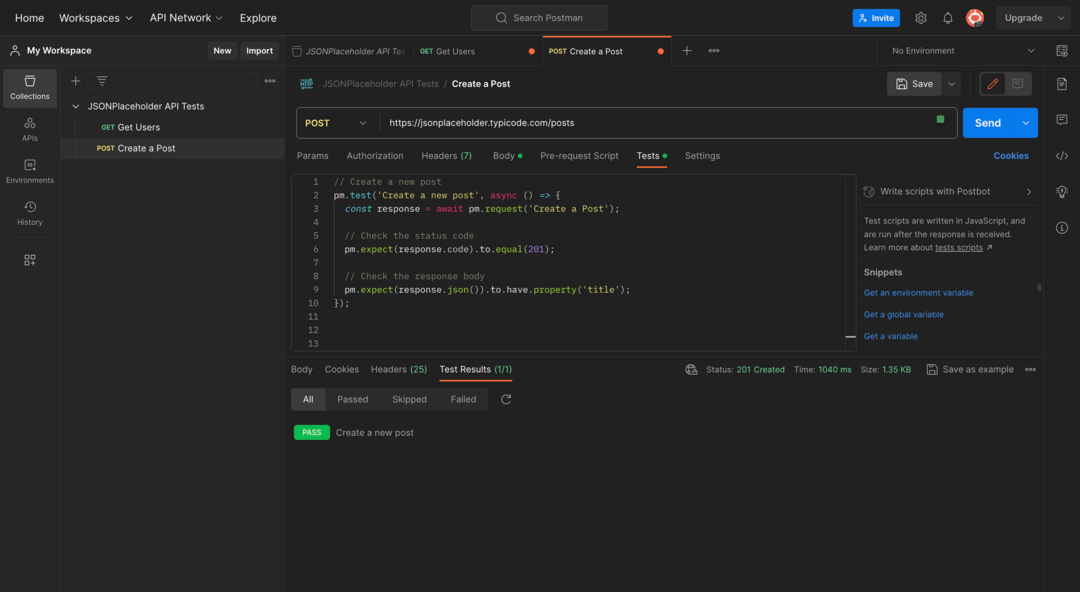
For "Create a Post" Request:
Create a new post
pm.test('Create a new post', async () => {
  const response = await pm.request('Create a Post');

  // Check the status code
  pm.expect(response.code).to.equal(201);

  // Check the response body
  pm.expect(response.json()).to.have.property('title');
});
Step 5: Run Collection using Collection Runner
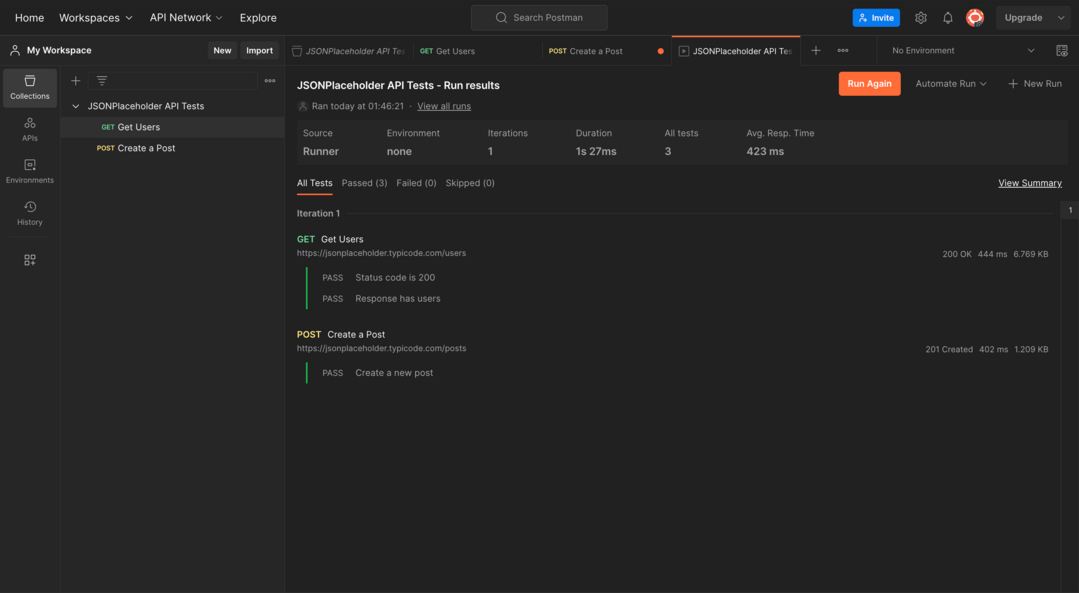
The Collection Runner in Postman is used to execute an entire collection of API requests in sequence. It allows testers to run multiple API tests together, automate execution, and validate responses in one go.
- Click on the "Runner" tab in the top menu.
- Select the collection "JSONPlaceholder API Tests."
- Click "Run JSONPlaceholder API Tests."
.png)
- Run the collection and review the test results.
- Review the test results.
Install Newman CLI
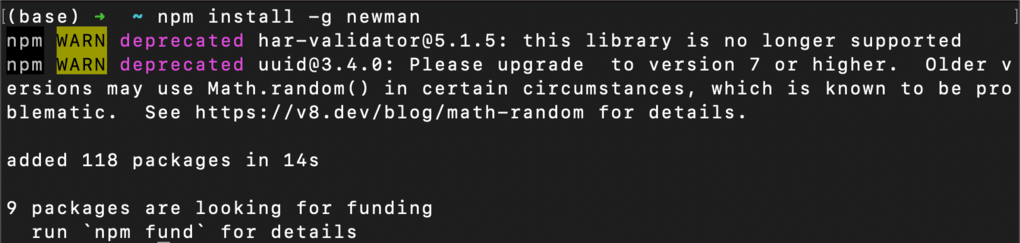
- Open a terminal window.
- Run the following command:
npm install -g newman
Note: This will install Newman, which is the command-line Collection Runner for Postman used to execute and automate API tests.
Once Newman is installed, run it from any directory on your machine. To run tests automatically using Newman, use the following command:
Running Tests Manually:
newman run <collection-name>
Here, the collection file is named JSONPlaceholder API Tests.postman_collection.json, so the following command is used:
newman run "JSONPlaceholder API Tests.postman_collection.json"
.png)
Scheduling Tests to Run Automatically:
- Newman does not support built-in scheduling.
- Use Cron, Windows Task Scheduler, or CI/CD tools (Jenkins/GitHub Actions) to schedule runs.
- These tools execute Newman commands automatically at set intervals.
1. Open the Postman app.
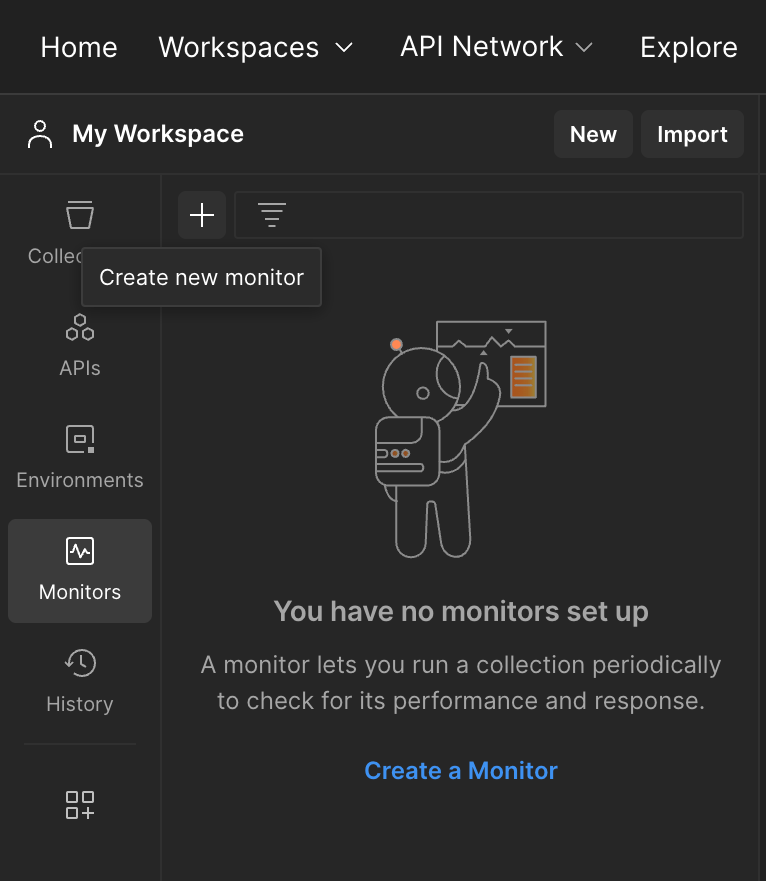
2. Enter a name for the monitor and select the collection you want to monitor.
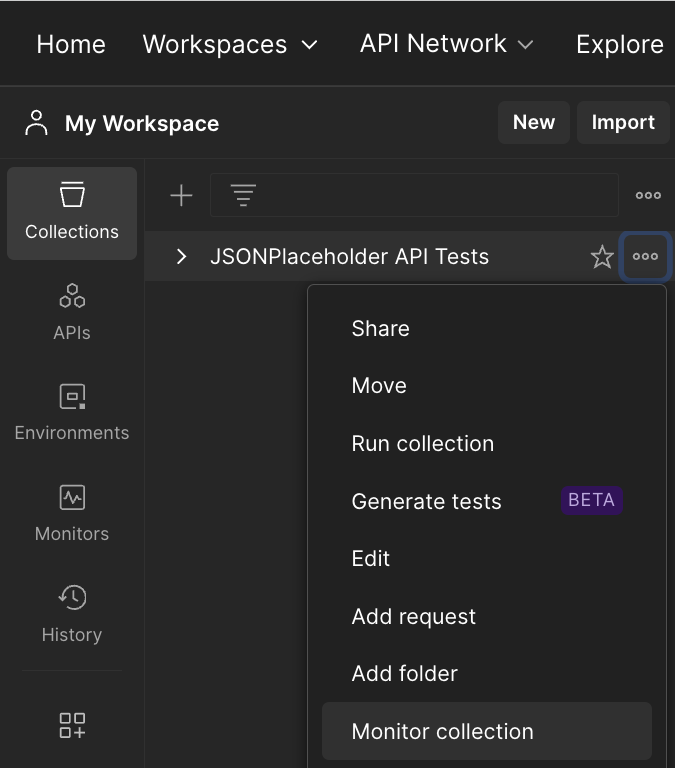
3. Configure a collection-based monitor.

4. Run the tests.
.png)
Best Practices for Automating API Tests in Postman
The following are best practices for Postman API test automation:
- Organize tests into collections and folders. This will make it easier to find and run the necessary tests.
- Use variables and environments. This will make tests more reusable and portable.
- Write reusable tests. This will save time and effort in the long run.
- Implement error handling. This will prevent tests from failing if something unexpected happens.
- Log test results. This will make it easier to monitor test results and identify any problems.
- Implement data cleanup strategies to remove or reset test data after execution to maintain a clean and consistent testing environment.
Benefits of Automated API Testing
Some of the benefits of automated API testing are:
- Speed: Automated tests execute much faster than manual testing, enabling quick validation of multiple APIs in less time.
- Accuracy: Automated tests reduce human errors by using predefined scripts, ensuring reliable and consistent results.
- Repeatability: Automated tests can be run multiple times with the same precision, making them ideal for regression testing.
- Scalability: Automated tests can handle large and complex systems by executing tests across multiple APIs and environments efficiently.
Limitations of Postman
Postman is a powerful API testing tool, but it also has certain limitations that should be considered while using it for automation and large-scale testing.
- Postman is not ideal for very large-scale performance testing compared to tools like JMeter.
- Complex test logic can become harder to manage as collections grow.
- Requires manual setup for advanced CI/CD integration.
- Limited support for true parallel execution of tests.