
The Linux Kernel is the core part of the Linux operating system that connects software with hardware. It manages system resources and allows applications to function properly. Linux is open-source, which means anyone can view, modify and distribute its source code.
- The Linux Kernel acts as a bridge between hardware and software.
- Open-source and freely available to everyone.
- Developed by Linus Torvalds in 1991 as a personal project.
- Continuous community contributions made it powerful and popular.
Role of the Kernel in Resource Management
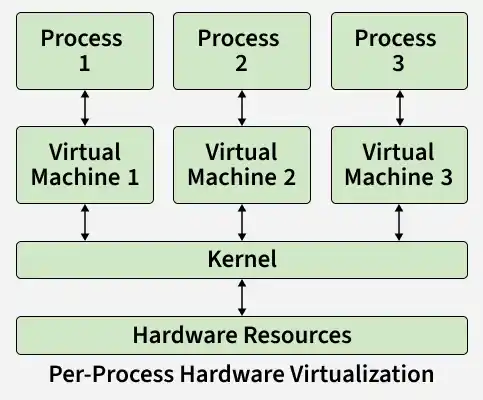
In a general-purpose computer, multiple processes run simultaneously. To manage these processes efficiently, a special software layer is required. This layer is known as the kernel.
- Allocates CPU time to processes
- Manages system memory
- Controls access to hardware devices
- Prevents conflicts between processes
- Provides virtual resources to applications
Core Subsystems of the Linux Kernel
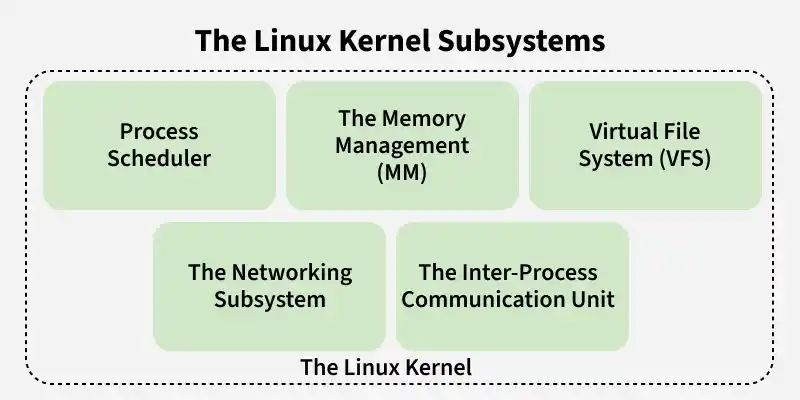
The Linux kernel is composed of several subsystems that work together to manage system resources.
Major Subsystems
- The Process Scheduler
- The Memory Management (MM)
- The Virtual File System (VFS)
- The Networking Subsystem
- Inter-Process Communication (IPC) Unit
Important Subsystems of The Linux kernel
1. Process Scheduler
The Process Scheduler is responsible for distributing CPU time fairly among all running processes. It decides which process should run and for how long.
- Controls process execution order
- Ensures fair CPU usage
- Supports multitasking
- Improves system responsiveness
2. Memory Management
The Memory Management manages system memory and allocates it to different processes. It provides each process with its own virtual address space.
- Allocates and frees memory
- Handles paging and swapping
- Provides memory protection
- Improves memory efficiency
3. Virtual File System (VFS)
The Virtual File System provides a unified interface for accessing different types of file systems. It hides the details of physical storage from applications.
- Supports multiple file systems
- Provides a standard file interface
- Improves portability
- Simplifies file access
4. Networking Subsystem
The networking subsystem manages network communication, including protocols such as TCP/IP, socket interfaces and packet routing.
- Handles network packets
- Manages sockets and connection
- Supports multiple network protocols
- Enables communication between systems
5. Inter-Process Communication (IPC)
IPC mechanisms allow processes to communicate and synchronize with each other.
Common IPC methods:
- Pipes
- Message queues
- Shared memory
- Signals
- Semaphores
Basic Linux Commands for Kernel Work
To work effectively with Linux and the kernel, you should be familiar with some basic terminal commands.
1. ls: List Files and Directories
Displays the contents of a directory.
Syntax:
ls [OPTION] [FILE]Example:
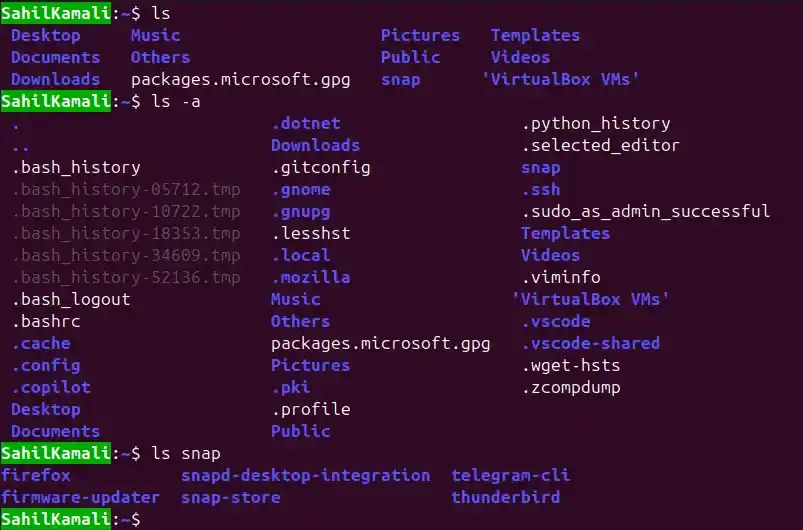
To list all the file and directories in our current location
ls        # List current directory
ls -a     # Show hidden files
ls snap   # List contents of snap directory
2. mkdir: Create a Directory
To creates a new directory we use mkdir (make directory) command.
Syntax:
mkdir [OPTION] DIRECTORYExample:
To make a directory name `test` and to check it we can use command `ls`.
mkdir test
ls
Output:

3. cat: Display File Content
Prints the contents of a file to the terminal.
Syntax:
cat [OPTION] [FILE]Example:
Printing a content inside a text file name `example`.

4. pwd: Show Current Directory
Displays the full path of the current working directory.
Syntax:
pwdExample:
