
The Linux operating system architecture defines how different components of the system interact with each other to manage hardware resources, run applications, and provide a stable and secure computing environment. Linux follows a layered architecture, where each layer has a specific role and responsibility.
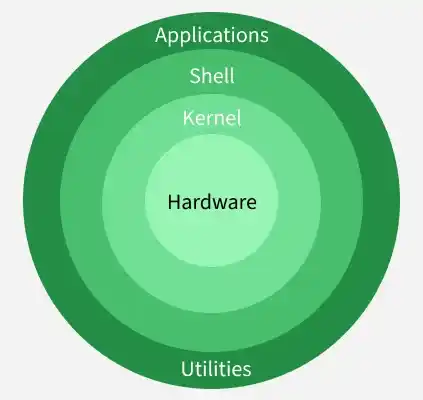
The main components of Linux operating system are:
- Application
- Shell
- Kernel
- Hardware
- Utilities
Each layer communicates with the one below it, creating a structured and efficient operating system design:
Kernel
Kernel is the core component of the Linux operating system that sits between the hardware and user space, managing system resources and ensuring smooth communication between software and hardware. It controls how processes are executed, scheduled, and isolated to maintain system stability and security.
The kernel is responsible for:
- Memory management – Allocates and manages system memory efficiently
- Process management – Schedules processes and controls execution using queues
- Resource allocation – Distributes CPU, memory, and I/O resources among processes
- Device management – Controls hardware devices through device drivers
- Application interaction – Acts as a bridge between applications and hardware
- Security – Enforces access control and system-level security mechanisms
Types of Kernel
1. Monolithic Kernel
- A Monolithic kernel Offers high performance due to direct communication between components, but the large kernel size makes it more complex and harder to maintain
- All core operating system services such as process management, memory management, device drivers, and file systems run in kernel space, sharing the same memory
2. Microkernel
- Only essential services like process scheduling and memory management run in kernel space, while other services execute in user space
- Microkernel provides better security and modularity, but may suffer from performance overhead due to frequent inter-process communication
3. Exokernel
- Exokernel exposes hardware resources directly to applications, allowing them to manage resources at a low level
- Enables high flexibility and performance, but increases application complexity due to minimal abstraction provided by the kernel
4. Hybrid kernel
- Combines features of monolithic and microkernel architectures, keeping critical services in kernel space while supporting modular components
- Delivers balanced performance and flexibility, making it suitable for modern systems that require both speed and stability
Main Subsystems of kernel
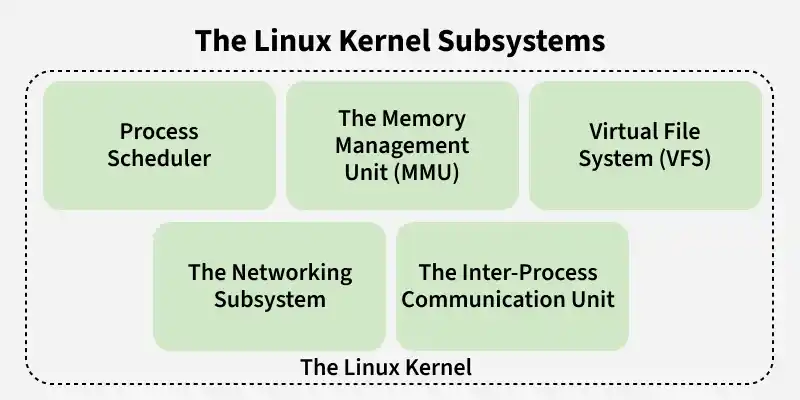
- Process scheduler: Responsible for fairly distributing the processing time among all the concurrently running process
- Memory management unit: This kernel sub unit is responsible for proper distribution of memory resources among the concurrently running process
- Virtual file system: This subsystem provides interface to access stored data across different file system and different physical media
- Networking Subsystem: Responsible for handling all network communication, including data transmission, routing, and network protocols
- Inter-Process Communication (IPC) Unit: Enables communication and synchronization between multiple running processes within the system
System Libraries
System libraries provide predefined functions that allow application programs and system utilities to access kernel features without interacting with the kernel directly. They form the foundation for software development by offering reusable, standardized interfaces for system operations.
Common system libraries include:
- GNU C Library (glibc): Provides core system calls and built-in functions required for executing C programs
- libpthread (POSIX Threads): Enables creation and management of multithreaded applications
- libdl (Dynamic Linker): Supports dynamic loading and linking of shared libraries at runtime
- libm (Math Library): Offers mathematical functions such as trigonometry, logarithms, and exponentiation
- Other libraries: librt (Real-Time operations), libcrypt (Cryptographic functions), libnss (Name Service Switch), libstdc++ (C++ Standard Library)
Shell
The shell is a software interface to the kernel. It takes commands from the user and interprets them. The shell transmits these commands to the kernel, which then performs the requested operations. Users can just enter the command and using the kernel's function that specific task is performed accordingly.
Different types of shell
Each shell offers unique features and user experiences for interacting with Unix/Linux systems, from basic scripting to advanced customization.
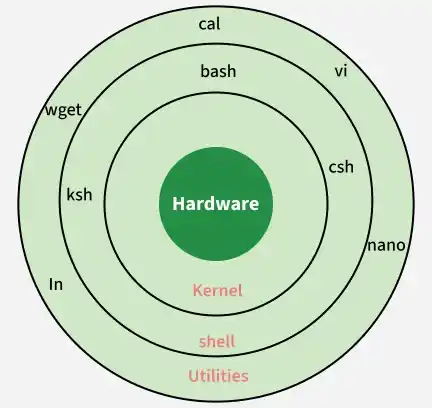
1. Bourne Shell (sh)
- One of the earliest Unix shells, providing basic command execution and simple scripting capabilities
- Reliable and lightweight, still widely used for system scripts and compatibility purposes
2. C Shell (csh)
- Designed with a syntax similar to the C programming language, making it familiar to C developers
- Introduced features like command history, but is less suitable for complex scripting
3. Korn Shell (ksh)
- Combines features of the Bourne Shell and C Shell while maintaining backward compatibility
- Widely used in enterprise environments for its powerful scripting and stability
4. Bash (Bourne Again Shell)
- An enhanced version of the Bourne Shell with features like command history, tab completion, and scripting improvements
- The default shell on most Linux distributions and widely used due to being free and flexible
5. Z Shell (zsh)
- A highly customizable shell that integrates features from Bash, ksh, and csh
- Popular among developers for its themes, plugins, and advanced auto-completion
6. Fish (Friendly Interactive Shell)
- Designed for ease of use with features like syntax highlighting, command suggestions, and simple configuration
- Ideal for interactive use, though less commonly used for complex scripting
Hardware Layer
The hardware layer is the lowest level of the Linux operating system and forms the foundation on which all other components operate. It consists of physical devices and low-level controls that allow the system to function efficiently and reliably.
- Includes physical components such as CPU, memory, storage, and I/O devices
- Works with device drivers to enable hardware communication
- Supports memory access, CPU control, and I/O operations
- Ensures stable and efficient interaction between hardware and the operating system
System utilities
System utilities are command-line tools that help users and administrators manage, configure, and monitor the Linux system. They simplify system administration by providing ready-to-use commands for common tasks.
- Perform file and directory management operations
- Monitor system performance and resource usage
- Manage users, groups, and permissions
- Configure and troubleshoot network settings