
Comments in shell scripts are used to explain code and improve readability. They are ignored by the shell during execution and do not affect the program output. Comments are mainly used for documentation and code maintenance. They help developers understand the purpose and logic of commands, especially when scripts become long or complex.
- Comments are ignored by the shell interpreter.
- They improve script readability and maintainability.
- Comments help explain logic, variables, and script purpose.
- Shell scripting mainly supports single-line comments.
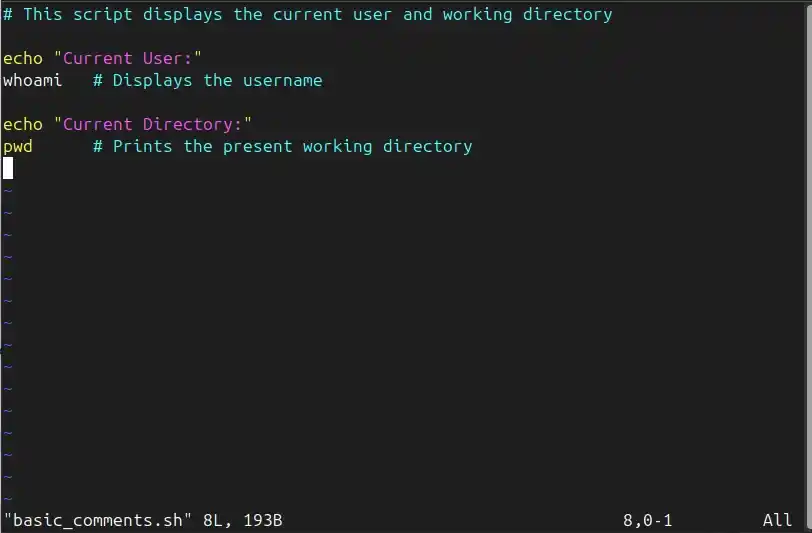
Example: Basic Use of Comments in a Shell Script
To show how comments are used to explain script behavior without affecting execution.
# This script displays the current user and working directory

echo "Current User:"
whoami   # Displays the username

echo "Current Directory:"
pwd      # Prints the present working directory
- Lines starting with # are comments and are ignored by the shell
- Comments explain what the script and individual commands do
- Inline comments (after a command) are also allowed
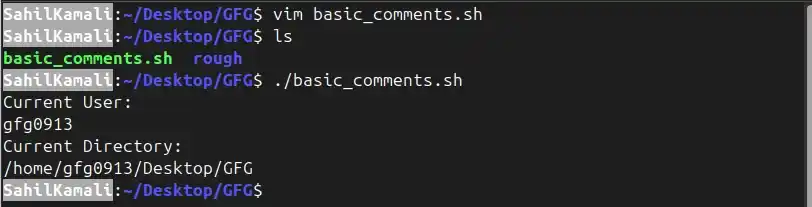
Output:
Syntax
# comment text- #: Indicates the start of a comment
- comment text: Any explanatory text ignored by the shell
Types of Comments in Shell Scripting
- Single-line comments using #
- Multi-line comments using workarounds
- Documentation-style comments for larger explanations
1. Single-line comments
Single-line comments are used to explain a single command or a small block of code. They begin with the # symbol, and everything after it on the same line is ignored by the shell.
- Explain the purpose of a command
- Improve script readability
- Temporarily disable a command
- Add short notes for future reference
Syntax:
# comment text- #: Indicates the start of a comment
- comment text: Any explanatory text ignored by the shell
Example 1: Commenting a Line
To explain what a specific command does.
Command:
# This command prints a message on the terminal
echo "Hello World"
- The # symbol marks the line as a comment. The shell skips this line and executes the echo command.
Output:


Example 2: Disabling a Command
To prevent a command from executing without deleting it.
Command:
# echo "This line will not run"
echo "This line will run"
- The first echo command is commented out using #, so the shell ignores it.
Output:


2. Multi-line Comments in Shell Script
Shell scripting does not support native multi-line comments. However, multi-line comments can be created using commands that do nothing, such as : (null command). This method is useful for adding long explanations or documentation blocks.
- Add detailed documentation
- Explain complex logic
- Temporarily ignore multiple lines
- Improve script maintainability
Syntax:
: ' multi-line comment '- : - Null command that performs no action
- ' ' - Single quotes preserve multi-line text
- Text inside quotes: Ignored by the shell
Example: Using : for Multi-line Comments
To include a block of text that spans multiple lines and is ignored during execution.
Command:
: '
This is a multi-line comment.
The shell ignores everything inside this block.
'
echo "Script executed"
- The : command does nothing. The text enclosed in single quotes is treated as its argument and ignored.
Output:


Shebang Line (Interpreter Directive)
The shebang line is a special comment placed at the very beginning of a shell script. It indicates the interpreter that should execute the script.
Format:
#!/bin/bash- Begins with #! followed by the absolute path of the interpreter.
- Required for direct script execution
Note: Although it starts with #, it is handled specially by the operating system.
Common Pitfalls and Misconceptions
- Expectation of multi-line comments: Shell scripting does not provide native multi-line comment syntax.
- Missing space in inline comments: The # must have a space before it; otherwise, the shell may treat it as part of the command or argument.
- Excessive commenting: Redundant comments reduce clarity instead of improving it.
- Replacing clean code with comments: Clear naming and structure should reduce the need for explanations.