
The bg command in Linux is used to resume a suspended job and run it in the background. It allows processes to continue execution without blocking the terminal.
- Moves a stopped (suspended) job to the background
- Works with job control in the shell (like Bash)
- Requires a job ID (e.g., bg %1) to resume a specific job
- Commonly used after suspending a process using Ctrl + Z
- Allows the terminal to be used for other commands while the job runs
Example
Step 1: Start a long-running process (e.g., sleep 60).
sleep 60Step 2: Suspend the process by pressing Ctrl + Z.
Output:
[1]+ Stopped sleep 60Step 3: Resume the suspended process in the background using bg.
bgOutput:
[1]+ sleep 60 &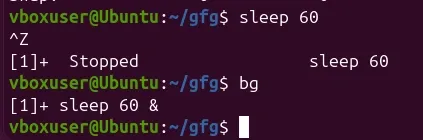
- The process sleep 60 resumes execution in the background.
- You can verify it by running the jobs command:
Syntax
bg [job_spec ...]where,
- job_spec: This is used to identify the job you want to move to the background. It can be specified in several formats:
- %n: Refers to job number n.
- %str: Refers to a job that was started by a command beginning with str.
- %?str: Refers to a job that was started by a command containing str.
- %% or %+: Refers to the current job. Both fg and bg commands will operate on this job if no job_spec is provided.
- %-: Refers to the previous job.
If no job_spec is provided, the most recent job is resumed in the background.
Useful Options for bg command
1. bg [JOB_SPEC]:
This command is used to run the mentioned job in the background.
Command:
jobs
sleep 500
# Press: Ctrl + Z   (to suspend the process)

jobs
bg %1
jobs
Output:
![bg [JOB_SPEC]](https://media.geeksforgeeks.org/wp-content/uploads/bg-image.png) The command sleep 500 creates a foreground job.
The command sleep 500 creates a foreground job.
- We use jobs command to list all jobs
- We create a process using sleep command, we get its ID as 1.
- We move it to the background using its job ID with bg
2. bg --help:
Displays the help information for the bg command. This is useful if you need more information.
Command:
bg --helpOutput:
