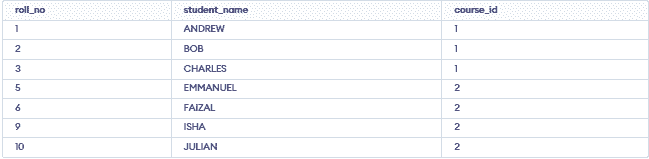
The IN operator is used to check whether a column’s value matches any value in a given list.It is used to:
- Compare a column with multiple values at once.
- Return TRUE if a match is found in the list.
- Return FALSE if no values match.
- Simplify queries by replacing multiple OR conditions.
Syntax 1: SELECT IN for a list of values
Using the IN operator to provide a list of values:
SELECT column1, column2, ..., columnN
FROM table_name
WHERE column_name IN (val_1, val_2, ..., val_N);
Parameters:
- column1, column2, ..., columnN: The columns you want to retrieve.
- table_name: The table from which to retrieve the columns.
- column_name: The column you want to filter.
- val_1, val_2, ..., val_N: The list of values you want to match.
Syntax 2: SELECT IN with a Subquery
Using the IN operator on values returned by another subquery:
SELECT column1, column2....columnN
FROM table_name1
WHERE column_name IN
(SELECT column_name
FROM table_name2);
Parameters:
- table_name1: The primary table from which to retrieve the columns.
- table_name2: The secondary table used in the subquery to provide the list of values.
SQL SELECT IN Example
Let's look at some examples of the SELECT IN in SQL and understand it's working. First we have to create a demo database and table, on which we will perform the operation.
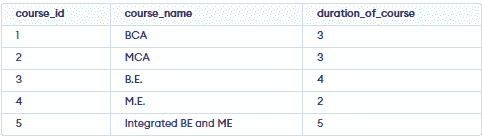
Course Table
CREATE TABLE COURSE(
    course_id INT,
    course_name VARCHAR(20),
    duration_of_course INT,
    PRIMARY KEY(course_id)
);

INSERT INTO COURSE(course_id, course_name, duration_of_course)
VALUES
    (1, 'BCA', 3),
    (2, 'MCA', 3),
    (3, 'B.E.', 4),
    (4, 'M.E.', 2),
    (5, 'Integrated BE and ME', 5);
Output:
Student Table
CREATE TABLE STUDENT(
    roll_no INT,
    student_name VARCHAR(20),
    course_id INT,
    PRIMARY KEY(roll_no)
);

INSERT INTO STUDENT(roll_no, student_name, course_id)
VALUES
    (1, 'ANDREW', 1),
    (2, 'BOB', 1),
    (3, 'CHARLES', 1),
    (4, 'DAIZY', 3),
    (5, 'EMMANUEL', 2),
    (6, 'FAIZAL', 2),
    (7, 'GEORGE', 4),
    (8, 'HARSH', 5),
    (9, 'ISHA', 2),
    (10, 'JULIAN', 2),
    (11, 'KAILASH', 3),
    (12, 'LAIBA', 5),
    (13, 'MICHAEL', 3);

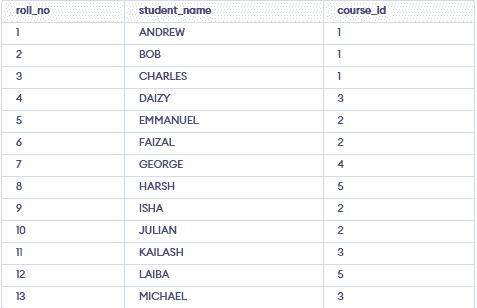
SELECT * FROM STUDENT
Output:
Example 1: Using SELECT IN with a List of Values
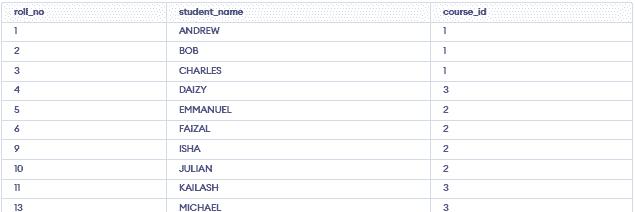
In this example, we will use SELECT IN statement on a list of values in WHERE Clause.
SELECT * FROM
STUDENT
WHERE course_id
IN (1, 2, 3);
Output:
Example 2: SELECT IN with a Sub-query
In this example, we will use SELECT IN to provide a subquery to WHERE clause.
SELECT *
FROM STUDENT
WHERE course_id
IN (SELECT course_id
      FROM COURSE
      WHERE duration_of_course = 3
);
Output: