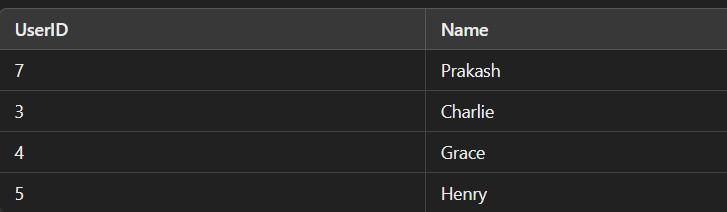
Set Operators in SQL are used to combine, compare or filter data by performing operations between two or more sets, enabling deeper and more flexible analysis. They allow users to analyze overlaps, differences and unions between data groups making it easier to answer complex business questions that go beyond simple filtering.
- Combines multiple sets using logical operations
- Supports Union, Intersection and Difference
- Helps compare overlapping and non-overlapping data
- Enables advanced segmentation and analysis
Create User Tables
Before exploring SQL set operators first create a simple dataset that represents users recorded across different years. Each table contains a UserID and Name, allowing us to compare users across time using set operations.
Refer: Create table in SQL
Table Structure
Each yearly table follows the same structure to ensure compatibility with SQL set operators.
CREATE TABLE IF NOT EXISTS users.users_2021 ( UserID INT PRIMARY KEY, Name VARCHAR(50));
CREATE TABLE IF NOT EXISTS users.users_2022 ( UserID INT PRIMARY KEY, Name VARCHAR(50));
CREATE TABLE IF NOT EXISTS users.users_2023 ( UserID INT PRIMARY KEY, Name VARCHAR(50));
Sample Data Insertion
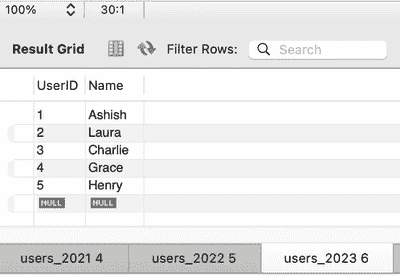
We insert sample user records for each year to simulate new users joining and existing users continuing across years.
INSERT INTO users.users_2021 (UserID, Name) VALUES (1, 'Ashish'), (2, 'Laura'), (7, 'Prakash');
INSERT INTO users.users_2022 (UserID, Name) VALUES (1, 'Ashish'), (2, 'Laura'), (3, 'Charlie'), (4, 'Grace');
INSERT INTO users.users_2023 (UserID, Name) VALUES (1, 'Ashish'), (2, 'Laura'), (3, 'Charlie'), (4, 'Grace'), (5, 'Henry');
Output:
Types of Set Operators in SQL
1. UNION
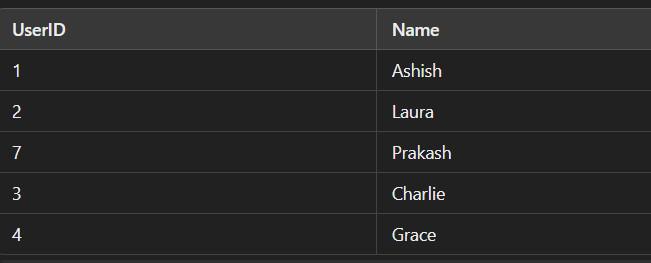
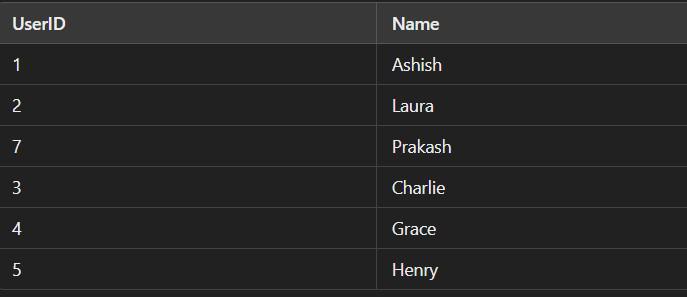
Combines the result sets of two or more SELECT statements and removes duplicate rows.
Syntax:
SELECT columns FROM table1
UNION
SELECT columns FROM table2;
Example: Union removes duplicates and we are using a similar database of users which we have created previously in joins.
SELECT * FROM users.users_2021
UNION
SELECT * FROM users.users_2022;
SELECT * FROM users.users_2021
UNION
SELECT * FROM users.users_2023;
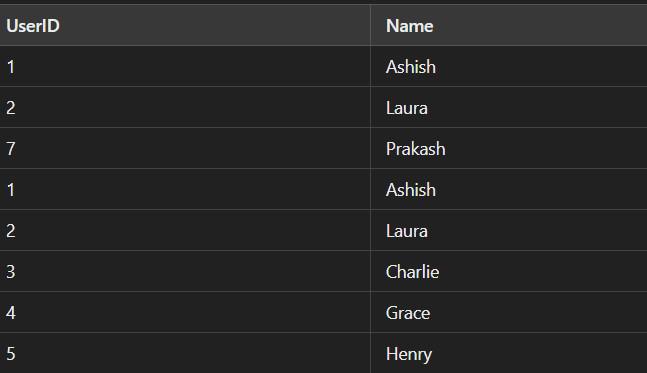
2. UNION ALL
Combines the result sets of two or more SELECT statements without removing duplicates.
Syntax:
SELECT columns FROM table1
UNION ALL
SELECT columns FROM table2;
Example:
SELECT * FROM users.users_2021
UNION ALL
SELECT * FROM users.users_2022;
3. EXCEPT
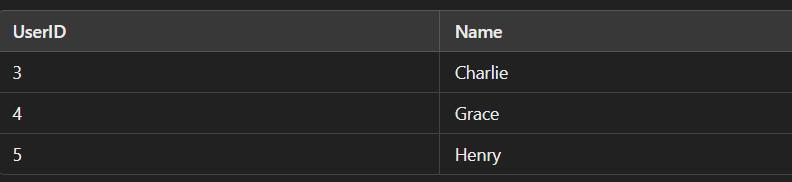
Returns the rows from the first SELECT statement that are not in the second SELECT statement.
Syntax:
SELECT columns FROM table1
EXCEPT
SELECT columns FROM table2;
Example:
SELECT * FROM users.users_2021
EXCEPT
SELECT * FROM users.users_2022;

SELECT * FROM users.users_2023
EXCEPT
SELECT * FROM users.users_2021;
4. INTERSECT
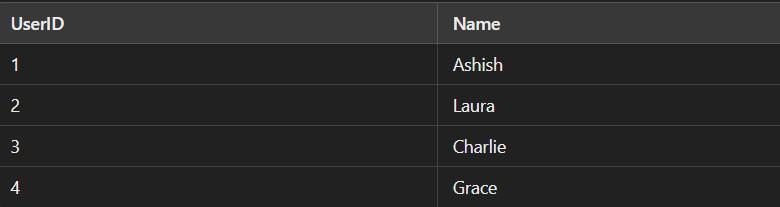
Returns only the rows that are common to both SELECT statements.
Syntax:
SELECT columns FROM table1
INTERSECT
SELECT columns FROM table2;
Example:
SELECT * FROM users.users_2021
INTERSECT
SELECT * FROM users.users_2022;

SELECT * FROM users.users_2022
INTERSECT
SELECT * FROM users.users_2023;
Combining Multiple Set Operators
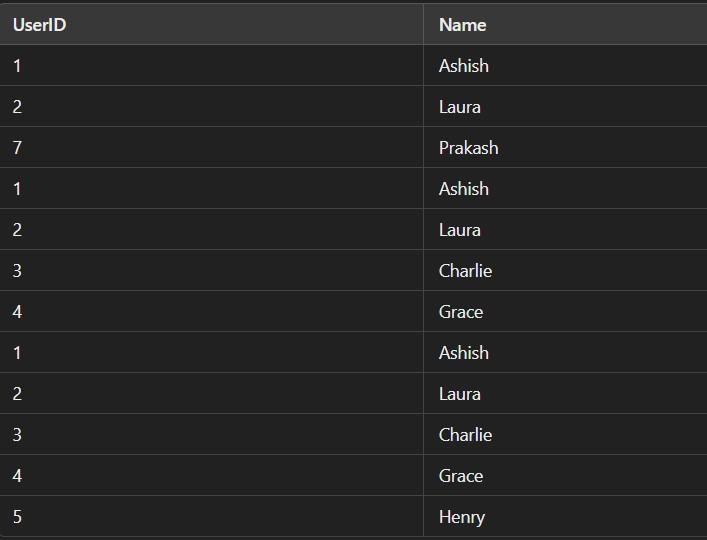
We can combine multiple set operators to create complex queries.
Note: UNION and UNION ALL can be combined, but the use of parentheses ensures the correct order of operations when combining multiple operators.
SELECT * FROM users.users_2021
UNION ALL
SELECT * FROM users.users_2022
UNION
SELECT * FROM users.users_2023;
1. List the New Users Added in 2022
Identifies users who appeared in 2022 but were not present in 2021.
SELECT * FROM users.users_2022
EXCEPT
SELECT * FROM users.users_2021;

2. List the new users added in 2023
Finds users who joined in 2023 and did not exist in the 2022 dataset.
SELECT * from users.users_2023
EXCEPT
SELECT * from users.users_2022;

3. List the users who left us
Returns users who were present in 2021 but are missing in both 2022 and 2023.
SELECT * FROM users.users_2021
EXCEPT
SELECT * FROM users.users_2022
EXCEPT
SELECT * FROM users.users_2023;

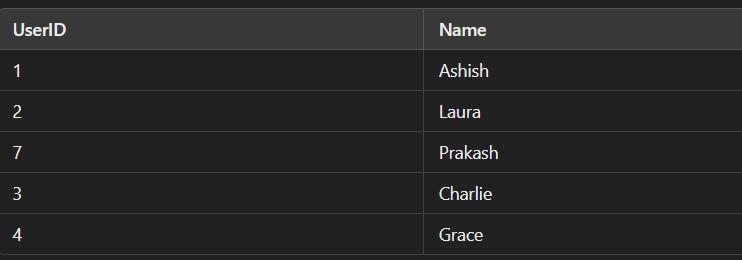
4. List All the Users That Were There Throughout the Database for 2021 & 2022
Lists all users who existed at any point during 2021 or 2022.
SELECT * FROM users.users_2022
UNION
SELECT * FROM users.users_2021;
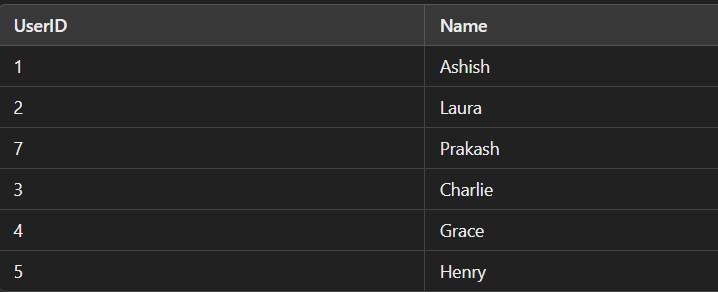
5. All Users Across All Years
Combines all unique users who appeared in 2021, 2022 or 2023.
SELECT * FROM users.users_2021
UNION
SELECT * FROM users.users_2022
UNION
SELECT * FROM users.users_2023;
6. List the Users That Are There With Us for the Last 3 Years
Identifies users who consistently appear in all three yearly datasets.
SELECT * FROM users.users_2021
INTERSECT
SELECT * FROM users.users_2022
INTERSECT
SELECT * FROM users.users_2023;

7. List All Users Except Those Who Are There With Us for 3 Years
Returns all users except those who have been present continuously for all three years.
SELECT * FROM users.users_2021
UNION
SELECT * FROM users.users_2022
UNION
SELECT * FROM users.users_2023
EXCEPT
SELECT * FROM users.users_2021
INTERSECT
SELECT * FROM users.users_2022
INTERSECT
SELECT * FROM users.users_2023;