
In ReactJS, re-rendering occurs when React needs to update the app with new data or when a component’s state or props change. React compares the updated component with the previous one and updates only the parts that need changing to keep everything in sync.
How React Handles Re-Rendering
React uses Virtual DOM as an intermediate layer. It sits between what the developer wants to show on the screen and what the browser actually renders. This helps React efficiently update only the necessary parts of the UI.
- Initial Render: React creates a virtual DOM tree representing the UI based on the current state and props of components.
- State or Props Change: When the state or props change, React updates the component’s virtual DOM and compares it with the previous virtual DOM using a process called reconciliation.
- Diffing Algorithm: React’s diffing algorithm identifies the differences between the current and previous virtual DOM. Only the changes are applied to the real DOM, which minimizes performance overhead.
- Re-rendering: React re-renders the components with the new state or props, and only the necessary DOM updates are applied.
Example: React Re-rendering with State
import React, { useState } from 'react';

function Counter() {
    const [count, setCount] = useState(0);

    return (
        <div>
            <p>Count: {count}</p>
            <button onClick={() => setCount(count + 1)}>Increment</button>
        </div>
    );
}

export default Counter;
Output
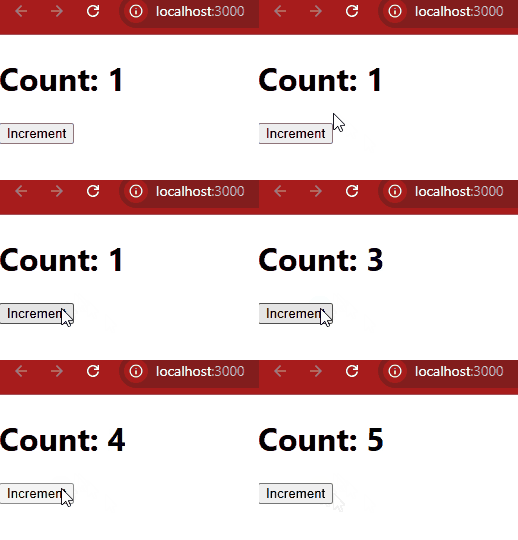
In this example
- Initially the component rerenders with the count = 0.
- When we click the button the state updates, which trigger the re-rendering.
- Now, the React will compare with the virtual Dom and will update the only changed part.
When Does React Re-render a Component
Re-rendering components in React happens when
- State Change: Using setState in class components or useState in functional components triggers a re-render.
const [count, setCount] = useState(0);const increment = () => setCount(count + 1);- Props Changes: When a parent component passes new props to a child, the child component re-renders.
<ChildComponent value={newValue} />- Force Update: Although rarely needed, you can force a re-render using forceUpdate() in class components.
this.forceUpdate();- Context Changes: Components consuming context via useContext will re-render when the context value changes.
const value = useContext(MyContext);How React Optimizes Re-rendering
React optimizes re-rendering using several techniques to ensure performance:
- Virtual DOM: React maintains a lightweight virtual DOM that helps minimize direct DOM manipulations.
- Diffing Algorithm: React compares the new virtual DOM with the previous version to detect changes efficiently.
- Batched Updates: React batches multiple state updates together to reduce the number of re-renders.
- Memoization: React provides tools like React.memo and useMemo to prevent unnecessary re-renders.
How to Control Re-rendering in React
Controlling unnecessary re-renders is essential for optimizing performance, especially in large applications. Here are some techniques to manage re-rendering:
- React.memo: Unnecessary re-renders are prevented with React.memo by updating only when props change.
- shouldComponentUpdate: Re-rendering can be controlled with shouldComponentUpdate by returning
falseto skip updates even when state or props change. - useMemo: Expensive values can be cached with useMemo until dependencies change.
- useCallback: Function references can be cached with useCallback until dependencies change.
- Lazy Loading and Suspense: Component loading can be delayed with Lazy Loading and Suspense until they are needed.