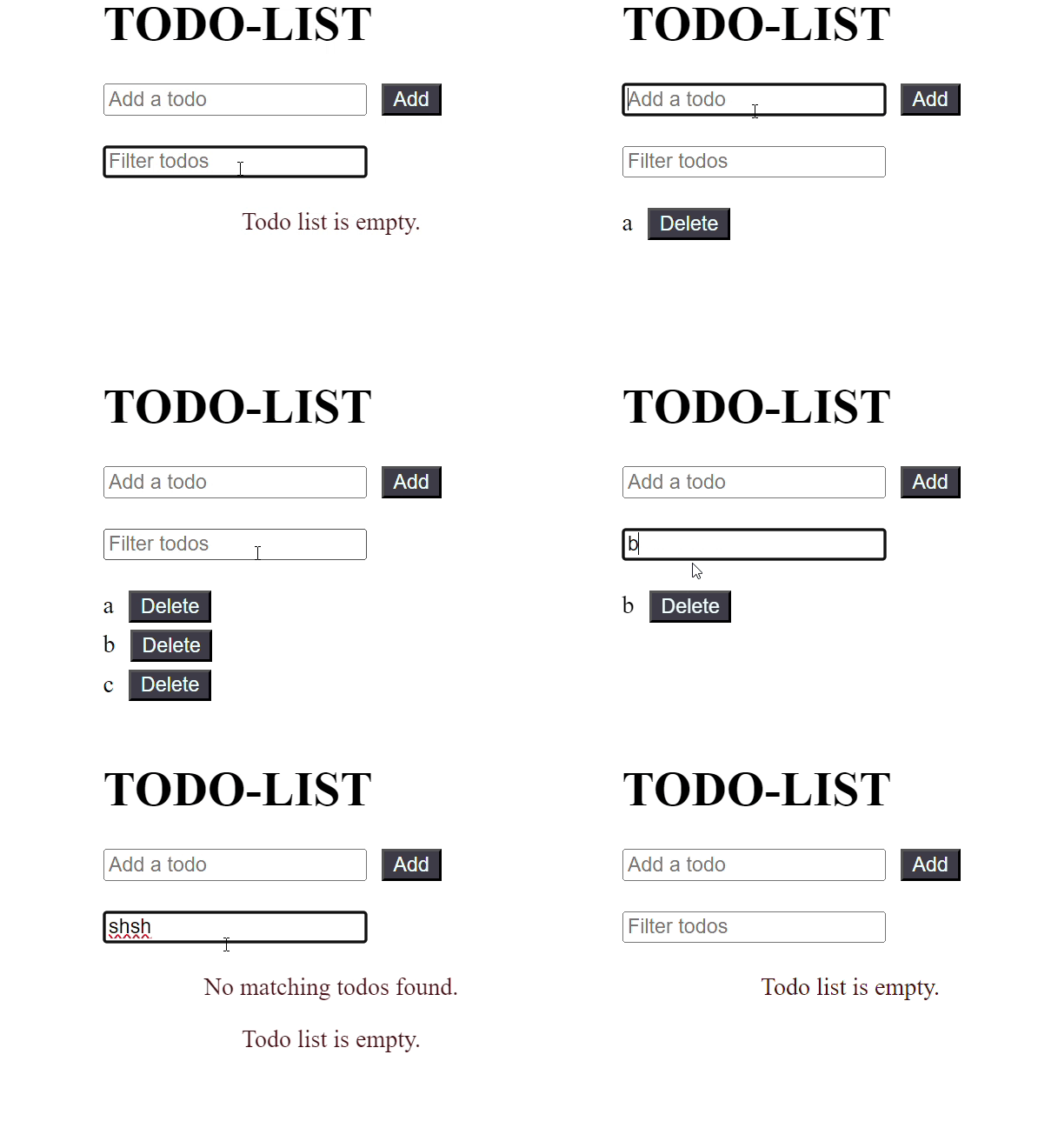
React.memo and useMemo help improve performance by avoiding unnecessary re-computations. They allow React to reuse previously calculated results when inputs have not changed.
- React.memo prevents re-rendering of functional components when props are unchanged
- useMemo memoizes the result of a function call inside a componen
- Both help optimize performance in React applications
React.memo()
React.memo() is a higher-order component (HOC) provided by React that memoizes functional components. It means that it caches the result of the component’s rendering based on its props, and re-renders only when the props have changed.
Syntax of React.memo():
const MemoizedComponent = React.memo(FunctionalComponent);useMemo()
useMemo() is a React Hook used to memoize the result of expensive computations within functional components. It memorizes the value returned by a provided function and re-calculates it only when the dependencies change.
Syntax of useMemo():
const memoizedValue = useMemo(() => computeExpensiveValue(dep1, dep2), [dep1, dep2]);Features:
- Efficient Rendering: Use React.memo() to avoid unnecessary re-renders, improving performance, especially for complex components.
- Memoized Data: Use useMemo() to save the results of filtered data so the app doesn’t recalculate it every time, making it faster.
- Dynamic Filtering: Allows users to search and filter through lists easily without slowing down the app.
- Real-time Updates: The list updates instantly as the user types in the filter, providing a smooth experience.
- Scalability: Designed to handle large datasets efficiently, keeping performance stable even as data grows.
Steps to Create a React App:
Step 1: Create a new React.js project and install the required dependencies:-
npx create-react-app my-react-app.Step 2: Navigate to the root directory of your project using the following command.
cd my-react-appExample: Below is an example of both React.memo() and useMemo().
import React, {
    useState,
    useMemo
} from 'react';

const TodoList = React.memo(({ todos, onDelete }) => {
    console.log('Rendering TodoList');

    if (todos.length === 0) {
        return <p className="message">
            Todo list is empty.
        </p>;
    }

    return (
        <ul className="todo-list">
            {todos.map((todo, index) => (
                <li key={index}>
                    {todo}
                    <button className="buttons"
                        onClick={() => onDelete(index)}>
                        Delete
                    </button>
                </li>
            ))}
        </ul>
    );
});

const TodoApp = () => {
    const [filter, setFilter] = useState('');
    const [newTodo, setNewTodo] = useState('');
    const [todos, setTodos] = useState([]);

    // Memoize the filtered todos based on the filter value
    const filteredTodos = useMemo(() => {
        console.log('Filtering todos');
        return todos.filter(todo =>
            todo.toLowerCase().includes(filter.toLowerCase()));
    }, [todos, filter]);

    const handleAddTodo = () => {
        if (newTodo !== '') {
            setTodos(prevTodos =>
                [...prevTodos, newTodo]);
            setNewTodo('');
        }
    };

    const handleDeleteTodo = (index) => {
        setTodos(prevTodos =>
            prevTodos.filter((_, i) => i !== index));
    };

    return (
        <div className="container">
            <div className="input-container">
                <h1 className="heading">TODO-LIST</h1>
                <input
                    type="text"
                    placeholder="Add a todo"
                    value={newTodo}
                    onChange={(e) => setNewTodo(e.target.value)}
                />
                <button className="buttons"
                    onClick={handleAddTodo}>
                    Add
                </button>
            </div>
            <div className="input-container">
                <input
                    type="text"
                    placeholder="Filter todos"
                    value={filter}
                    onChange={(e) => setFilter(e.target.value)}
                />
            </div>
            {
                filteredTodos.length === 0 &&
                todos.length !== 0 && (
                    <p className="message">
                        No matching todos found.
                    </p>
                )}
            <TodoList todos={filteredTodos}
                onDelete={handleDeleteTodo} />
        </div>
    );
};

export default TodoApp;
Output: