
Higher-order components (HOC) are an advanced technique in React that is used for reusing component logic. It is the function that takes the original component and returns the new enhanced component.
- It doesn’t modify the input component directly. Instead, they return a new component with enhanced behavior.
- They allow you to reuse component logic across multiple components without duplicating it.
- They are pure functions that accept a component and return a new component.
Syntax:
const EnhancedComponent = higherOrderComponent(OriginalComponent);- A Higher-Order Component takes a component as input.
- It returns a new component with added functionality.
- The new component behaves like the original but with extra features.
Implementation of the Higher-Order Components
Step 1: Create a React application
Create a React application by using the following command.
npm create vite@latest foldernameStep 2: Move in the Folder
After creating your project folder i.e. foldername, move to it using the following command.
cd foldernameProject Structure:
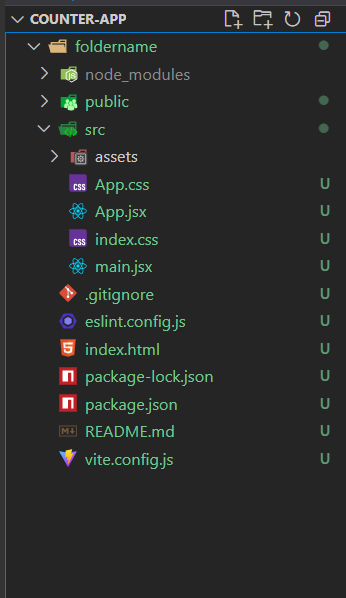
Example 1: Let say, we need to reuse the same logic, like passing on the name to every component.
import React from 'react';
// Higher-Order Component (HOC) as a functional component
const withName = (OriginalComponent) => {
  const NewComponent = (props) => {
    return <OriginalComponent {...props} name="GeeksforGeeks" />;
  };
  return NewComponent;
};
export default withName;
import React from "react";
import "./App.css";
import withName from './Components/Name'; // Import the HOC
// Functional component
const App = (props) => {
  return <h1>{props.name}</h1>;
};
// Wrap the App component with the HOC to create the enhanced version
const EnhancedComponent = withName(App);
// Export the enhanced component
export default EnhancedComponent;
Output:

- withName adds a name prop with the value "GeeksforGeeks"
- App displays the name inside an <h1> tag
- The wrapped component renders “GeeksforGeeks” in the browser
Example 2: In this example let's implement some logic. Let's make a counter app. In HighOrder.js, we pass the handleclick and show props for calling the functionality of the component.
body {
  margin: 0;
  font-family: sans-serif;
  background: #f0f4f8;
  display: flex;
  justify-content: center;
  align-items: center;
  height: 100vh;
}

.container {
  background: #ffffff;
  padding: 40px;
  border-radius: 16px;
  box-shadow: 0 8px 16px rgba(0, 0, 0, 0.1);
  text-align: center;
}

.title {
  margin-bottom: 20px;
  font-size: 1.8rem;
  color: #333;
}

.count {
  font-size: 4rem;
  color: #007bff;
  margin-bottom: 20px;
}

.buttons {
  display: flex;
  gap: 12px;
  justify-content: center;
}

.btn {
  font-size: 1.5rem;
  padding: 10px 16px;
  border: none;
  border-radius: 8px;
  background-color: #007bff;
  color: white;
  cursor: pointer;
  transition: 0.3s;
}

.btn:hover {
  background-color: #0056b3;
}

.reset {
  background-color: #ff4d4f;
}

.reset:hover {
  background-color: #d9363e;
}
// src/components/withCounter.jsx
import React, { useState } from 'react';
const withCounter = (WrappedComponent) => {
  return function WithCounter(props) {
    const [count, setCount] = useState(0);

    const increment = () => setCount((prev) => prev + 1);
    const decrement = () => setCount((prev) => prev - 1);
    const reset = () => setCount(0);
    return (
      <WrappedComponent
        count={count}
        increment={increment}
        decrement={decrement}
        reset={reset}
        {...props}
      />
    );
  };
};

export default withCounter;
// src/components/Counter.jsx
import React from 'react';
import '../App.css';

const Counter = ({ count, increment, decrement, reset }) => {
  return (
    <div className="container">
      <h2 className="title">Counter App</h2>
      <div className="count">{count}</div>
      <div className="buttons">
        <button onClick={increment} className="btn">+</button>
        <button onClick={decrement} className="btn">-</button>
        <button onClick={reset} className="btn reset">Reset</button>
      </div>
    </div>
  );
};

export default Counter;
// src/App.jsx
import React from 'react';
import withCounter from './components/withCounter';
import Counter from './components/Counter';
import './App.css';

const EnhancedCounter = withCounter(Counter);
const App = () => {
  return <EnhancedCounter/>;
};
export default App;
// src/index.js
import React from 'react';
import ReactDOM from 'react-dom/client';
import App from './App';

const root = ReactDOM.createRoot(document.getElementById('root'));
root.render(<App />);
Output:
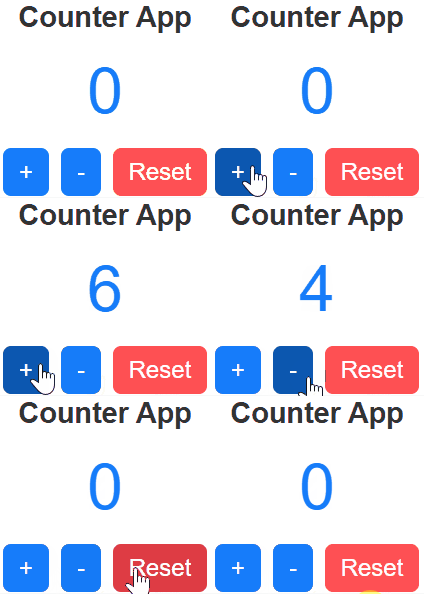
Advantages of Higher-Order Components
- Code Reusability: Allows sharing common logic across multiple components.
- Separation of Concerns: Keeps business logic separate from UI code.
- Readability: Makes components cleaner and easier to understand.
- Maintainability: Reduces duplication and simplifies updates.
HOC Usage Tips
- Avoid Overuse: Use HOCs only when necessary.
- Reusable Logic: Apply HOCs for common features like auth or loaders.
- Pass Props: Forward all required props to wrapped components
- Clear Naming: Use meaningful names for easier debugging.