
A Recipe Manager is a web application that allows users to manage and share their recipes. This application enables users to add new recipes, view a list of recipes, manage recipe and search for recipes by title. Built with Next.js, this app leverages server-side rendering for better performance. Users can interact with the app through a responsive user interface, making it easy to manage recipes from any device.
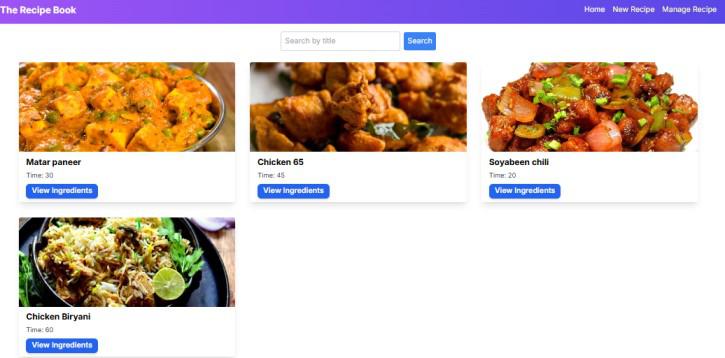
Output Preview: Let us have a look at how the final output will look like.
Prerequisites:
Approach to Build a Recipe Manager Using Next.js:
- Set Up Your Next.js Project
- For state management we will use the built-in React hooks and Next.js features.
- Create Navbar.js Navigation bar for the application.
- Create Home page to display the list of recipes.
- Create RecipeCard.js which displays individual recipe cards.
- Create add-recipe.js which will have Form to add a new recipe.
- Create manage-recipe.js to update or delete the recipe details.
- We will use Tailwind CSS classes for responsive and modern design.
- We will save and retrieve recipes data from localStorage.
Steps to Create a Recipe Manager Using Next.js:
Step 1: Initialized the Nextjs app
npx create-next-app@latest recipe-managerStep 2: It will ask you some questions, so choose as the following bolded option.
√ Would you like to use TypeScript? ... No / Yes
√ Would you like to use ESLint? ... No / Yes
√ Would you like to use Tailwind CSS? ... No / Yes
√ Would you like to use `src/` directory? ... No / Yes
√ Would you like to use App Router? (recommended) ... No / Yes
√ Would you like to customize the default import alias (@/*)? ... No / Yes
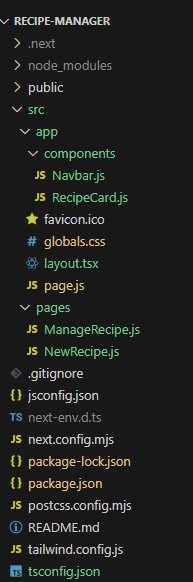
Step 3: Create folder structure as shown below.
Project Structure:
The dependencies in package.json file will look like:
"dependencies": {
    "react": "^18",
    "react-dom": "^18",
    "next": "14.2.5"
  },
  "devDependencies": {
    "postcss": "^8",
    "tailwindcss": "^3.4.1"
  }
Example: Create the required files and write the following code.
/* globals.css */
@tailwind base;
@tailwind components;
@tailwind utilities;

:root {
    --foreground-rgb: 0, 0, 0;
    --background-start-rgb: 214, 219, 220;
    --background-end-rgb: 255, 255, 255;
}

@media (prefers-color-scheme: dark) {
    :root {
        --foreground-rgb: 255, 255, 255;
        --background-start-rgb: 0, 0, 0;
        --background-end-rgb: 0, 0, 0;
    }
}

body {
    color: rgb(var(--foreground-rgb));
    background: linear-gradient(to bottom,
            transparent,
            rgb(var(--background-end-rgb))) rgb(var(--background-start-rgb));
}

@layer utilities {
    .text-balance {
        text-wrap: balance;
    }
}
// page.js
"use client";

import { useEffect, useState } from "react";
import RecipeCard from "./components/RecipeCard";
import Navbar from "./components/Navbar";

export default function Home() {
    const [recipes, setRecipes] = useState([]);
    const [searchTerm, setSearchTerm] = useState("");
    const [filteredRecipes, setFilteredRecipes] = useState([]);

    useEffect(() => {
        const storedRecipes = localStorage.getItem("recipes");
        if (storedRecipes) {
            setRecipes(JSON.parse(storedRecipes));
        }
    }, []);

    useEffect(() => {
        // Filter recipes based on the search term
        if (searchTerm === "") {
            setFilteredRecipes(recipes);
        } else {
            setFilteredRecipes(
                recipes.filter((recipe) =>
                    recipe.title.toLowerCase().includes(searchTerm.toLowerCase())
                )
            );
        }
    }, [searchTerm, recipes]);

    return (
        <>
            <Navbar />
            <div className="container mx-auto px-4 sm:px-6 lg:px-8">
                <div className="flex flex-col sm:flex-row justify-center items-center my-4 gap-2">
                    <input
                        type="text"
                        placeholder="Search by title"
                        value={searchTerm}
                        onChange={(e) => setSearchTerm(e.target.value)}
                        className="w-full sm:w-64 p-2 border border-gray-300 rounded"
                    />
                    <button
                        onClick={() => { }}
                        className="w-full sm:w-auto mt-2 sm:mt-0 p-2 bg-blue-500 text-white rounded"
                    >
                        Search
                    </button>
                </div>
                <div className="grid grid-cols-1 sm:grid-cols-2 lg:grid-cols-3 gap-4">
                    {filteredRecipes.map((recipe, index) => (
                        <RecipeCard key={index} recipe={recipe} />
                    ))}
                </div>
            </div>
        </>
    );
}
// components/Navbar.js

import Link from "next/link";
import { useState } from "react";

const Navbar = () => {
    const [isOpen, setIsOpen] = useState(false);

    const toggleMenu = () => setIsOpen(!isOpen);

    return (
        <nav className="bg-gradient-to-r from-purple-500 to-indigo-600 p-4">
            <div className="container mx-auto flex flex-wrap items-center justify-between">
                <div className="flex items-center">
                    <Link href="/">
                        <h1 className="text-white text-xl font-bold cursor-pointer">
                            The Recipe Book
                        </h1>
                    </Link>
                </div>
                <button
                    className="text-white lg:hidden"
                    onClick={toggleMenu}
                    aria-label="Toggle menu"
                >
                    <svg
                        className="w-6 h-6"
                        fill="none"
                        stroke="currentColor"
                        viewBox="0 0 24 24"
                        xmlns="https://www.w3.org/2000/svg"
                    >
                        <path
                            strokeLinecap="round"
                            strokeLinejoin="round"
                            strokeWidth="2"
                            d="M4 6h16M4 12h16m-7 6h7"
                        ></path>
                    </svg>
                </button>
                <div
                    className={`w-full lg:flex lg:items-center lg:w-auto ${isOpen ? "block" : "hidden"
                        }`}
                >
                    <Link href="/">
                        <span className="block lg:inline-block text-white hover:text-yellow-300 mr-4 transition duration-300">
                            Home
                        </span>
                    </Link>
                    <Link href="/NewRecipe">
                        <span className="block lg:inline-block text-yellow-100 hover:text-yellow-300 mr-4 transition duration-300">
                            New Recipe
                        </span>
                    </Link>
                    <Link href="/ManageRecipe">
                        <span className="block lg:inline-block text-yellow-100 hover:text-yellow-300 transition duration-300">
                            Manage Recipe
                        </span>
                    </Link>
                </div>
            </div>
        </nav>
    );
};

export default Navbar;
// components/RecipeCard.js
import { useState } from "react";
const RecipeCard = ({ recipe }) => {
const [isDialogOpen, setIsDialogOpen] = useState(false);
const toggleDialog = () => {
setIsDialogOpen(!isDialogOpen);
};
return (
<div className="max-w-xs md:max-w-sm lg:max-w-md xl:max-w-lg
rounded overflow-hidden bg-white shadow-lg m-2 transition-transform
transform hover:scale-105 hover:shadow-lg hover:bg-gray-50">
<img
className="w-full h-48 object-cover"
src={recipe.image}
alt={recipe.title}
/>
<div className="px-4 py-2">
<div className="font-bold text-lg mb-1 truncate">{recipe.title}</div>
<p className="text-gray-700 text-sm">Time: {recipe.time}</p>
<button
onClick={toggleDialog}
className="mt-2 py-1 px-3 bg-blue-600 text-white font-semibold
rounded-lg shadow-md hover:bg-blue-700 focus:outline-none
focus:ring-2 focus:ring-blue-500 transition"
>
View Ingredients
</button>
</div>
{isDialogOpen && (
<div className="fixed inset-0 flex items-center justify-center
z-50 bg-black bg-opacity-50">
<div className="bg-white rounded-lg overflow-hidden
shadow-xl max-w-md w-full p-6 mx-4 sm:mx-0">
<div className="flex justify-between items-center mb-4">
<h3 className="text-xl font-semibold text-gray-900">
Ingredients
</h3>
<button
onClick={toggleDialog}
className="text-gray-700 hover:text-gray-900
focus:outline-none"
>
✕
</button>
</div>
<ul className="list-disc list-inside text-gray-700 text-sm">
{recipe.ingredients.map((ingredient, index) => (
<li key={index}>{ingredient.name}</li>
))}
</ul>
<div className="flex justify-end mt-4">
<button
onClick={toggleDialog}
className="py-1 px-3 bg-red-600 text-white
font-semibold rounded-lg shadow-md hover:bg-red-700
focus:outline-none focus:ring-2
focus:ring-red-500 transition"
>
Close
</button>
</div>
</div>
</div>
)}
</div>
);
};
export default RecipeCard;
// pages/ManageRecipe.js

"use client";

import { useState, useEffect } from "react";
import { useRouter } from "next/router";
import Navbar from "../app/components/Navbar";
import "../app/globals.css";

const ManageRecipe = () => {
    const [recipes, setRecipes] = useState([]);
    const [editRecipe, setEditRecipe] = useState(null);
    const [formValues, setFormValues] = useState({
        title: "",
        time: "",
        image: "",
        ingredients: [],
    });
    const router = useRouter();

    useEffect(() => {
        const storedRecipes = localStorage.getItem("recipes");
        if (storedRecipes) {
            setRecipes(JSON.parse(storedRecipes));
        }
    }, []);

    const handleDelete = (index) => {
        const updatedRecipes = recipes.filter((_, i) => i !== index);
        setRecipes(updatedRecipes);
        localStorage.setItem("recipes", JSON.stringify(updatedRecipes));
    };

    const handleEdit = (index) => {
        setEditRecipe(index);
        setFormValues(recipes[index]);
    };

    const handleSave = () => {
        const updatedRecipes = recipes.map((recipe, i) =>
            i === editRecipe ? formValues : recipe
        );
        setRecipes(updatedRecipes);
        localStorage.setItem("recipes", JSON.stringify(updatedRecipes));
        setEditRecipe(null);
    };

    const handleInputChange = (e) => {
        const { name, value } = e.target;
        setFormValues({ ...formValues, [name]: value });
    };

    const handleIngredientChange = (index, e) => {
        const newIngredients = formValues.ingredients.map((ingredient, i) =>
            i === index ? { ...ingredient, name: e.target.value } : ingredient
        );
        setFormValues({ ...formValues, ingredients: newIngredients });
    };

    const handleAddIngredient = () => {
        setFormValues({
            ...formValues,
            ingredients: [...formValues.ingredients, { name: "" }],
        });
    };

    const handleRemoveIngredient = (index) => {
        const newIngredients = formValues.ingredients.filter((_, i) => i !== index);
        setFormValues({ ...formValues, ingredients: newIngredients });
    };

    return (
        <>
            <Navbar />
            <div className="flex flex-col items-center min-h-screen bg-gray-100 p-4 sm:p-6 lg:p-8">
                <div className="w-full max-w-4xl bg-white shadow-md rounded-lg p-6 sm:p-8 mt-6">
                    <h2 className="text-2xl sm:text-3xl font-semibold mb-6 text-gray-800">
                        Manage Recipes
                    </h2>
                    <div className="overflow-x-auto">
                        <table className="min-w-full bg-white border border-gray-300">
                            <thead>
                                <tr>
                                    <th className="border-b px-4 py-2 text-left">Title</th>
                                    <th className="border-b px-4 py-2 text-left">Time</th>
                                    <th className="border-b px-4 py-2 text-left">Image</th>
                                    <th className="border-b px-4 py-2 text-left">Ingredients</th>
                                    <th className="border-b px-4 py-2 text-left">Actions</th>
                                </tr>
                            </thead>
                            <tbody>
                                {recipes.map((recipe, index) => (
                                    <tr key={index}>
                                        <td className="border-b px-4 py-2">{recipe.title}</td>
                                        <td className="border-b px-4 py-2">{recipe.time}</td>
                                        <td className="border-b px-4 py-2">
                                            <img
                                                src={recipe.image}
                                                alt={recipe.title}
                                                className="w-16 h-16 object-cover"
                                            />
                                        </td>
                                        <td className="border-b px-4 py-2">
                                            <ul className="list-disc pl-5">
                                                {recipe.ingredients.map((ingredient, i) => (
                                                    <li key={i}>{ingredient.name}</li>
                                                ))}
                                            </ul>
                                        </td>
                                        <td className="border-b px-4 py-2">
                                            <button
                                                onClick={() => handleEdit(index)}
                                                className="text-blue-500 hover:underline"
                                            >
                                                Edit
                                            </button>
                                            <button
                                                onClick={() => handleDelete(index)}
                                                className="ml-2 text-red-500 hover:underline"
                                            >
                                                Delete
                                            </button>
                                        </td>
                                    </tr>
                                ))}
                            </tbody>
                        </table>
                    </div>
                    {editRecipe !== null && (
                        <div className="mt-8 bg-white p-6 border border-gray-300 rounded-lg">
                            <h3 className="text-xl font-semibold mb-4">Edit Recipe</h3>
                            <input
                                name="title"
                                value={formValues.title}
                                onChange={handleInputChange}
                                className="block w-full p-3 mb-4 border border-gray-300 rounded-md"
                                placeholder="Title"
                            />
                            <input
                                name="time"
                                value={formValues.time}
                                onChange={handleInputChange}
                                className="block w-full p-3 mb-4 border border-gray-300 rounded-md"
                                placeholder="Time"
                            />
                            <input
                                name="image"
                                value={formValues.image}
                                onChange={handleInputChange}
                                className="block w-full p-3 mb-4 border border-gray-300 rounded-md"
                                placeholder="Image URL"
                            />
                            <div>
                                <label className="block text-sm font-medium text-gray-700">
                                    Ingredients
                                </label>
                                {formValues.ingredients.map((ingredient, index) => (
                                    <div key={index} className="flex items-center mb-2">
                                        <input
                                            type="text"
                                            value={ingredient.name}
                                            onChange={(e) => handleIngredientChange(index, e)}
                                            className="block w-full p-2 border border-gray-300 rounded-md"
                                            placeholder="Enter ingredient"
                                        />
                                        <button
                                            type="button"
                                            onClick={() => handleRemoveIngredient(index)}
                                            className="ml-2 text-red-500 hover:text-red-700"
                                        >
                                            Remove
                                        </button>
                                    </div>
                                ))}
                                <button
                                    type="button"
                                    onClick={handleAddIngredient}
                                    className="w-full py-2 mt-2 bg-green-600 text-white
                                    font-semibold rounded-lg hover:bg-green-700"
                                >
                                    Add Ingredient
                                </button>
                            </div>
                            <button
                                onClick={handleSave}
                                className="w-full py-2 mt-4 bg-blue-600 text-white
                                font-semibold rounded-lg hover:bg-blue-700"
                            >
                                Save Changes
                            </button>
                        </div>
                    )}
                </div>
            </div>
        </>
    );
};

export default ManageRecipe;
// pages/NewRecipe.js

import { useState } from "react";
import { useRouter } from "next/navigation";
import "../app/globals.css";
import Navbar from "../app/components/Navbar";

export default function NewRecipe() {
    const [title, setTitle] = useState("");
    const [time, setTime] = useState("");
    const [image, setImage] = useState("");
    const [ingredients, setIngredients] = useState([{ name: "" }]);
    const [errors, setErrors] = useState({});
    const router = useRouter();

    const validateForm = () => {
        const errors = {};
        if (!title.trim()) errors.title = "Title is required.";
        if (!time.trim()) errors.time = "Preparation time is required.";
        if (!image.trim()) errors.image = "Image URL is required.";
        if (ingredients.every((ingredient) => !ingredient.name.trim())) {
            errors.ingredients = "At least one ingredient is required.";
        }

        setErrors(errors);
        return Object.keys(errors).length === 0;
    };

    const handleSubmit = (e) => {
        e.preventDefault();

        if (!validateForm()) return;

        const newRecipe = { title, time, image, ingredients };
        const storedRecipes = localStorage.getItem("recipes");
        const recipes = storedRecipes ? JSON.parse(storedRecipes) : [];
        recipes.push(newRecipe);
        localStorage.setItem("recipes", JSON.stringify(recipes));

        router.push("/");
    };

    const handleIngredientChange = (index, event) => {
        const newIngredients = ingredients.map((ingredient, i) => {
            if (i === index) {
                return { ...ingredient, name: event.target.value };
            }
            return ingredient;
        });
        setIngredients(newIngredients);
    };

    const handleAddIngredient = () => {
        setIngredients([...ingredients, { name: "" }]);
    };

    const handleRemoveIngredient = (index) => {
        const newIngredients = ingredients.filter((_, i) => i !== index);
        setIngredients(newIngredients);
    };

    return (
        <>
            <Navbar />
            <div className="flex items-center justify-center min-h-screen bg-gray-100 px-4">
                <div className="w-full max-w-md bg-white shadow-md rounded-lg p-8 mx-4 md:mx-0">
                    <h2 className="text-2xl md:text-3xl font-semibold mb-6 text-gray-800">
                        Add a New Recipe
                    </h2>
                    <form onSubmit={handleSubmit} className="space-y-4">
                        <div>
                            <label
                                htmlFor="title"
                                className="block text-sm font-medium text-gray-700"
                            >
                                Title
                            </label>
                            <input
                                id="title"
                                type="text"
                                placeholder="Enter the recipe title"
                                value={title}
                                onChange={(e) => setTitle(e.target.value)}
                                className={`block w-full p-3 border rounded-md
                                     shadow-sm focus:outline-none focus:ring-2 ${errors.title
                                        ? "border-red-500 focus:ring-red-500"
                                        : "border-gray-300 focus:ring-blue-500"
                                    }`}
                            />
                            {errors.title && (
                                <p className="text-red-500 text-sm mt-1">{errors.title}</p>
                            )}
                        </div>
                        <div>
                            <label
                                htmlFor="time"
                                className="block text-sm font-medium text-gray-700"
                            >
                                Time
                            </label>
                            <input
                                id="time"
                                type="text"
                                placeholder="Enter the time to prepare"
                                value={time}
                                onChange={(e) => setTime(e.target.value)}
                                className={`block w-full p-3 border rounded-md
                                    shadow-sm focus:outline-none focus:ring-2 ${errors.time
                                        ? "border-red-500 focus:ring-red-500"
                                        : "border-gray-300 focus:ring-blue-500"
                                    }`}
                            />
                            {errors.time && (
                                <p className="text-red-500 text-sm mt-1">{errors.time}</p>
                            )}
                        </div>
                        <div>
                            <label
                                htmlFor="image"
                                className="block text-sm font-medium text-gray-700"
                            >
                                Image URL
                            </label>
                            <input
                                id="image"
                                type="text"
                                placeholder="Enter the image URL"
                                value={image}
                                onChange={(e) => setImage(e.target.value)}
                                className={`block w-full p-3 border rounded-md
                                    shadow-sm focus:outline-none focus:ring-2 ${errors.image
                                        ? "border-red-500 focus:ring-red-500"
                                        : "border-gray-300 focus:ring-blue-500"
                                    }`}
                            />
                            {errors.image && (
                                <p className="text-red-500 text-sm mt-1">{errors.image}</p>
                            )}
                        </div>
                        <div>
                            <label className="block text-sm font-medium text-gray-700">
                                Ingredients
                            </label>
                            {ingredients.map((ingredient, index) => (
                                <div
                                    key={index}
                                    className="flex flex-col md:flex-row items-center mb-2"
                                >
                                    <input
                                        type="text"
                                        placeholder="Enter ingredient"
                                        value={ingredient.name}
                                        onChange={(e) => handleIngredientChange(index, e)}
                                        className={`block w-full p-2 border rounded-md
                                            shadow-sm focus:outline-none focus:ring-2
                                            ${errors.ingredients
                                                ? "border-red-500 focus:ring-red-500"
                                                : "border-gray-300 focus:ring-blue-500"
                                            }`}
                                    />
                                    <button
                                        type="button"
                                        onClick={() => handleRemoveIngredient(index)}
                                        className="mt-2 md:mt-0 md:ml-2 text-red-500
                                         hover:text-red-700 focus:outline-none"
                                    >
                                        Remove
                                    </button>
                                </div>
                            ))}
                            {errors.ingredients && (
                                <p className="text-red-500 text-sm mt-1">
                                    {errors.ingredients}
                                </p>
                            )}
                            <button
                                type="button"
                                onClick={handleAddIngredient}
                                className="w-full py-2 mt-2 bg-green-600 text-white
                                 font-semibold rounded-lg shadow-md hover:bg-green-700
                                  focus:outline-none focus:ring-2 focus:ring-green-500"
                            >
                                Add Ingredient
                            </button>
                        </div>
                        <button
                            type="submit"
                            className="w-full py-3 bg-blue-600 text-white font-semibold
                             rounded-lg shadow-md hover:bg-blue-700 focus:outline-none
                              focus:ring-2 focus:ring-blue-500"
                        >
                            Add Recipe
                        </button>
                    </form>
                </div>
            </div>
        </>
    );
}
// tailwind.config.ts

/** @type {import('tailwindcss').Config} */
module.exports = {
    content: [
        "./src/pages/**/*.{js,ts,jsx,tsx,mdx}",
        "./src/components/**/*.{js,ts,jsx,tsx,mdx}",
        "./src/app/**/*.{js,ts,jsx,tsx,mdx}",
    ],
    theme: {
        extend: {
            backgroundImage: {
                "gradient-radial": "radial-gradient(var(--tw-gradient-stops))",
                "gradient-conic":
                    "conic-gradient(from 180deg at 50% 50%, var(--tw-gradient-stops))",
            },
        },
    },
    plugins: [],
};
To start the application run the following command.
npm run dev