
A favicon is a small image displayed next to a website’s title in the browser tab. It helps users quickly recognize and return to a website.
- Appears in browser tabs, bookmarks, and browsing history for easy identification.
- Improves brand recognition by serving as a visual identity for the website.
- Enhances the professionalism and credibility of the site.
- Improves usability by helping users locate their tab among multiple open tabs.
<!DOCTYPE html>
<html lang="en">
<head>
    <title>GeeksforGeeks</title>
    <link rel="icon"
    href="https://media.geeksforgeeks.org/wp-content/cdn-uploads/gfg_200X200.png"
    type="image/x-icon">
</head>
<body>
    <h3 style="color:green;">GeeksforGeeks</h3>
    <p>Welcome to my website</p>
</body>
</html>
Output:
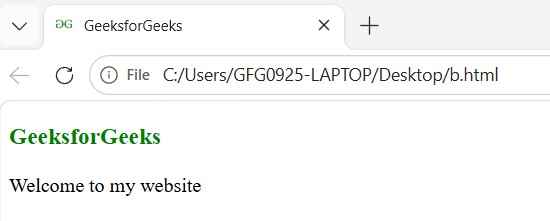
Note: Major browsers are not supported by the sizing property of the favicon.
Creating and Adding a Favicon
To create and add a favicon to your website, follow these simple steps to ensure it's displayed properly across different browsers and devices:
- Design a small favicon image (usually 16×16 or 32×32 pixels) and save it in formats like .ico, .png, or .svg.
- Upload the favicon image to your website’s root directory or use an external image URL.
- Add a <link> tag inside the <head> section of your HTML file to reference the favicon.
- Save the changes and test the favicon by opening the website in a browser to ensure it displays correctly.
List of Favicon Sizes
Name | Size | Description |
|---|---|---|
favicon-32.png | 32×32 | Standard for most desktop browsers. |
favicon-57.png | 57×57 | Standard iOS home screen. |
favicon-76.png | 76×76 | iPad home screen icon. |
favicon-96.png | 96×96 | GoogleTV icon. |
favicon-120.png | 120×120 | iPhone retina touch icon. |
favicon-128.png | 128×128 | Chrome Web Store icon & Small Windows 8 Star Screen Icon*. |
favicon-144.png | 144×144 | Internet Explorer 10 Metro tile for pinned site* |
favicon-152.png | 152×152 | iPad touch icon. |
favicon-167.png | 167×167 | iPad Retina touch icon (change for iOS 10: up from 152×152, not in action. iOS 10 will use 152×152) |
favicon-180.png | 180×180 | iPhone 6 plus |
favicon-192.png | 192×192 | Google Developer Web App Manifest Recommendation |
favicon-195.png | 195×195 | Opera Speed Dial icon (Not working in Opera 15 and later) |
favicon-196.png | 196×196 | Chrome for Android home screen icon |
favicon-228.png | 228×228 | Opera Coast icon |
Favicon File Format Support
| File Format | Browser Support | Quality |
|---|---|---|
ICO | All Five | ICO supports multiple icon sizes in a single file and provides wide browser compatibility |
| PNG | All Five | PNG support High-quality image, supports transparency, smaller file size |
| GIF | All Five | GIF Provides animation |
| JPEG | All Five | JPEG have Good for high-quality images |
| SVG | All Five | SVG is Scalable, small file size, sharp quality at any resolution |
| WebP | All Five | Webp have Smaller file size with high quality |
Troubleshooting Favicon Issues
These steps help fix common problems when a favicon does not appear correctly in the browser.
1. Clear Browser Cache
It Refresh the favicon by clearing the browser cache or using incognito mode, as browsers may store old versions.
- Browsers often cache favicons, preventing updates from appearing immediately.
- Clear the cache or open the website in incognito mode to refresh the favicon.
2. Check File Path:
It verify the favicon’s location and link, placing it in the root directory or ensuring the path is correct.
- Ensure the favicon file path is correct and properly referenced.
- Place the favicon in the root directory or verify the link location.
3. Use Full URL
It Specify the complete URL of the favicon to ensure it loads correctly.
- Use the complete URL if the favicon does not load correctly.
- Example: <link rel="icon" href="https://www.example.com/favicon.ico" type="image/x-icon">
4. Format Issues
It Ensure the favicon uses a supported format (ICO, PNG, SVG) for cross-browser compatibility.
- Confirm the favicon format is supported (ICO, PNG, SVG).
- Make sure the format works consistently across different browsers.