
Creating visually stunning images by blending the content of one image with the artistic style of another has captivated artists and technologists alike. This technique, known as style transfer, leverages deep learning to transform photographs into masterpieces reminiscent of famous artists like Van Gogh or Picasso. In this article, we'll delve into the concepts and implementation of style transfer using the Fast.ai library, making the complex world of deep learning accessible and efficient.
Table of Content
Introduction to Style Transfer
Style Transfer is a fascinating technique in the field of deep learning that enables the blending of two images: one serving as the content source and the other providing the artistic style. The result is a new image that retains the structural integrity of the content image while adopting the color schemes, textures, and brushstrokes of the style image.
Imagine taking a photograph of a cityscape (content image) and rendering it in the swirling, vibrant style of Van Gogh's "Starry Night" (style image). The resulting image would maintain the recognizable buildings and layout of the city but with the expressive and dynamic aesthetics characteristic of Van Gogh.
Why Fast.ai for Style Transfer?
Fast.ai is a high-level deep learning library built on top of PyTorch, designed to make complex machine learning tasks more accessible without sacrificing performance. Its strengths include:
- Simplicity and Flexibility: Fast.ai provides high-level abstractions that simplify model building, training, and experimentation.
- Integration with PyTorch: Leveraging PyTorch's powerful features, Fast.ai allows for both rapid prototyping and fine-grained control.
- Rich Documentation and Community Support: Extensive resources and a vibrant community make troubleshooting and learning more manageable.
For style transfer, Fast.ai streamlines the process by handling many of the underlying complexities, allowing users to focus on the creative aspects of blending content and style.
Understanding the Components of Style Transfer
To implement style transfer effectively, it's crucial to understand its core components and how they interact within the deep learning framework.
1. Content and Style Images
- Content Image: This is the base image whose structural elements (like shapes, objects, and spatial arrangements) we aim to preserve.
- Style Image: This image provides the artistic style elements, such as color palettes, textures, and brushstroke patterns.
The objective is to generate a stylized image that maintains the content of the content image while adopting the style characteristics of the style image.
2. VGG Networks for Feature Extraction
VGG Networks (VGG16 and VGG19) are convolutional neural networks pre-trained on the ImageNet dataset. They are instrumental in style transfer for the following reasons:
- Feature Extraction: The early layers of VGG networks capture low-level features (like edges and textures), while deeper layers capture high-level features (like object shapes and content).
- Transfer Learning: Leveraging a pre-trained model allows us to use learned features without training a network from scratch, saving computational resources and time.
3. Gram Matrix and Style Representation
The Gram matrix is a mathematical construct used to capture the style of an image by measuring the correlations between different feature channels. In style transfer:
- Style Representation: By computing the Gram matrix of the feature maps extracted from specific layers of the VGG network, we can encapsulate the style of the style image.
- Style Loss: The difference between the Gram matrices of the generated image and the style image quantifies how well the style has been transferred.
4. Loss Functions: Style and Content
Two primary loss functions guide the style transfer process:
- Style Loss: Measures the discrepancy between the style representations (Gram matrices) of the generated and style images. The goal is to minimize this loss to ensure the generated image adopts the desired style.
- Content Loss (Activation Loss): Measures the difference in feature representations of the generated image and the content image. Minimizing this loss ensures that the content structure is preserved.
Combining these losses allows the model to generate images that balance both content fidelity and stylistic resemblance.
Implementing Style Transfer with Fast.ai
Set Up Our Environment:
First, we need to install Fast.ai and other dependencies. If we are using Google Colab, it's even easier since most of the packages come pre-installed. But here's how we can install it:
!pip install fastaiSetting Up CUDA Availability:
This part checks if a CUDA-enabled GPU is available. CUDA is a parallel computing platform that allows software developers to use a GPU for general-purpose processing. If a GPU isn't available, it raises an error to inform the user that they need to run this code in a GPU environment for optimal performance.
# Check CUDA availability
if not torch.cuda.is_available():
    raise RuntimeError("No CUDA available, please use a GPU runtime.")
Let's break down the implementation into manageable steps, ensuring clarity and understanding at each stage.
1. Loading the Style Image
The first step involves acquiring the style image
Downloading the Style Image:
url = 'https://static.greatbigcanvas.com/images/singlecanvas_thick_none/megan-aroon-duncanson/little-village-abstract-art-house-painting,1162125.jpg'
!wget {url} -O 'style.jpg'
2. Extracting Features and Computing Gram Matrices
With the style image preprocessed, we extract its features using the VGG19 network and compute the Gram matrices necessary for style representation.
- Feature Extraction Function: This function retrieves specific layers from the VGG network, sets them to evaluation mode, and ensures their parameters are not updated during training.
# Function to get VGG layers
def _get_layers(arch: str, pretrained=True):
    "Get the layers and arch for a VGG Model (16 and 19 are supported only)"
    feat_net = vgg19(pretrained=pretrained).cuda() if arch.find('9') > 1 else vgg16(pretrained=pretrained).cuda()
    config = _vgg_config.get(arch)
    features = feat_net.features.cuda().eval()
    for p in features.parameters(): p.requires_grad=False
    return feat_net, [features[i] for i in config]
# Configuration for VGG16 and VGG19
_vgg_config = {
    'vgg16': [1, 11, 18, 25, 20],
    'vgg19': [1, 6, 11, 20, 29, 22]
}
from fastai.callback.hook import hook_outputs

def get_feats(arch: str, pretrained=True):
    "Retrieve features from the specified VGG architecture"
    feat_net, layers = _get_layers(arch, pretrained)
    hooks = hook_outputs(layers, detach=False)
    def _inner(x):
        feat_net(x)
        return hooks.stored
    return _inner

# Extract features from the style image
im_feats = get_feats('vgg19')(style_im)
- Gram Matrix Calculation:The Gram matrix is used to capture the style of an image. This function computes the Gram matrix from the feature maps by reshaping the input tensor and performing matrix multiplication. The resulting matrix encodes the correlations between different feature channels.
from torch import Tensor
import torch.nn.functional as F

def gram(x: Tensor):
    "Compute Gram matrix from feature maps"
    n, c, h, w = x.shape
    x = x.view(n, c, -1)
    return (x @ x.transpose(1, 2)) / (c * w * h)

# Compute Gram matrices for the style features
im_grams = [gram(f) for f in im_feats]
- Style Loss Function: This function calculates the style loss by comparing the Gram matrices of the input features and the target features. The Mean Squared Error (MSE) is used to measure the differences between the computed and target Gram matrices. A scaling factor is applied to balance the loss contribution.
# Define style loss function
def style_loss(inp: Tensor, out_feat: Tensor):
    "Calculate style loss by comparing Gram matrices"
    bs = inp[0].shape[0]
    loss = []
    for y, f in zip(*map(get_stl_fs, [im_grams, inp])):
        loss.append(F.mse_loss(y.repeat(bs, 1, 1), gram(f)))
    return 3e5 * sum(loss)
- Feature Loss Class: This class combines both style loss and activation loss. The
forwardmethod computes the losses for the predicted and target images, while the metrics tracking helps monitor the losses over training iterations.
# Define FeatureLoss class
class FeatureLoss(Module):
    "Combines two losses and features into a usable loss function"
    def __init__(self, feats, style_loss, act_loss):
        store_attr(self, 'feats, style_loss, act_loss')
        self.reset_metrics()

    def forward(self, pred, targ):
        pred_feat, targ_feat = self.feats(pred), self.feats(targ)
        style_loss = self.style_loss(pred_feat, targ_feat)
        act_loss = self.act_loss(pred_feat, targ_feat)
        self._add_loss(style_loss, act_loss)
        return style_loss + act_loss

    def reset_metrics(self):
        self.metrics = dict(style=[], content=[])

    def _add_loss(self, style_loss, act_loss):
        self.metrics['style'].append(style_loss)
        self.metrics['content'].append(act_loss)
- Activation Loss Function: This function calculates the activation loss, which is the MSE between the final feature maps of the predicted and target images. It measures how closely the content of the generated image matches the target image.
# Define activation loss function
def act_loss(inp: Tensor, targ: Tensor):
    "Calculate the MSE loss of the activation layers"
    return F.mse_loss(inp[-1], targ[-1])
- Initializing the Loss Function: Here, we instantiate the
FeatureLossclass, passing in the feature extraction function, style loss function, and activation loss function. This sets up the loss calculation for the style transfer model.
# Initialize the loss function
loss_func = FeatureLoss(get_feats('vgg19'), style_loss, act_loss)
3. Building the Transformer Model Architecture
The Transformer Network processes the content image, applying the style captured by the Gram matrices to generate the stylized image.
- Model Architecture: We've previously defined the
ReflectionLayer,ResidualBlock,UpsampleConvLayer, andTransformerNetclasses.- The
ReflectionLayerclass applies reflection padding before performing a convolution operation. This helps preserve spatial information at the borders of the image ResidualBlockclass implements a residual network structure where the input is added back to the output after passing through two reflection layers and normalization. This helps in training deeper networks by allowing gradients to flow through the identity connections.- The
UpsampleConvLayerclass allows for upsampling the feature maps using nearest-neighbor interpolation followed by a convolution operation. This is essential for resizing the output image. - The
TransformerNetclass is a simple architecture for style transfer. It consists of an initial convolution layer, followed by two residual blocks and an upsampling layer to produce the final stylized image.
- The
class ReflectionLayer(nn.Module):
    "Reflection padding followed by convolution"
    def __init__(self, in_channels, out_channels, ks=3, stride=1):
        super().__init__()
        reflection_padding = ks // 2
        self.reflection_pad = nn.ReflectionPad2d(reflection_padding)
        self.conv2d = nn.Conv2d(in_channels, out_channels, ks, stride)

    def forward(self, x):
        out = self.reflection_pad(x)
        out = self.conv2d(out)
        return out

class ResidualBlock(nn.Module):
    "Residual block with two reflection layers and instance normalization"
    def __init__(self, channels):
        super().__init__()
        self.conv1 = ReflectionLayer(channels, channels, ks=3, stride=1)
        self.in1 = nn.InstanceNorm2d(channels, affine=True)
        self.conv2 = ReflectionLayer(channels, channels, ks=3, stride=1)
        self.in2 = nn.InstanceNorm2d(channels, affine=True)
        self.relu = nn.ReLU()

    def forward(self, x):
        residual = x
        out = self.relu(self.in1(self.conv1(x)))
        out = self.in2(self.conv2(out))
        out = out + residual
        return out

class UpsampleConvLayer(nn.Module):
    "Upsampling followed by reflection padding and convolution"
    def __init__(self, in_channels, out_channels, ks=3, stride=1, upsample=None):
        super().__init__()
        self.upsample = upsample
        reflection_padding = ks // 2
        self.reflection_pad = nn.ReflectionPad2d(reflection_padding)
        self.conv2d = nn.Conv2d(in_channels, out_channels, ks, stride)

    def forward(self, x):
        x_in = x
        if self.upsample:
            x_in = torch.nn.functional.interpolate(x_in, mode='nearest', scale_factor=self.upsample)
        out = self.reflection_pad(x_in)
        out = self.conv2d(out)
        return out

class TransformerNet(nn.Module):
    "Transformer network for style transfer"
    def __init__(self):
        super().__init__()
        self.conv1 = ReflectionLayer(3, 32, ks=9, stride=1)
        self.in1 = nn.InstanceNorm2d(32, affine=True)
        self.res1 = ResidualBlock(32)
        self.res2 = ResidualBlock(32)
        self.upsample = UpsampleConvLayer(32, 3, upsample=2)

    def forward(self, x):
        x = self.in1(self.conv1(x))
        x = self.res1(x)
        x = self.res2(x)
        x = self.upsample(x)
        return x
4. Preprocessing the Style Image
Next, we will process the acuired image
Preprocessing Function:
The get_style_im function downloads the image, applies necessary transformations, and normalizes it based on ImageNet statistics.
- This function handles the preprocessing of the downloaded style image.
- It uses
PILImage.createto convert the image into a format suitable for processing. - The image is then loaded into a DataLoader that applies a series of transformations:
ToTensor(): Converts the image to a PyTorch tensor.IntToFloatTensor(): Converts the integer tensor to a float tensor.Normalize.from_stats(*imagenet_stats): Normalizes the image using statistics from the ImageNet dataset.
def get_style_im(url):
    download_url(url, 'style.jpg')
    fn = 'style.jpg'
    dset = Datasets(fn, tfms=[PILImage.create])
    dl = dset.dataloaders(after_item=[ToTensor()], after_batch=[IntToFloatTensor(), Normalize.from_stats(*imagenet_stats)], bs=1)
    return dl.one_batch()[0]
Extracting Features:
- The style image is preprocessed and stored in
style_im. get_feats('vgg19')is likely a function you defined earlier to extract features from the VGG19 model. This is crucial for style transfer since it captures different layers of the image.
style_im = get_style_im(url)
im_feats = get_feats('vgg19')(style_im)
Computing Gram Matrices: This line computes the Gram matrices for each of the feature maps extracted from the style image. Gram matrices are essential in style transfer because they capture the correlations between different feature channels.
im_grams = [gram(f) for f in im_feats]
5. Applying the Transformer Model
- An instance of the
TransformerNetis created and moved to the GPU. - The preprocessed style image is unsqueezed to add a batch dimension (required by the model) and then passed through the model to generate a stylized image.
model = TransformerNet().cuda()
res = model(style_im.unsqueeze(0).cuda())
6. Displaying the Result
Finally, the generated image is converted back to the CPU and displayed using the show() method. TensorImage is likely a utility you defined to help with visualizing images from tensors.
TensorImage(res[0].cpu()).show()
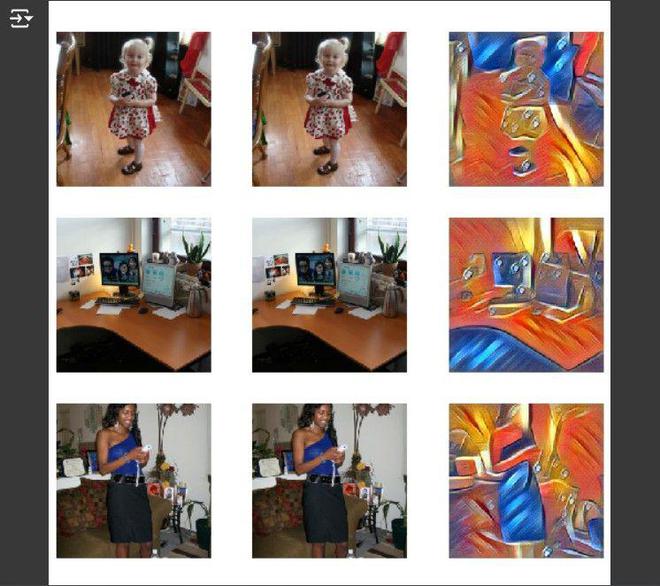
Below is the complete code for implementing style transfer with the necessary steps up to displaying the resulting image:
# Ensure we have a P100 GPU
!nvidia-smi

# Check CUDA availability
if not torch.cuda.is_available():
    raise RuntimeError("No CUDA available, please use a GPU runtime.")

# Function to get VGG layers
def _get_layers(arch: str, pretrained=True):
    "Get the layers and arch for a VGG Model (16 and 19 are supported only)"
    feat_net = vgg19(pretrained=pretrained).cuda() if arch.find('9') > 1 else vgg16(pretrained=pretrained).cuda()
    config = _vgg_config.get(arch)
    features = feat_net.features.cuda().eval()
    for p in features.parameters(): p.requires_grad=False
    return feat_net, [features[i] for i in config]

# Configuration for VGG16 and VGG19
_vgg_config = {
    'vgg16' : [1, 11, 18, 25, 20],
    'vgg19' : [1, 6, 11, 20, 29, 22]
}

# Get features
def get_feats(arch: str, pretrained=True):
    "Get the features of an architecture"
    feat_net, layers = _get_layers(arch, pretrained)
    hooks = hook_outputs(layers, detach=False)
    def _inner(x):
        feat_net(x)
        return hooks.stored
    return _inner

# Define Gram matrix function
def gram(x: Tensor):
    "Transpose a tensor based on c,w,h"
    n, c, h, w = x.shape
    x = x.view(n, c, -1)
    return (x @ x.transpose(1, 2)) / (c * w * h)

# Define style loss function
def style_loss(inp: Tensor, out_feat: Tensor):
    "Calculate style loss, assumes we have im_grams"
    bs = inp[0].shape[0]
    loss = []
    for y, f in zip(*map(get_stl_fs, [im_grams, inp])):
        loss.append(F.mse_loss(y.repeat(bs, 1, 1), gram(f)))
    return 3e5 * sum(loss)

# Define FeatureLoss class
class FeatureLoss(Module):
    "Combines two losses and features into a usable loss function"
    def __init__(self, feats, style_loss, act_loss):
        store_attr(self, 'feats, style_loss, act_loss')
        self.reset_metrics()

    def forward(self, pred, targ):
        pred_feat, targ_feat = self.feats(pred), self.feats(targ)
        style_loss = self.style_loss(pred_feat, targ_feat)
        act_loss = self.act_loss(pred_feat, targ_feat)
        self._add_loss(style_loss, act_loss)
        return style_loss + act_loss

    def reset_metrics(self):
        self.metrics = dict(style=[], content=[])

    def _add_loss(self, style_loss, act_loss):
        self.metrics['style'].append(style_loss)
        self.metrics['content'].append(act_loss)

# Define activation loss function
def act_loss(inp: Tensor, targ: Tensor):
    "Calculate the MSE loss of the activation layers"
    return F.mse_loss(inp[-1], targ[-1])

# Initialize the loss function
loss_func = FeatureLoss(get_feats('vgg19'), style_loss, act_loss)

# Define the model architecture
class ReflectionLayer(Module):
    "A series of Reflection Padding followed by a ConvLayer"
    def __init__(self, in_channels, out_channels, ks=3, stride=2):
        reflection_padding = ks // 2
        self.reflection_pad = nn.ReflectionPad2d(reflection_padding)
        self.conv2d = nn.Conv2d(in_channels, out_channels, ks, stride)

    def forward(self, x):
        out = self.reflection_pad(x)
        out = self.conv2d(out)
        return out

class ResidualBlock(Module):
    "Two reflection layers and an added activation function with residual"
    def __init__(self, channels):
        self.conv1 = ReflectionLayer(channels, channels, ks=3, stride=1)
        self.in1 = nn.InstanceNorm2d(channels, affine=True)
        self.conv2 = ReflectionLayer(channels, channels, ks=3, stride=1)
        self.in2 = nn.InstanceNorm2d(channels, affine=True)
        self.relu = nn.ReLU()

    def forward(self, x):
        residual = x
        out = self.relu(self.in1(self.conv1(x)))
        out = self.in2(self.conv2(out))
        out = out + residual
        return out

class UpsampleConvLayer(Module):
    "Upsample with a ReflectionLayer"
    def __init__(self, in_channels, out_channels, ks=3, stride=1, upsample=None):
        self.upsample = upsample
        reflection_padding = ks // 2
        self.reflection_pad = nn.ReflectionPad2d(reflection_padding)
        self.conv2d = nn.Conv2d(in_channels, out_channels, ks, stride)

    def forward(self, x):
        x_in = x
        if self.upsample:
            x_in = torch.nn.functional.interpolate(x_in, mode='nearest', scale_factor=self.upsample)
        out = self.reflection_pad(x_in)
        out = self.conv2d(out)
        return out

class TransformerNet(Module):
    "A simple network for style transfer"
    def __init__(self):
        super().__init__()
        self.conv1 = ReflectionLayer(3, 32, ks=9, stride=1)
        self.in1 = nn.InstanceNorm2d(32, affine=True)
        self.res1 = ResidualBlock(32)
        self.res2 = ResidualBlock(32)
        self.upsample = UpsampleConvLayer(32, 3, upsample=2)

    def forward(self, x):
        x = self.in1(self.conv1(x))
        x = self.res1(x)
        x = self.res2(x)
        x = self.upsample(x)
        return x

# Load style image
url = 'https://static.greatbigcanvas.com/images/singlecanvas_thick_none/megan-aroon-duncanson/little-village-abstract-art-house-painting,1162125.jpg'
!wget {url} -O 'style.jpg'

# Preprocess the style image
def get_style_im(url):
    download_url(url, 'style.jpg')
    fn = 'style.jpg'
    dset = Datasets(fn, tfms=[PILImage.create])
    dl = dset.dataloaders(after_item=[ToTensor()], after_batch=[IntToFloatTensor(), Normalize.from_stats(*imagenet_stats)], bs=1)
    return dl.one_batch()[0]

style_im = get_style_im(url)
im_feats = get_feats('vgg19')(style_im)

# Compute Gram matrices for the style features
im_grams = [gram(f) for f in im_feats]

# Now let's display the result using the TransformerNet
model = TransformerNet().cuda()
res = model(style_im.unsqueeze(0).cuda())

# Display the resulting image
TensorImage(res[0].cpu()).show()
Output:
Conclusion
In this article, we've explored the captivating technique of style transfer using the Fast.ai library. By understanding the interplay between content and style images, leveraging pre-trained VGG networks for feature extraction, and constructing a Transformer Network, we've successfully blended the structural integrity of one image with the artistic flair of another. Fast.ai's high-level abstractions simplify the intricate processes of deep learning, making advanced techniques like style transfer accessible to enthusiasts and professionals alike.