
Adam (Adaptive Moment Estimation) optimizer combines the advantages of Momentum and RMSprop techniques to adjust learning rates during training. It works well with large datasets and complex models because it uses memory efficiently and adapts the learning rate for each parameter automatically.
Working of Adam Optimizer
Adam combines two optimization techniques, Momentum and RMSProp, to achieve faster and more stable training.
1. Momentum
Momentum accelerates gradient descent by using a moving average of past gradients, helping reduce oscillations and speed up convergence. The update rule with momentum is:
w_{t+1} = w_{t} - \alpha m_{t}
where:
m_t is the moving average of the gradients at timet α is the learning ratew_t andw_{t+1} are the weights at timet andt+1 , respectively
The momentum term
m_{t} = \beta_1 m_{t-1} + (1 - \beta_1) \frac{\partial L}{\partial w_t}
where:
\beta_1 is the momentum parameter (typically set to 0.9)\frac{\partial L}{\partial w_t} is the gradient of the loss function with respect to the weights at timet
2. RMSprop (Root Mean Square Propagation)
RMSprop is an adaptive learning rate optimization method that improves AdaGrad by using an exponentially weighted moving average of squared gradients. This prevents the learning rate from decreasing too quickly during training. The update rule for RMSprop is:
w_{t+1} = w_{t} - \frac{\alpha_t}{\sqrt{v_t + \epsilon}} \frac{\partial L}{\partial w_t}
where:
v_t is the exponentially weighted average of squared gradients:
v_t = \beta_2 v_{t-1} + (1 - \beta_2) \left( \frac{\partial L}{\partial w_t} \right)^2
ϵ is a small constant (e.g.,10^{-8} ) added to prevent division by zero
Combining Momentum and RMSprop to form Adam Optimizer
Adam optimizer combines the momentum and RMSprop techniques to provide a more balanced and efficient optimization process. The key equations governing Adam are as follows:
- First moment (mean) estimate:
m_t = \beta_1 m_{t-1} + (1 - \beta_1) \frac{\partial L}{\partial w_t}
- Second moment (variance) estimate:
v_t = \beta_2 v_{t-1} + (1 - \beta_2) \left( \frac{\partial L}{\partial w_t} \right)^2
- Bias correction: Since both
m_t andv_t are initialized at zero, they tend to be biased toward zero, especially during the initial steps. To correct this bias, Adam computes the bias-corrected estimates:
\hat{m_t} = \frac{m_t}{1 - \beta_1^t}, \quad \hat{v_t} = \frac{v_t}{1 - \beta_2^t}
- Final weight update: The weights are then updated as:
w_{t+1} = w_t - \frac{\hat{m_t}}{\sqrt{\hat{v_t}} + \epsilon} \alpha
Key Parameters
α : The learning rate or step size (default is 0.001)\beta_1 and\beta_2 : Decay rates for the moving averages of the gradient and squared gradient, typically set to\beta_1 = 0.9 and\beta_2 = 0.999 ϵ : A small positive constant (e.g.,10^{-8} ) used to avoid division by zero when computing the final update
Performance of Adam Optimizer
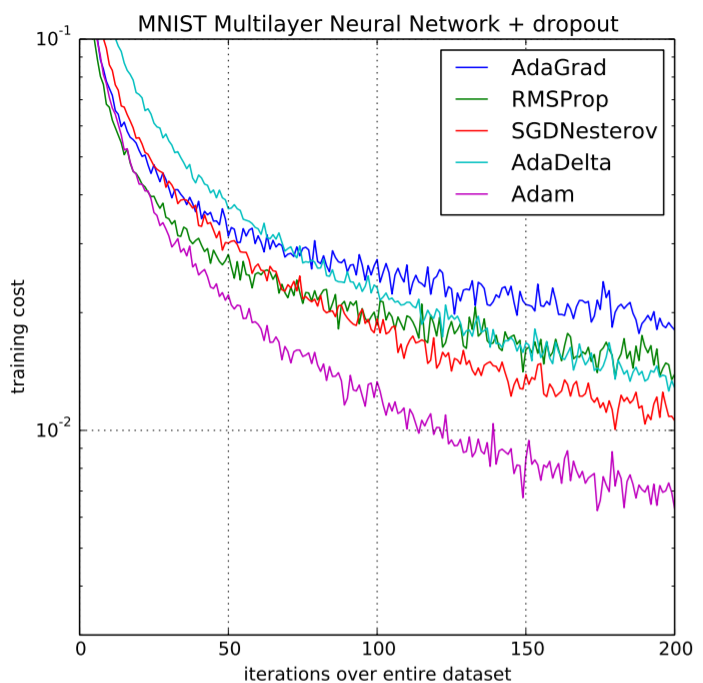
Adam delivers strong performance in training deep learning models and large datasets by combining adaptive learning rates with momentum.
- Uses adaptive learning rates for each parameter based on past gradients and their magnitudes
- Helps reduce oscillations and move past local minima effectively
- Applies bias correction to prevent instability during early training stages
- Requires less hyperparameter tuning compared to optimizers like SGD
- Provides efficient, stable, and reliable optimization across different tasks
Implementation
Step 1: Install Required Libraries
- TensorFlow/Keras is used for building and training neural networks
- NumPy handles numerical computations and arrays
- Matplotlib is used for visualization and plotting
- Scikit-learn provides dataset utilities and preprocessing tools
- Run the following command in your terminal
pip install tensorflow numpy matplotlib scikit-learn
Step 2: Import Required Libraries
- make_moons() generates a non-linear classification dataset
- train_test_split() divides data into training and testing sets
- StandardScaler() normalizes the data
- Sequential() creates a neural network model
- Dense() adds fully connected layers
- Adam() applies the Adam optimizer
import numpy as np
import matplotlib.pyplot as plt

from sklearn.datasets import make_moons
from sklearn.model_selection import train_test_split
from sklearn.preprocessing import StandardScaler

from tensorflow.keras.models import Sequential
from tensorflow.keras.layers import Dense
from tensorflow.keras.optimizers import Adam
Step 3: Create Dataset
Generate a synthetic dataset for binary classification.
- n_samples=1000 creates 1000 data points
- noise=0.2 adds slight randomness for realistic data
- random_state=42 ensures reproducibility
X, y = make_moons(n_samples=1000, noise=0.2, random_state=42)
Step 4: Split the Dataset
Divide the dataset into training and testing sets.
- 80% of data is used for training
- 20% of data is reserved for testing
- Helps evaluate model generalization
X_train, X_test, y_train, y_test = train_test_split(
    X, y, test_size=0.2, random_state=42
)
Step 5: Normalize the Data
Feature scaling improves optimization performance and convergence speed.
- Standardization transforms features to zero mean and unit variance
- Prevents features with large values from dominating training
- Helps Adam optimizer converge faster and more stably
scaler = StandardScaler()

X_train = scaler.fit_transform(X_train)
X_test = scaler.transform(X_test)
Step 6: Build the Neural Network
Create a neural network using fully connected layers.
- First hidden layer contains 16 neurons with ReLU activation
- Second hidden layer contains 8 neurons
- Output layer uses sigmoid activation for binary classification
model = Sequential([
    Dense(16, activation='relu', input_shape=(2,)),
    Dense(8, activation='relu'),
    Dense(1, activation='sigmoid')
])
Step 7: Compile the Model with Adam Optimizer
- Initialize the Adam optimizer with a learning rate.
- Compile the neural network with loss function and evaluation metric.
adam_optimizer = Adam(learning_rate=0.001)
model.compile(
    optimizer=adam_optimizer,
    loss='binary_crossentropy',
    metrics=['accuracy']
)
Step 8: Train the Model
Train the neural network using the training dataset.
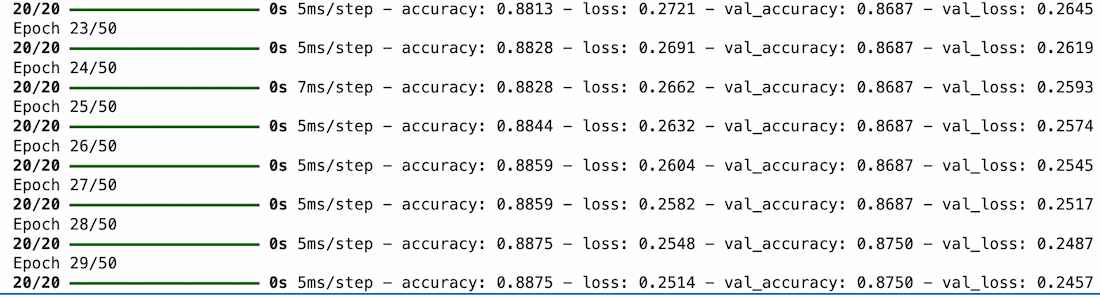
- epochs=50 means the dataset is processed 50 times
- batch_size=32 updates weights after every 32 samples
- validation_split=0.2 reserves 20% of training data for validation
- Training history stores loss and accuracy values
history = model.fit(
    X_train,
    y_train,
    epochs=50,
    batch_size=32,
    validation_split=0.2,
    verbose=1
)
Output:
Step 9: Evaluate the Model
Evaluate model performance on unseen test data.
- Evaluates how well the model generalizes to new data
- Lower loss and higher accuracy indicate better performance
loss, accuracy = model.evaluate(X_test, y_test)

print("Test Loss:", loss)
print("Test Accuracy:", accuracy)
Output:

Download full code from here
Advantages
- Uses adaptive learning rates for each parameter based on past gradients
- Helps reduce oscillations and escape local minima effectively
- Applies bias correction to improve stability during early training stages
- Requires less hyperparameter tuning compared to optimizers like SGD
- Provides efficient optimization across different machine learning tasks
Limitations
- Can sometimes converge to suboptimal solutions compared to SGD
- Requires more memory because it stores additional moment estimates
- Performance is sensitive to hyperparameter selection in some cases
- May generalize less effectively on certain datasets and deep learning tasks
- Can struggle with sparse gradients or very noisy optimization landscapes