
Dropdown lists let users choose one or more items from a list, which makes them an important part of websites and apps. React-Bootstrap provides tools that make creating and maintaining these dropdown lists easier with a consistent look and feel.
We will explore how to capture selected values from dropdowns using two approaches in React-Bootstrap:
Steps to Create the React Application
Step 1: Create a React project
Create a new react project using the command:
npx create-react-app my-dropdown-appStep 2: Navigate to the project root directory using
cd my-dropdown-appStep 3: Installing Dependencies
Install react-bootstrap using npm:
npm install react-bootstrap bootstrapProject Structure:
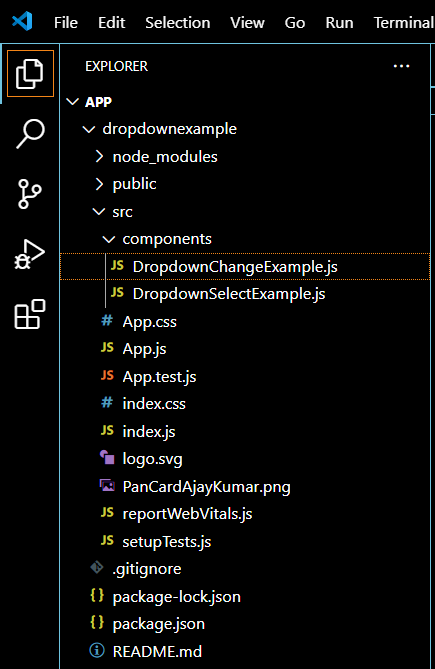
Updated Dependencies:
dependencies {
    "@testing-library/jest-dom": "^5.17.0",
    "@testing-library/react": "^13.4.0",
    "@testing-library/user-event": "^13.5.0",
    "bootstrap": "^5.3.3",
    "react": "^18.3.1",
    "react-bootstrap": "^2.10.4",
    "react-dom": "^18.3.1",
    "react-scripts": "5.0.1",
    "web-vitals": "^2.1.4"
  }
Using React State and the onSelect Event
Here, we will utilize the React state to manage the value selected in the dropdown list. When selecting an item in the dropdown menu, the onSelect event is executed. In the onSelect event, we change the state by taking the selected value. This method can allow flexible action based on user inputs and it is easy to track the selected choice in another part of our component. This keeps consistency with the state of the React component and makes the value of the dropdown selection to be updated.
Example: This will illustrate creation of a dropdown menu component that uses the onSelect event to update the React state with the selected option and display it in the App.js file.
//components/DropdownSelectExample
import React, { useState } from 'react';
import { Dropdown, DropdownButton } from 'react-bootstrap';

const DropdownSelectExample = () => {
    const [selectedItem, setSelectedItem] = useState('Select an item');

    const handleSelect = (eventKey) => {
        setSelectedItem(eventKey);
    };

    return (
        <div>
            <DropdownButton
                id="dropdown-basic-button"
                title={selectedItem}
                onSelect={handleSelect}
            >
                <Dropdown.Item eventKey="Item 1">
                    Item 1
                </Dropdown.Item>
                <Dropdown.Item eventKey="Item 2">
                    Item 2
                </Dropdown.Item>
                <Dropdown.Item eventKey="Item 3">
                    Item 3
                </Dropdown.Item>
            </DropdownButton>

            <p>Selected Item: {selectedItem}</p>
        </div>
    );
};

export default DropdownSelectExample;
//src/App.js
import 'bootstrap/dist/css/bootstrap.min.css';
import React from 'react';
import './App.css';
import DropdownSelectExample from './components/DropdownSelectExample';
function App() {
    return (
        <div className="App">
            <DropdownSelectExample />
        </div>
    );
}
export default App;
Run the application using npm command:
npm run devOutput:
Using React State and the onChange Event
Like approach 1, In this approach, the selected value of the dropdown list is managed with React state. When one of the options from the dropdown list is chosen, an onChange event is triggered. Inside this onChange function, we will update the state with the selected value. This will keep the dropdown list selection in sync with the state of the component and hence will be easy to track down the selected option and use it elsewhere in the component. This also can update dynamically based on the user input.
Example: This illustrates the creation of a dropdown using the onChange event to update the state with the selected value and display it in the App.js File.
//components/DropdownChangeExample
import React, { useState } from 'react';

const DropdownChangeExample = () => {
    const [selectedItem, setSelectedItem] = useState('Select an item');
    const handleChange = (event) => {
        setSelectedItem(event.target.value);
    };

    return (
        <div>
            <select className="form-select"
                value={selectedItem} onChange={handleChange}>
                <option disabled>Select an item</option>
                <option value="Item 1">
                    Item 1
                </option>
                <option value="Item 2">
                    Item 2
                </option>
                <option value="Item 3">
                    Item 3
                </option>
            </select>

            <p>Selected Item: {selectedItem}</p>
        </div>
    );
};

export default DropdownChangeExample;
//src/App.js
import 'bootstrap/dist/css/bootstrap.min.css';
import React from 'react';
import './App.css';
import DropdownChangeExample from './components/DropdownChangeExample';
function App() {
    return (
        <div className="App">
            <DropdownChangeExample />
        </div>
    );
}
export default App;
Run the application using npm command:
npm run devOutput: