Data explorer is a part of modeling and it is a package in R programming. It is used for data analysis. This package, which might be what we are referring to, is designed to provide a convenient interface to explore and visualize data, especially for initial exploratory data analysis (EDA) tasks.
Installation of Data Explorer
#Insralling required package
  install.packages("DataExplorer")
#load libraries
  library(DataExplorer)
Here we are taking the dataset: penguins, from the Palmer penguins package, and also loading the package for usage by typing the following commands:
#taking data set and libraries for that dataset
install.packages("palmerpenguins")
library(palmerpenguins)
Exploratory Data Analysis:
The introduce () function gives the basic information about our dataset i.e., penguins.
#Gives the basic details about dataset
str(penguins)
Output:
tibble [344 × 8] (S3: tbl_df/tbl/data.frame)
 $ species          : Factor w/ 3 levels "Adelie","Chinstrap",..: 1 1 1 1 1 1 1 1 1 1 ...
 $ island           : Factor w/ 3 levels "Biscoe","Dream",..: 3 3 3 3 3 3 3 3 3 3 ...
 $ bill_length_mm   : num [1:344] 39.1 39.5 40.3 NA 36.7 39.3 38.9 39.2 34.1 42 ...
 $ bill_depth_mm    : num [1:344] 18.7 17.4 18 NA 19.3 20.6 17.8 19.6 18.1 20.2 ...
 $ flipper_length_mm: int [1:344] 181 186 195 NA 193 190 181 195 193 190 ...
 $ body_mass_g      : int [1:344] 3750 3800 3250 NA 3450 3650 3625 4675 3475 4250 ...
 $ sex              : Factor w/ 2 levels "female","male": 2 1 1 NA 1 2 1 2 NA NA ...
 $ year             : int [1:344] 2007 2007 2007 2007 2007 2007 2007 2007 2007 2007 ...
#visualize the dataset
plot_intro(penguins)
Output:

To visualize the data which is shown above introduce the () function.
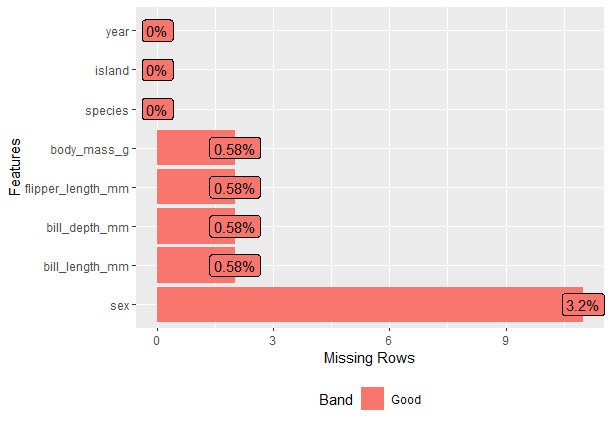
Plot the Missing values:
#missing plot values
plot_missing(penguins)
Output:
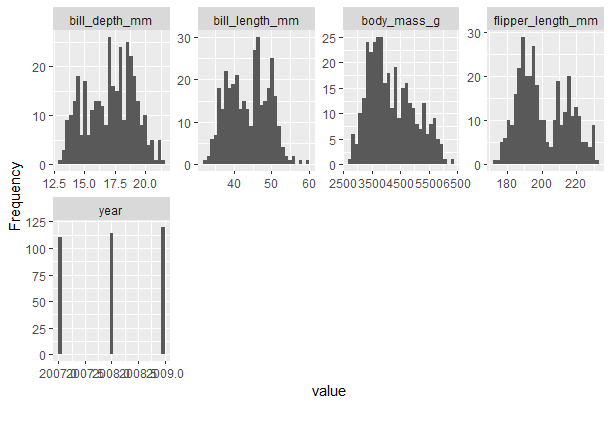
Continuous value columns with Plot_Histogram()
#visualize of data in histograms
plot_histogram(penguins)
Output:
Correlation Plots
#heatmap visualisation
plot_correlation(penguins,type = "all")
Output:
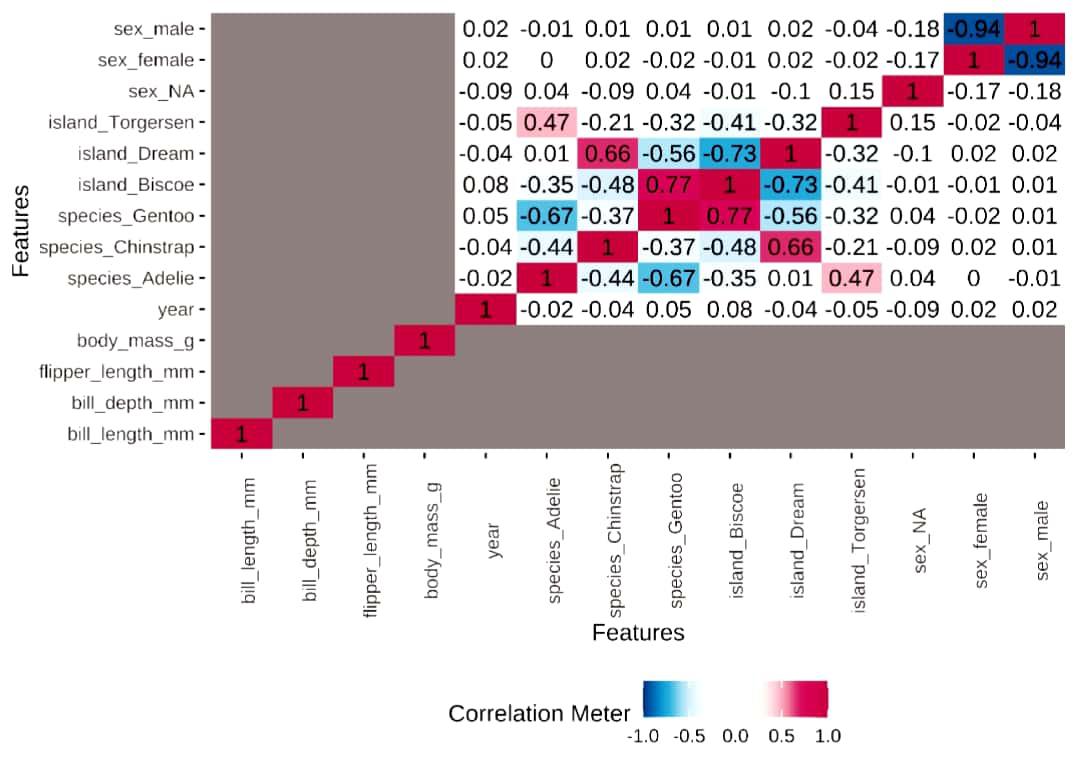
Visualizes the heatmap, in this, we use the argument called type=" " .,
Data Report of Data Explorer
create_report() is used to create the report on a dataset. and this will generate a file on our computer.
#creating Report of Data
create_report(
  penguins,
  output_file = "report_example.html",
  output_dir = getwd(),
  config = configure_report(),
  report_title = "Data Report"
)
From this, we get a report in HTML format that will show the complete information of the data.
Here,
- data: the dataset which you want to work with
- output_file: The name of the output file.
- output_dir: location where the rendered
- config: configuration of output
- report_title: Title of the report.
Adding a ggplot2 Theme to the dataset
ggtheme() adds a ggplot2 theme, to the plot.
For example, we are taking the theme_minimal() theme.
As well title() adds title to the plot.
#adds theme title and theme to the plot
plot_intro(penguins,
           title = "Missing Penguin Data Plot Title",
           ggtheme = theme_minimal())
Output:
.jpg)
Extra Theme Configuration
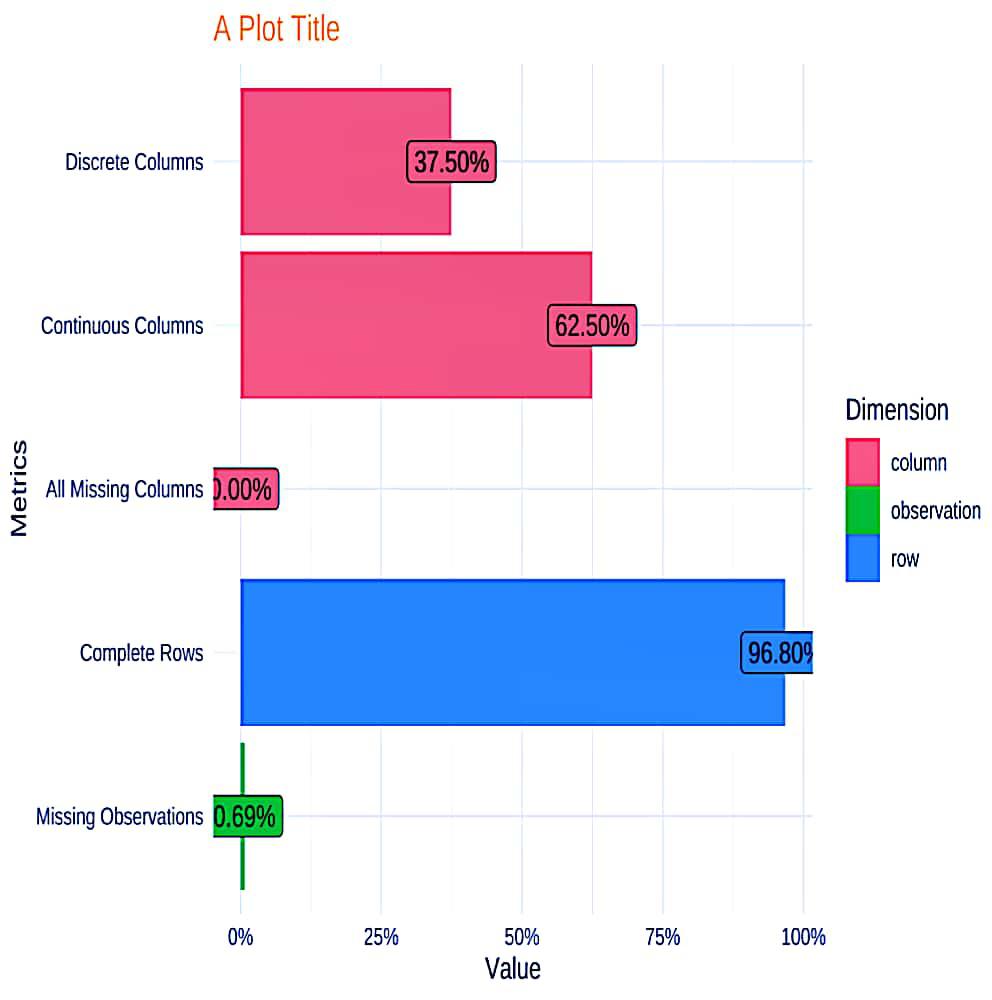
theme_config() is used to customize the elements in the plot.
plot. title is used to add color to the plot.
# plot_intro() with a theme and title
plot_intro(
  penguins,
  ggtheme = theme_minimal(),
  title = "A Plot Title",
  theme_config = theme(plot.title = element_text(color = "orange"))
)
Output:
First, install the Dataexplorer from CRAN:
#install packages
 install.packages("DataExplorer")
Report:
To get the report of dataset: air quality we have to use create _ report.
#installing library
library(DataExplorer)
#report creation
create_report(airquality)
From this, we get a report in HTML format that will show the complete information of the data.
# View basic description for airquality data
 introduce(airquality)
Output:
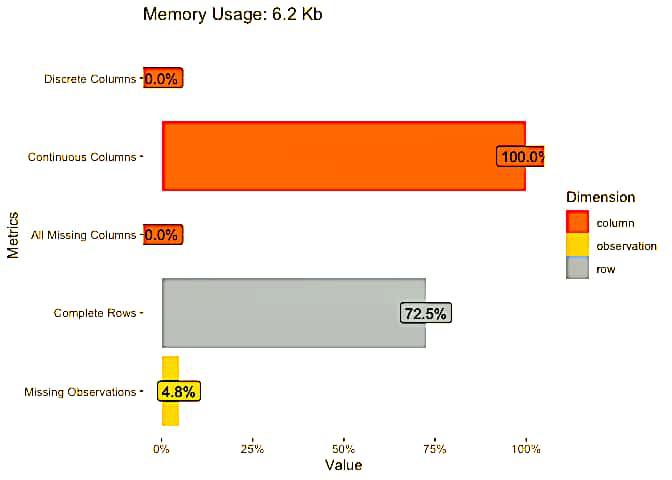
  rows columns discrete_columns continuous_columns all_missing_columns
1  153       6                0                  6                   0
  total_missing_values complete_rows total_observations memory_usage
1                   44           111                918         6376
Visual representation of our dataset
# Plot basic description for airquality data
 plot_intro(airquality)
Output:
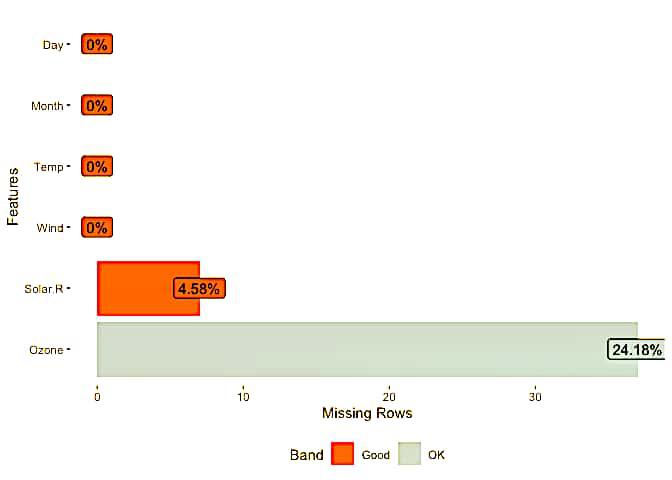
Missing values representation
# View missing value distribution for airquality data
 plot_missing(airquality)
Output:
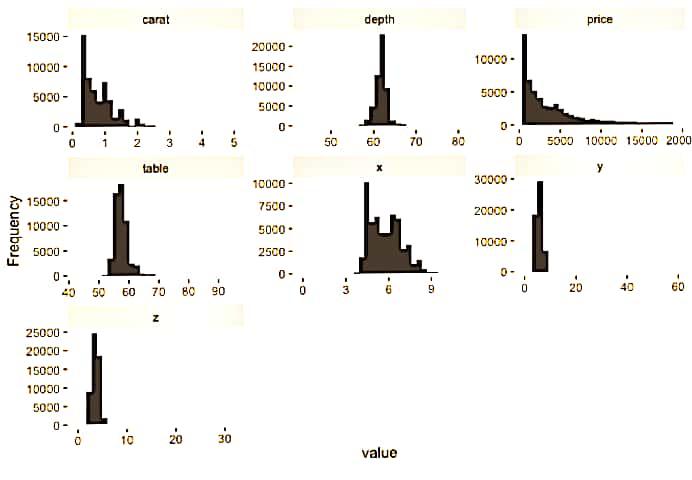
Histogram representation
#View histogram of all continuous variables
 plot_histogram(diamonds)
Output:
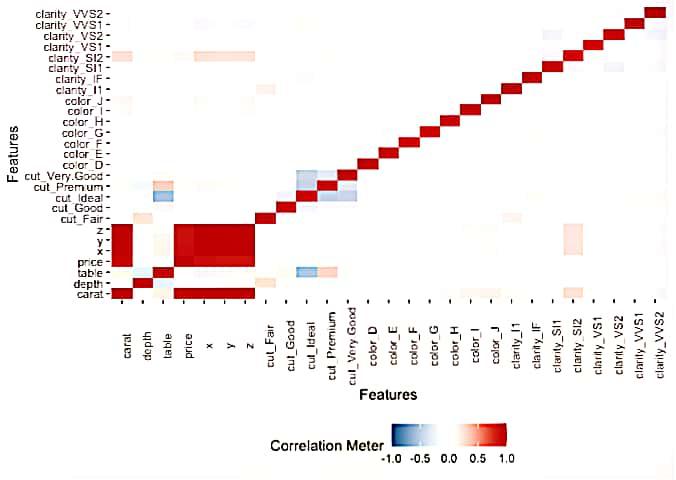
Heatmap representation
# View overall correlation heatmap
 plot_correlation(diamonds)
Output:
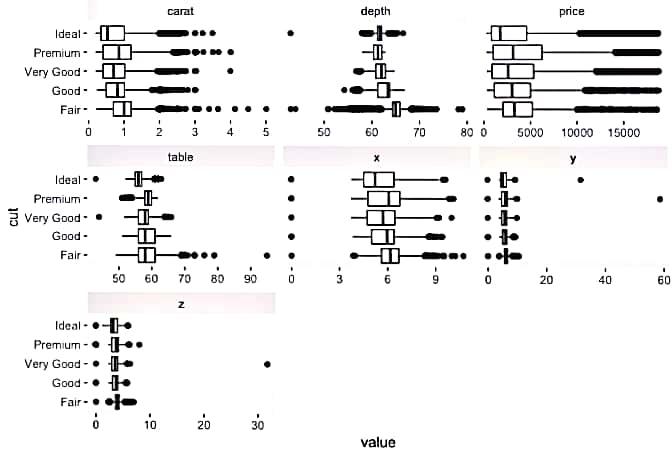
Bivariate continuous distribution using 'cut'.
#View bivariate continuous distribution based on `cut`
 plot_boxplot(diamonds, by = "cut")
Output:
Estimated continuous distribution
# View estimated density distribution of all continuous variables
 plot_density(diamonds)
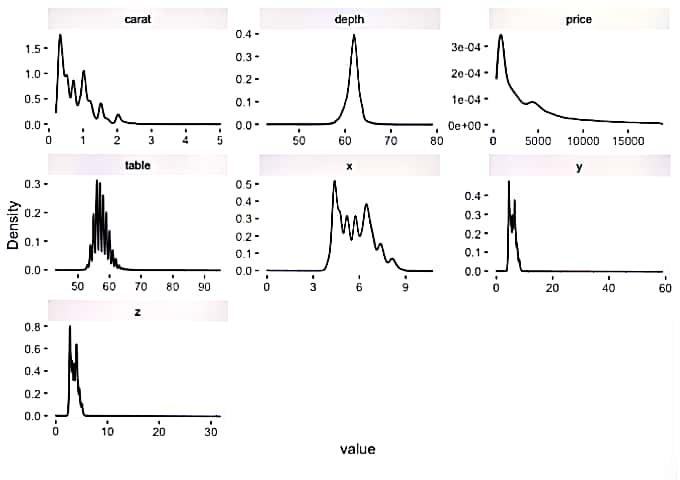
Output: